
Ration Card E-KYC Mismatch? A Step-by-Step Guide to Correcting Your Data Online
What Causes a Ration Card E-KYC Mismatch?
A ration card suddenly stopping at the Fair Price Shop can be frustrating, especially when everything seemed to be working fine before. In many cases, the issue isn’t with the shop or the system itself. It’s caused by a mismatch between the information stored in your Aadhaar records and the details linked to your ration card. Something as simple as a differently spelled name, an incorrect date of birth, an outdated mobile number, or fingerprints that no longer scan properly can prevent the e-KYC process from completing. When that happens, the Public Distribution System marks the record as unauthenticated, which can interrupt access to subsidised food grains.
The good news is that these problems are usually fixable. Whether the mismatch can be resolved entirely online or requires a quick visit to an Aadhaar Seva Kendra, Common Service Centre, or Fair Price Shop depends on what’s causing the issue. This guide explains how to identify the exact type of mismatch, correct the information in the right database, update your ration card records, and verify that everything has synced successfully before your next visit to the ration shop.
At A Glance: Ration Card E-KYC Mismatch
· Identify the Root Cause: Most ration card e-KYC failures are caused by a demographic or biometric data mismatch between your Aadhaar and state PDS records.
· Correct Aadhaar Data First: Always resolve name, address, or date of birth discrepancies directly on the UIDAI myAadhaar portal before updating your ration card.
· In-Person Updates: Fixing biometric mismatches (fingerprint/iris) or updating your registered mobile number for OTPs requires visiting an Aadhaar Seva Kendra or Common Service Centre (CSC).
· Mandatory Data Sync: Correcting Aadhaar does not automatically update your ration card. You must re-authenticate your e-KYC at a Fair Price Shop or online portal to sync the new details.
· Verify Your Status: Confirm your final e-KYC approval through your state’s Food and Civil Supplies website or the official Mera Ration mobile app to ensure uninterrupted access to subsidized food grains.
Understanding Ration Card E-KYC and Why Mismatches Occur
What is Ration Card E-KYC?
Ration Card e-KYC is an Aadhaar-based identity verification process that the Public Distribution System (PDS) requires for every person listed on a ration card, not just the head of the household. Verification can happen in two ways. You can receive an OTP on the mobile number linked to your Aadhaar, or you can complete biometric authentication using your fingerprint, iris, or face at the Fair Price Shop’s ePoS device. The objective is straightforward. It ensures that subsidised food grains reach genuine beneficiaries while helping the system identify duplicate records, outdated entries, or beneficiaries who are no longer eligible.
The requirement comes from amendments made to the Targeted Public Distribution System (Control) Order under Section 10 of the National Food Security Act, 2013. Although the policy applies across India, every state manages its own implementation. That’s why there isn’t a single national portal where everyone can complete e-KYC. Instead, each state provides its own Food and Civil Supplies website, all of which can be accessed through the central directory.
The Role of Aadhaar Seeding in the PDS Database
Before e-KYC can be completed, your Aadhaar must first be linked to your ration card. This process is known as Aadhaar seeding. Ideally, every member listed on the ration card should have their Aadhaar number connected to the household record in the state’s PDS database.
It’s important not to confuse seeding with authentication because they are two separate steps. Aadhaar seeding only establishes the link between your Aadhaar number and your ration card. E-KYC authentication goes one step further by confirming the identity of the person linked to that Aadhaar through an OTP or biometric verification. As a result, a ration card may show Aadhaar as successfully seeded while the e-KYC status still remains pending.
Once both steps are complete, the beneficiary’s information is synchronised with the Integrated Management of Public Distribution System (IMPDS) its portal. This integration supports the One Nation One Ration Card (ONORC) scheme, allowing eligible beneficiaries to receive their food grains from Fair Price Shops across the country. It also supports Direct Benefit Transfer records, which are available through this website, while PDS distribution transactions are reflected on the Annavitran dashboard.
Common Causes for E-KYC Authentication Failures
Most e-KYC failures can be traced back to a handful of common issues. One of the biggest reasons is a mismatch between the details stored in your Aadhaar and the information recorded against your ration card. Even small differences in your name, date of birth, or address can prevent successful authentication.
Another common problem involves the mobile number linked to Aadhaar. Since OTP-based verification depends entirely on that registered number, the process cannot move forward if the number has changed, is inactive, or was never linked in the first place.
Biometric authentication can also fail, particularly for older adults or people whose fingerprints have worn down after years of manual work. In these cases, the scanner may struggle to capture a clear match despite the person’s identity being genuine.
Other possible reasons include an Aadhaar that has been locked, temporarily suspended, or flagged for verification, as well as temporary technical issues such as server downtime or delays in data synchronisation between UIDAI and the state’s PDS database. Identifying the exact reason behind the failure is far more useful than repeatedly trying the same OTP or biometric verification, because each type of issue has its own solution.
Identifying the Specific Type of E-KYC Mismatch
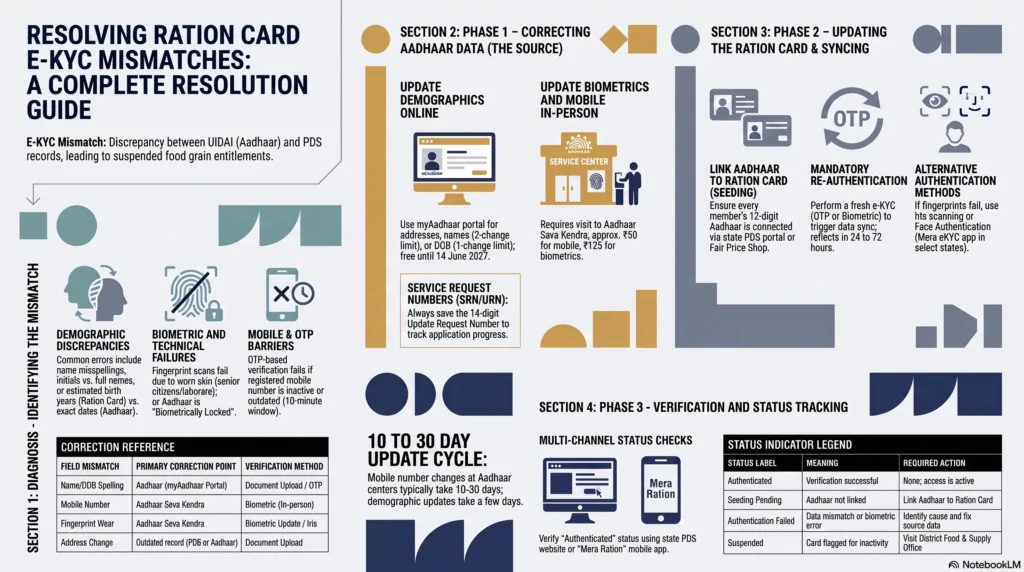
Demographic Discrepancies (Name, DOB, and Address)
Many demographic mismatches are caused by small differences that are easy to overlook. A name might be spelled slightly differently across records, such as “Lakshmi” instead of “Laxmi.” In other cases, one document may use initials while the other shows the person’s full name. Surname changes after marriage are another common reason for a mismatch if only one record has been updated.
Date of birth discrepancies are equally common. Older ration cards often contain only an estimated birth year, while Aadhaar reflects the complete and accurate date. Address mismatches usually happen when a family updates one document after moving but forgets to update the other.
Instead of guessing where the problem lies, compare both records directly whenever your state’s portal offers that option. For example, Odisha’s beneficiary e-KYC comparison page displays the details stored in the ration card database alongside the information retrieved from Aadhaar. This makes it much easier to identify the exact field causing the mismatch instead of dealing with a generic “mismatch” error. Several other state portals provide similar comparison pages under names such as “e-KYC Abstract” or “Beneficiary Details.”
| Field | Common mismatch | Usually corrected on |
| Name | Spelling differences, initials instead of full name, or surname changes after marriage | The outdated record, which is often the ration card |
| Date of birth | Estimated birth year on the ration card versus the exact date on Aadhaar | Ration card through the state PDS portal |
| Address | Old address on one record and updated address on the other | Whichever record contains outdated information |
| Gender | Data entry mistake during enrolment | Aadhaar, subject to UIDAI’s lifetime correction limit |
Missing or Incorrect Aadhaar-Linked Mobile Numbers
OTP-based e-KYC depends entirely on the mobile number registered with Aadhaar. If that number was never linked, has been changed, or the SIM is no longer active, the verification process will usually stop before it even begins. You may see messages indicating that the mobile number isn’t registered with Aadhaar, or the OTP may simply never arrive.
This often leads people to believe there’s a network problem, when the real issue is that the OTP is being sent to an older number they no longer have access to. Before attempting multiple retries, it’s worth confirming which mobile number is actually linked to your Aadhaar. Doing so can save a lot of unnecessary waiting and repeated authentication attempts. We’ll cover how to verify and update your registered mobile number later in this guide.
Biometric Authentication Failures (Fingerprint and Iris)
Biometric failures can be especially frustrating because they happen even when all your details are correct. You stand at the Fair Price Shop, place your finger on the scanner, and the system still refuses to authenticate your identity.
In many cases, the problem is simply worn fingerprints. This is particularly common among senior citizens and people who have spent years doing manual labour, farming, construction work, or jobs involving constant exposure to water and chemicals. Fingerprint scanners may also struggle if fingers are dirty, oily, excessively dry, or if the ePoS device itself isn’t functioning properly. Iris authentication can occasionally fail too, particularly after certain eye surgeries or medical conditions.
UIDAI has already accounted for these situations. Under Regulation 6 of the Aadhaar (Enrolment and Update) Regulations, 2016, explained in the Biometric Exception Enrolment Guidelines, individuals who cannot provide usable fingerprints because of injury, disability, or permanent physical conditions can rely on alternative biometric methods such as iris authentication. The guidelines also require operators to use special capture procedures for elderly individuals whose fingerprints have naturally become faint. In most cases, a failed fingerprint scan is not the end of the process. It simply means another approved authentication method should be used.
Inactive or Suspended Aadhaar Status
Sometimes the problem has nothing to do with the ration card. Instead, the Aadhaar itself may be preventing successful authentication. Understanding the difference between the possible Aadhaar statuses can help you choose the right solution.
The simplest situation is a biometric lock. This is a security feature that Aadhaar holders can enable themselves through the myAadhaar Lock/Unlock service. When biometrics are locked, fingerprint, iris, and face authentication are disabled, but OTP-based authentication continues to work normally. Unlocking biometrics for a ration shop visit takes only a few minutes after OTP verification.
Another possibility is a full Aadhaar lock, where the Aadhaar number cannot be used directly for authentication. In such cases, you can generate or retrieve a Virtual ID (VID) through the official portal and use that instead.
The least common situation is an Aadhaar that has become inactive or deactivated. This usually happens because of data-quality issues or prolonged inactivity rather than any deliberate action by the cardholder. Before assuming the worst, check the Aadhaar’s status through the official website. This allows you to confirm whether the Aadhaar number is active and valid before making an unnecessary trip to an Aadhaar centre.
Prerequisites and Required Documents for Data Correction
Essential Documents for Online Mismatch Resolution
The documents you’ll need depend on where the incorrect information exists. If the error is in your Aadhaar record, you’ll need to update it through UIDAI first. If the mistake is only in your ration card details, you’ll need to submit the correction through your state’s PDS portal. Having the required documents ready before you begin can save time and help you avoid restarting the process midway.
| Document | Purpose | Required format |
| Aadhaar number or Virtual ID (VID) | Needed for both Aadhaar and ration card corrections | 12-digit Aadhaar number or 16-digit VID if Aadhaar is locked |
| Ration card number | Required for ration card updates and status checks | As printed on the ration card |
| Proof of address, identity, or date of birth | Supports Aadhaar demographic corrections | PDF or JPEG, generally under 2 MB |
| Registered mobile number | Used for OTP verification on myAadhaar, state PDS portals, or the Mera Ration app | Must be linked to Aadhaar |
| Passport-size photograph | Usually required for offline corrections at an Aadhaar centre, Fair Price Shop, CSC, or District Food and Supply Office | One or two recent photographs |
Keeping digital copies of your documents ready before starting the application can make the process much smoother, especially if your state’s portal requires supporting files to be uploaded.
Identifying the Correct State PDS Web Portal
Unlike Aadhaar services, ration card management is handled separately by each state. That means there isn’t one central website where everyone can submit corrections. The safest approach is to begin with the official National Food Security Act directory, which links directly to every state’s Food and Civil Supplies portal. If you simply need to access your state’s ration card portal, you can also use this government portal.
Some states have dedicated pages specifically for e-KYC services or status checks. Here are a few commonly used portals:
| State | Portal / Service | Official link |
| Assam | ONORC e-KYC | https://epos.assam.gov.in/ONRC_eKYC |
| Bihar | e-KYC Status | https://epos.bihar.gov.in/ONRC_eKYC.jsp |
| Bihar | ONORC Status | https://epos.bihar.gov.in/impds_interface.jsp |
| Kerala | e-KYC Abstract and Updated List | https://epos.kerala.gov.in/eKYC_Abstract.jsp and https://epos.kerala.gov.in/eKYC_Dist.jsp |
| Maharashtra | Ration Card Login and Entitlement Check | https://rcms.mahafood.gov.in/PublicLogin/frmPublicLogin.aspx |
| Odisha | e-KYC Results | https://pdsodisha.gov.in/NFSA/BeneficiaryDetailseKYCResult/BeneficiaryDetailseKYCResultView |
| West Bengal | Citizen Portal | https://wbfss.wb.gov.in/Citizen.aspx?page_id=25 |
If your state isn’t listed above, don’t worry. You can still reach the correct portal through the NFSA directory. Once you’re there, look for options such as e-KYC, Aadhaar Authentication, Ration Card Services, or Correction Request, depending on how your state’s website is organised.
Ensuring Uninterrupted OTP Access
Before beginning any online correction, take a minute to make sure your mobile phone is ready to receive OTPs. Most government portals allow only a limited amount of time, often around ten minutes, to enter the verification code. If the OTP expires before you submit it, you’ll usually have to restart the entire application.
It’s also a good idea to confirm that the mobile number linked to your Aadhaar is the one you’re currently using. Many people only discover they’ve been trying to receive OTPs on an old or inactive number after they’ve already started the correction process. Verifying this in advance can save a great deal of time and frustration.
Step-by-Step Guide to Correcting Aadhaar and Ration Card Details
Method 1: Updating Incorrect Data on the UIDAI Portal First
If the incorrect information is on your Aadhaar, always fix that first before updating your ration card. Correcting the ration card to match inaccurate Aadhaar details only creates another mismatch, which means you’ll eventually have to repeat the process. The best place to start is the myAadhaar portal.
Log in using your 12-digit Aadhaar number, complete the captcha, and verify your identity with the OTP sent to your registered mobile number. Once you’re signed in, the available update options depend on the information that needs to be corrected.
- Address: In most cases, you can update your address online by uploading a valid proof of address.
- Name, date of birth, and gender: These details can often be updated online with the required supporting documents. Keep in mind that UIDAI applies lifetime limits to these changes. A name can generally be corrected twice, while the date of birth and gender can usually be corrected only once. If you’ve already reached those limits or the online request isn’t accepted, you’ll need to visit an Aadhaar Seva Kendra in person.
- Document updates: If your personal details are already correct but your supporting documents need refreshing, you can upload updated proof of identity or address online. UIDAI currently allows standalone document updates free of charge until 14 June 2027.
- Mobile number and biometrics: These cannot be updated online. For security reasons, both require an in-person visit to an Aadhaar Enrolment Centre or Aadhaar Seva Kendra.
After submitting your request, you’ll receive a Service Request Number (SRN) or Update Request Number (URN). Save this number carefully, as you’ll need it to track your application’s progress through the official portal .
In most cases, demographic updates attract a fee of around ₹50. If you’re updating biometric information at an Aadhaar centre, the biometric update generally costs around ₹125, while certain demographic changes completed alongside it may be included as part of the same visit.
Method 2: Submitting a Correction Request on the State PDS Portal
Once your Aadhaar information is accurate, the next step is updating your state’s ration card database. This step is important because Aadhaar and the PDS database do not automatically exchange updated information.
Visit your state’s official portal through this government website or use the state-specific links listed earlier in this guide. Depending on the portal, look for services such as Update Ration Card, Correction Request, Citizen Services, or e-KYC.
Most states ask you to provide:
- Your ration card number.
- The Aadhaar number of the family member whose information needs correction.
- Supporting documents, which often include a copy of the updated Aadhaar.
Some states process these requests through the Common Registration Facility instead of maintaining a separate correction portal.
If online correction isn’t available for the field you need to update, particularly for details like your name or date of birth, you’ll usually have to visit your local Fair Price Shop or District Food and Supply Office. Officials there can either update the record directly or forward your request to the appropriate authority.
Whichever method you use, make sure you save the acknowledgement receipt or reference number. If there’s a delay or you need to follow up later, this reference number will be your primary proof that the correction request was submitted.
Syncing Updated Aadhaar Information with Your Ration Card
One of the most common misunderstandings is assuming that updating Aadhaar automatically fixes your ration card records. Unfortunately, that’s not how the system works.
After your Aadhaar correction has been approved, you must complete the ration card e-KYC process again. This fresh authentication allows the PDS database to retrieve and verify the updated Aadhaar information. Until you complete this step, your ration card may continue showing the old mismatch even though your Aadhaar has already been corrected.
Processing times can vary between states. Aadhaar demographic updates are often completed within a few days, while the updated information generally reflects in the ration card database within 24 to 72 hours after you repeat the e-KYC process. During periods of heavy demand, some states may take up to a week to synchronise the records.
If the updated status doesn’t appear immediately, don’t assume the correction has failed. It’s usually worth waiting a little longer and checking the status again before submitting another request.
Resolving Mobile Number and OTP-Related Authentication Errors
How to Check Which Mobile Number is Linked to Aadhaar
If you’re having trouble receiving OTPs, the first thing to verify is whether you’re using the same mobile number that’s registered with your Aadhaar. It’s a simple check, but one that can save you a lot of time.
UIDAI provides a Verify Email/Mobile Number service, and you can also perform this check through the mAadhaar app. Enter your Aadhaar number along with the mobile number you believe is linked to it. The system will tell you whether the number matches UIDAI’s records.
This step helps you quickly identify the real issue. If the number is correctly linked, the problem may be due to network delays or temporary server issues. If it isn’t, there’s little point requesting multiple OTPs because they’ll either be sent to an old number or won’t be generated at all. Knowing which situation you’re dealing with makes the next step much clearer.
Steps to Update Your Mobile Number at an Aadhaar Seva Kendra
Unlike some demographic updates, your Aadhaar-linked mobile number cannot be changed online. UIDAI requires this update to be completed in person because the registered mobile number serves as the primary verification channel for many Aadhaar services.
To update your number, visit an Aadhaar Enrolment Centre or Aadhaar Seva Kendra. You can book an appointment in advance through https://bookappointment.uidai.gov.in/. The booking service is free, and you don’t need your current mobile number to be linked with Aadhaar to schedule an appointment, which is particularly helpful if you’re visiting specifically to update that number.
If you’re unsure where to go, use the Aadhaar centre locator at https://appointments.uidai.gov.in/easearch.aspx. You can search by state or PIN code to find the nearest authorised centre.
At the centre, your identity will be verified using your existing biometrics before the new mobile number is registered. The update generally costs around ₹50, and once the request is submitted, it typically takes 10 to 30 days for the new number to be fully updated in UIDAI’s records.
Completing E-KYC via OTP After Successful Number Update
After your new mobile number has been updated and reflected in UIDAI’s database, verify it once more using the Verify Email/Mobile Number service. Once confirmed, return to your state’s PDS portal or the Mera Ration app and complete the OTP-based e-KYC process as you normally would.
There’s no separate procedure for users who have recently updated their mobile number. Simply complete the standard OTP verification again so the corrected Aadhaar information can be authenticated successfully.
If your mobile number update is still being processed and you need to complete e-KYC urgently, you don’t necessarily have to wait. In many cases, you can visit your Fair Price Shop and complete biometric authentication instead. This allows you to finish the e-KYC process while the mobile number update is still making its way through UIDAI’s system.
Workarounds for Persistent Biometric Mismatches
Alternative Biometric Options: Iris Scanning and Face Authentication
If fingerprint authentication keeps failing, it doesn’t necessarily mean your e-KYC can’t be completed. In many cases, switching to another biometric method is all that’s needed.
One option is iris authentication. Most modern ePoS devices used at Fair Price Shops support iris scanning, which can be a reliable alternative for people whose fingerprints are difficult to capture. This is especially helpful for senior citizens and individuals whose fingerprints have worn down over time due to manual work or regular exposure to water, chemicals, or rough materials. Since iris patterns remain stable throughout life, they are often easier for the system to verify.
Another alternative is face authentication, which confirms your identity by matching a live facial scan with the photograph stored in your Aadhaar records. For ration card e-KYC, this can be completed through the Mera eKYC app .
The app currently supports face authentication for PDS beneficiaries in Bihar, Delhi, Kerala, Ladakh, Lakshadweep, Maharashtra, Sikkim, Tripura, and the Andaman & Nicobar Islands. After selecting your state, you’ll need to enter your Aadhaar number, verify it using an OTP, and follow the on-screen instructions to complete the face scan. Once the scan matches your Aadhaar records, your e-KYC is successfully completed.
Offline Biometric Updates Through Common Service Centres (CSCs)
If the issue isn’t with the scanner at the Fair Price Shop but with the biometric information stored in your Aadhaar itself, you’ll need to update your biometrics before trying e-KYC again. For many people, a Common Service Centre (CSC) is the easiest place to get this done.
Known by different names in different states, such as Jan Seva Kendra or Lok Mitra Kendra, CSCs provide assisted access to various government services, including Aadhaar updates. Instead of navigating online portals on your own, a trained operator helps complete the process using official government systems.
During your visit, the operator enters your details, verifies your identity through the required authentication method, and submits the update while you’re present. A nominal service fee may apply depending on the service provided. This option is particularly useful for elderly beneficiaries, people who are uncomfortable using online services, or households with limited internet access.
Manual Verification Procedures at the Food Supply Office
If fingerprint authentication, iris scanning, face authentication, and OTP verification have all failed, or if you’re unable to visit an Aadhaar centre or CSC, your next step is to contact the District Food and Supply Office.
Carry your ration card, a copy of your Aadhaar, and any acknowledgement receipts or reference numbers from previous correction requests. Officials can manually review your documents, verify your identity, and update the PDS records without relying solely on biometric authentication.
If the issue still isn’t resolved after a reasonable period or you’re unable to get a response from the local office, you can file a formal grievance through your state’s official grievance portal. Unlike repeated visits or verbal follow-ups, a grievance submission generates a reference number that allows you to track the progress of your complaint until it’s resolved.
How to Check the Status of Your Corrected E-KYC
Verifying E-KYC Status on the Official State PDS Website
After submitting a correction, it’s a good idea to check whether the updated information has actually been reflected in the PDS database. The easiest way to do this is through your state’s official ration card portal.
Once you’re on your state’s website, look for options such as e-KYC Status, Aadhaar Authentication Status, or Beneficiary Status. While the wording varies from one state to another, these services all serve the same purpose. Enter your ration card number or Aadhaar number, and you’ll usually see the authentication status for each family member listed on the card.
This is one of the most reliable ways to confirm whether your correction has been processed because it reflects the same information that the Fair Price Shop’s ePoS device uses during ration distribution.
Using the Mera Ration Mobile App to Confirm Authentication
If you’re checking from your phone, the Mera Ration app can be a faster and more convenient option. It’s available for Android and for iOS.
After selecting your preferred language, open the Ration Card Details section and enter either your ration card number or Aadhaar number. The app displays every member registered on the ration card along with their individual authentication status, making it easy to see whether the corrected record has been successfully updated.
The app also shows whether your ration card is enabled under the One Nation One Ration Card (ONORC) scheme, allowing eligible beneficiaries to access subsidised food grains outside their home state. If you need help using the application or understanding its features, the Department of Food and Public Distribution provides an official FAQ .
Understanding Different Status Indicators (Pending, Approved, Rejected)
Although the exact wording differs between state portals, the status messages generally have the same meaning. Understanding these labels can help you decide whether you simply need to wait, complete another step, or contact the authorities.
| Status displayed | What it means | What you should do |
| Authenticated / Verified / e-KYC Complete | Your identity has been successfully verified and your records are up to date. | No further action is required. |
| Aadhaar Seeding Pending | Your Aadhaar number has not yet been linked to your ration card. | Complete Aadhaar seeding before attempting e-KYC. |
| Pending Authentication | Aadhaar has been linked, but OTP or biometric verification is still incomplete. | Finish the e-KYC authentication process. |
| Authentication Failed | The verification could not be completed because of a mismatch, biometric issue, or OTP-related problem. | Identify the cause and follow the appropriate correction process before trying again. |
| Suspended / Deactivated | The ration card has been flagged, often because e-KYC requirements were not completed within the prescribed timeline. | Contact the District Food and Supply Office instead of repeatedly attempting online authentication. |
If your status shows Authenticated or Verified, your e-KYC process has been completed successfully. However, if the card is marked as Suspended or Deactivated, it’s best to visit the relevant food supply office as soon as possible. In most cases, repeated online attempts won’t resolve the issue until the underlying problem has been reviewed by the authorities.
The Consequences of Leaving E-KYC Mismatches Unresolved
Suspension of Subsidized Food Grains Under NFSA
An unresolved e-KYC mismatch can have an immediate impact on your ability to receive subsidised food grains. If a family member’s record remains unauthenticated, the Fair Price Shop’s ePoS device may refuse to process their entitlement, even if the rest of the ration card is active.
Under the National Food Security Act (NFSA), food grain allocation is calculated for each authenticated beneficiary rather than the household as a whole. This means a family with five members where only three have completed e-KYC may receive benefits for just those three people. The remaining members’ entitlement stays blocked until their authentication is successfully completed.
For many households, this can make a noticeable difference. Whether you’re covered under the Antyodaya Anna Yojana (AAY), which provides 35 kilograms of food grains per household each month, or the Priority Household (PHH) category, where each eligible member receives 5 kilograms, missing out on subsidised rations can significantly increase monthly grocery expenses.
Potential Deletion from the National Public Distribution System Database
If e-KYC remains incomplete long after the deadline set by your state, there’s a possibility that the ration card could be removed during periodic verification and de-duplication drives. These exercises are intended to identify duplicate, inactive, or ineligible beneficiaries so that welfare benefits reach the right people.
Since e-KYC deadlines have been revised several times and now differ from one state to another, it’s important to check your state’s latest notification rather than relying on older dates.
The consequences can extend beyond ration distribution. Aadhaar-linked ration cards are increasingly connected with other welfare schemes, including subsidised LPG benefits under programmes such as PM Ujjwala Yojana and various state welfare initiatives. If a ration card is removed from the PDS database because the mismatch wasn’t resolved in time, it may also affect access to these related benefits.
Steps to Restore a Deactivated Ration Card After Data Correction
A deactivated ration card can often be restored, but only after the issue that caused the deactivation has been resolved. The first step is to complete the required data correction, whether that involves updating your Aadhaar, correcting your ration card details, or successfully completing e-KYC.
Once the correction has been approved, visit your local Food and Supply Office, tehsil, or taluka office and submit a request for reactivation. Carry the acknowledgement receipt from your correction request along with any supporting documents that establish your eligibility. Depending on your state, you may be asked to provide documents such as your Aadhaar, proof of address, income certificate, or other household records.
Processing times vary considerably. Some states complete reactivation within a few weeks, while others may take longer depending on verification procedures and workload. If your request isn’t progressing despite repeated follow-ups, you can submit a formal complaint through your state’s grievance portal. Filing a grievance creates an official reference number, making it much easier to track your request than relying on informal visits alone.
FAQ: Ration Card E-KYC Mismatch
Yes, many states allow you to submit a ration card correction request online through their official Food and Civil Supplies portal. However, if the spelling error lies within your Aadhaar data, you must correct it on the UIDAI myAadhaar portal before resyncing your PDS records.
You cannot update your Aadhaar-linked mobile number online. For security reasons, you must visit an authorized Aadhaar Seva Kendra or Common Service Centre (CSC) in person for a biometric-verified update, which typically takes 10 to 30 days to process.
You can track your real-time status by entering your card details on your state’s PDS citizen portal under “e-KYC Status” or by using the official Mera Ration mobile app, which displays the Aadhaar seeding status for every member of the household.
Yes, continuous non-authentication leads to the suspension of subsidized food grains under the NFSA for unverified members. Extended delays can result in the card being flagged as inactive or deleted during state database de-duplication drives.
Resolving Your Ration Card E-KYC Mismatch Successfully
Seeing an “authentication failed” message can be worrying, but in most cases it points to a specific issue that can be fixed. It could be something as minor as a spelling difference in your name, an outdated mobile number, worn fingerprints, or a security setting on your Aadhaar account. Once you identify the exact cause, the path to resolving it usually becomes much more straightforward.
The key is to correct the information in the right place first, whether that’s your Aadhaar record or your state’s ration card database, and then complete the e-KYC process again so both systems are in sync. It’s equally important to verify that the updated information has actually been reflected in your ration card records, since changes made to Aadhaar don’t automatically update the PDS database.
Taking the time to complete these final checks helps ensure uninterrupted access to subsidised food grains and keeps your ration card fully functional under the One Nation One Ration Card (ONORC) scheme, wherever you’re eligible to use it.
Disclaimer
This guide is intended as a general informational explainer on ration card e-KYC correction procedures and is based on portal names, fee structures, and processes in effect at the time of writing. UIDAI, the Department of Food and Public Distribution, and individual state governments periodically revise deadlines, fees, and portal interfaces, so readers should verify current requirements on the official links referenced above before relying on any specific figure or step. This content does not constitute legal or official advice, and beneficiaries facing an urgent suspension of benefits are encouraged to contact their local Fair Price Shop dealer or District Food and Supply Office directly




Discussion (2)
Leave a Reply