
Pension Stopped? How to Submit Jeevan Pramaan Digital Life Certificate (2026)
Pension Stopped? Understanding the Annual Life Certificate Requirement
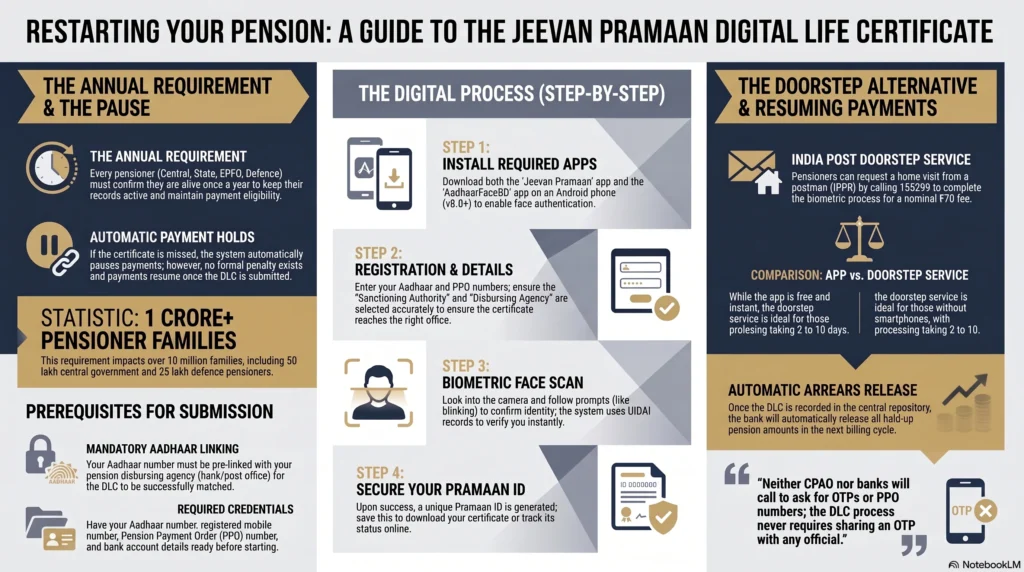
If a monthly pension suddenly stops arriving even though everything else about the account looks normal, the first thing to check is the annual life certificate. Every pensioner in India, whether they receive a pension from a central or state government department, EPFO, or the defence forces, has to confirm once a year that they are still alive. If that confirmation is missed, pension payments are put on hold until the certificate is submitted. Here comes the factor of submitting the Jeevan Pramaan Digital Life Certificate.
The process is much simpler than it used to be. There’s no longer any need to visit a bank branch or pension office just to complete this yearly formality. Through a government service called Jeevan Pramaan, pensioners can create a Digital Life Certificate (DLC) from home using a phone or computer with Aadhaar-based biometric verification.
This article explains why pension payments stop when the certificate is missed, what a Digital Life Certificate is, how to generate one through the Jeevan Pramaan app, how to request a doorstep visit through India Post Payments Bank if using an app is not practical, and how to check that pension payments have started again.
At a Glance: How to Submit Jeevan Pramaan Digital Life Certificate
- Why It Stopped: Monthly payouts pause automatically if the mandatory Annual Life Certificate is not submitted to your pension disbursing agency.
- The Digital Solution: You can generate a Digital Life Certificate (DLC) entirely from home using the government’s Jeevan Pramaan app on a smartphone.
- Verification Method: The app uses Aadhaar-based biometric face authentication (via the AadhaarFaceRD app), eliminating the need for physical fingerprint scanners or bank visits.
- Offline Doorstep Option: If you cannot use a smartphone, you can request a home visit from a postman via India Post Payments Bank (IPPB) to process the DLC for a nominal fee of ₹70.
- Resuming Payments: Once verified, you receive a unique Pramaan ID, and your paused pension (along with any arrears) will automatically restart in the next billing cycle.
Why Your Pension Disbursement Was Paused
A pension is not treated as a one-time payment that continues automatically forever. Every monthly payment is made on the condition that the pensioner is still eligible to receive it. To keep that record up to date, pension disbursing agencies, whether they are banks, post offices, or government accounts offices, ask pensioners to submit proof of life once every year. If that confirmation is missing, the system pauses future payments until the required certificate is received.
The Mandatory Annual Life Certificate Requirement
Before digital services became available, meeting this requirement often meant making a personal visit to the pension disbursing agency or getting a former employer to issue a life certificate and send it to the relevant office. As the Jeevan Pramaan portal explains, neither option was easy for older pensioners, people with health issues, or those who had relocated after retirement.
The rule applies to a very large number of pensioners across India. According to figures published on the Jeevan Pramaan portal, there are more than one crore pensioner families, including around fifty lakh central government pensioners, a similar number from state and Union Territory governments, over twenty-five lakh Army and defence pensioners, along with pensioners from public sector organisations and bodies such as EPFO. The Central Pension Accounting Office (CPAO) also directs pensioners to Para 14 of its Scheme Booklet and the relevant Department of Pension & Pensioners’ Welfare (DoPPW) office memoranda for the detailed rules governing the Annual Life Certificate. These are available through the CPAO official website.
The certificate itself is straightforward. It confirms that the pensioner is alive and, where required, declares that there has been no remarriage or employment that could affect eligibility for a family pension. Without this yearly declaration on record, the bank, post office, or pension office cannot continue releasing payments, so the pension is automatically placed on hold.
While the filing process varies slightly across pension categories, the yearly requirement remains the same. Central government pensioners usually deal with CPAO or their Pay and Accounts Office. Defence pensioners submit through the Defence Accounts Department and the SPARSH system. EPFO pensioners complete the process through their regional EPFO office or the EPFO arrangement with India Post Payments Bank discussed later in this article. Regardless of the route, filing one valid life certificate every twelve months keeps pension payments running.
CPAO also issues a clear warning about fraud. It states that neither CPAO, banks, nor any other government agency will call pensioners asking them to update their Life Certificate over the phone. They will never ask for a Pension Payment Order (PPO) number, date of birth, bank account details, or a one-time password (OTP) during such calls. Fraudsters often pretend to be pension officials, collect these details, and misuse the OTP to gain access to bank accounts. Whether the certificate is submitted through an app, at a bank, or during a doorstep visit, there is never any reason to share an OTP with anyone assisting in the process.
Also Read: Section 194P Exemption: The Complete 2026 ITR Guide for Senior Citizens
Grace Periods and Deadline Consequences
Every year, the government runs a dedicated Digital Life Certificate Campaign during which pensioners can submit their annual certificate. According to the Bhavishya pension tracking portal the latest published Campaign 4.0 was scheduled from 1 November to 30 November. In previous years, pensioners aged 80 and above were allowed to submit from 1 October, giving them an extra month before the general filing window opened. Since the schedule can change from year to year, it is always worth checking the latest dates on https://jeevanpramaan.gov.in or https://doppw.gov.in instead of relying on an earlier calendar.
Missing the deadline does not mean a pensioner has to apply for the pension all over again, nor is there a formal penalty. The payment simply remains on hold until a fresh life certificate is submitted. Once the certificate reaches the pension disbursing agency, payments usually restart, and any unpaid pension from the paused period is generally released as arrears.
The Bhavishya portal also carries a cyber security advisory for the DLC 4.0 campaign, reminding pensioners that scam calls often increase during the filing season. Submitting the certificate a little before the closing date can help avoid last-minute crowds at Jeevan Pramaan Centres and post offices. It also leaves enough time to fix issues such as an Aadhaar number that has not yet been linked with the pension account.
If the deadline has already passed and the pension has stopped, the solution is still the same. Generate a Digital Life Certificate through the Jeevan Pramaan app, a participating bank’s video-based service, or a doorstep visit from a postman. Once the certificate is recorded, the payment process resumes. There is no separate requirement to visit the pension office just to explain why the certificate was late. The certificate itself serves that purpose.
Pensioners who are unwell or admitted to hospital during the filing period should contact their pension sanctioning authority or pension disbursing agency as soon as possible. Many banks and post offices can arrange assisted filing or guide family members through the available doorstep options.
What is the Jeevan Pramaan Digital Life Certificate (DLC)?
Jeevan Pramaan is a government service managed by the National Informatics Centre (NIC) that allows pensioners from the central government, state governments, and other government organisations to submit their annual life certificate digitally. As described in the Jeevan Pramaan portal, it replaces the older method of visiting a pension office in person or sending a paper certificate through a former employer. Instead, the entire process can be completed from home with Aadhaar-based biometric verification.
The process itself is straightforward. The pensioner’s Aadhaar-linked biometric, whether it is a fingerprint, iris scan, or facial scan, is matched with the records maintained by the Unique Identification Authority of India (UIDAI). Once the identity check is successful, the system automatically creates a Digital Life Certificate and stores it in a central Life Certificate Repository. The pension disbursing agency can then access it online without asking the pensioner to submit any physical paperwork.
Transitioning from Physical Certificates to Digital Verification
The Jeevan Pramaan portal explains that the digital system was introduced to remove the inconvenience many pensioners faced under the older process. Travelling to a pension office every year was often difficult for elderly people, those with limited mobility, or retirees who had moved away from the city where they once worked. By shifting the process online, pensioners can complete the annual requirement from wherever they are, without depending on a former employer or making repeated visits to government offices.
Over the years, the service has become easier to use rather than changing in any major way. The current annual filing exercise is known as DLC 4.0. Alongside it, the Bhavishya portal publishes cyber security advisories reminding pensioners to stay alert during the filing season, when fraud attempts tend to increase. Face authentication has also become a popular option, especially for older pensioners whose fingerprints may no longer scan clearly. Using the AadhaarFaceRD application allows identity verification through a facial scan, which can be more dependable in such situations.
India Post Payments Bank also describes the service as a paper-free process. Once the biometric verification is successful, the Digital Life Certificate is generated immediately and a unique Pramaan ID is issued. This reference number can later be used to download a copy of the certificate whenever needed.
Pre-requisites for Generating a DLC at Home
Before starting the process, it helps to have a few details and devices ready. According to India Post Payments Bank, these are the basic requirements:
| What you need | Why it matters |
| Aadhaar number | This is the identity used for biometric verification. |
| A working mobile number | Needed to receive the one-time password required during the process. |
| Aadhaar linked with the pension disbursing agency | Your bank, post office, or pension office must already have your Aadhaar details on record so the certificate can be connected to your pension account. |
| Pension details | Keep your pension type, sanctioning authority, disbursing agency, PPO number, and pension account number ready. |
| A compatible device | An Android phone running version 8.0 or later with a working camera for face authentication, or a Windows 8 or later computer connected to a compatible biometric scanner. |
If you’ve generated a Digital Life Certificate before, the process becomes quicker. Details such as the sanctioning authority and pension disbursing agency are usually filled in automatically, leaving only a quick review before moving to the biometric verification stage.
One point that often causes problems is Aadhaar linking. The Aadhaar number must already be linked with the pension account before a Digital Life Certificate can be matched correctly. If the Aadhaar details have never been updated with the pension records, or if the mobile number linked to Aadhaar is no longer active, those issues should be sorted out with the bank or post office before starting the online process. Many first-time failures happen because this basic step was missed.
Step-by-Step: Submitting Your Life Certificate Online
Once everything is ready, generating a Digital Life Certificate through the Jeevan Pramaan app is a fairly simple process. It involves three stages: installing the required apps, entering your pension details, and completing biometric verification.
Step 1: Downloading the Jeevan Pramaan and AadhaarFaceRD Apps
If you’re using an Android phone running version 8.0 or later, you’ll need to install two separate apps from the Google Play Store. The download links are also available on the Jeevan Pramaan portal.
The first app is Jeevan Pramaan, which is where you’ll register, enter your pension details, and generate the Digital Life Certificate. The second is AadhaarFaceRD, developed by UIDAI for face authentication. During the verification stage, the Jeevan Pramaan app works with AadhaarFaceRD to complete the identity check. Since UIDAI manages Aadhaar face authentication centrally, both apps must be installed before you begin. Installing only one of them will prevent the process from being completed.
The first time AadhaarFaceRD opens, your phone will ask for permission to access the camera. This is a normal part of the setup because the camera is needed for the face scan. A stable internet connection is also necessary, as the verification is carried out online against UIDAI records.
Step 2: Registering Aadhaar and Pension Payment Order (PPO) Details
When you open the Jeevan Pramaan app for the first time, you’ll be asked to complete a registration form. Keep the following details ready before you begin:
- Aadhaar number
- Name exactly as it appears on Aadhaar
- Registered mobile number
- Type of pension
- Sanctioning authority
- Pension disbursing agency
- Pension Payment Order (PPO) number
- Pension account number
Each piece of information has a specific purpose. The sanctioning authority and pension disbursing agency tell the system where your Digital Life Certificate should be sent. If these details are entered incorrectly, the certificate may be generated successfully but never reach the office responsible for your pension. The PPO number and pension account number make sure the certificate is linked to the correct pension record, which is especially helpful for people receiving more than one pension or those drawing a family pension.
You’ll also be asked to give consent for Aadhaar-based authentication, as the verification takes place through UIDAI’s authentication system.
If you’ve submitted a Digital Life Certificate in an earlier year, you’ll often find that many of these details are already saved. In most cases, you’ll only need to review them before moving to the next step.
Step 3: Completing Biometric Face Authentication
After your details have been verified, the app moves to the biometric authentication stage.
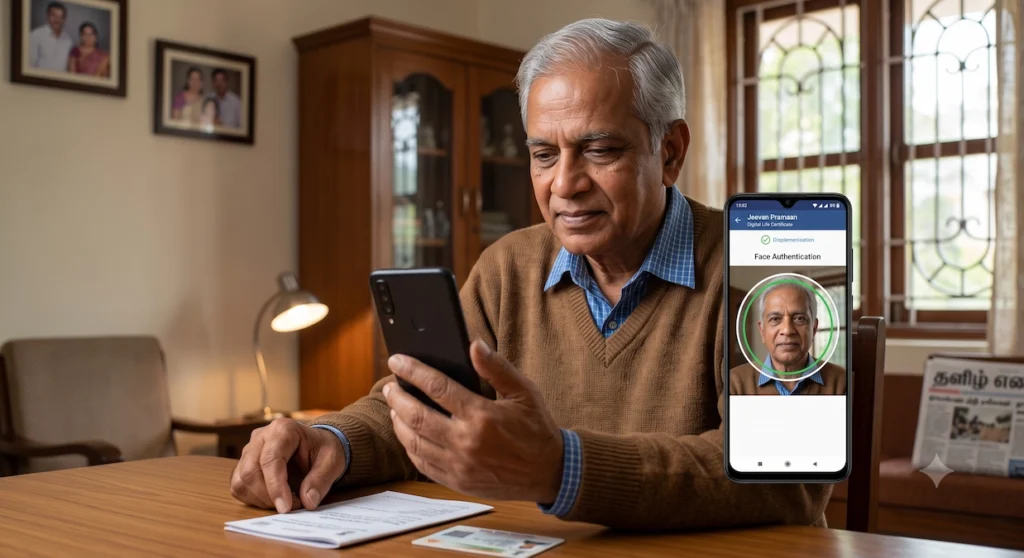
If you’re using face authentication, hold your phone at eye level and look directly into the camera. The app will guide you through a few simple instructions, such as blinking or making slight head movements, to confirm that a real person is in front of the camera rather than a photograph. Pensioners using a fingerprint scanner or iris scanner will complete the same stage with the appropriate biometric device instead.
Once the biometric information matches your Aadhaar record, the Digital Life Certificate is generated immediately. There is no separate approval process or waiting period. The certificate is stored in the central Life Certificate Repository, where it becomes available to the pension disbursing agency almost instantly.
At the same time, the system generates a unique Pramaan ID. It’s a good idea to save this number by taking a screenshot or writing it down. You’ll need it later if you want to download a copy of your Digital Life Certificate or refer to it while checking the status of your submission.
| Stage | What happens |
| 1. Download | Install the Jeevan Pramaan and AadhaarFaceRD apps from the Google Play Store. |
| 2. Register | Enter your Aadhaar number, registered mobile number, and pension details. |
| 3. Authenticate | Complete face, fingerprint, or iris verification. |
| 4. Confirmation | Your Digital Life Certificate is generated immediately. Save the Pramaan ID for future reference. |
Offline Alternative: Doorstep Submission via India Post Payments Bank
Not every pensioner is comfortable using a smartphone, and not everyone has access to one. For those who would rather not complete the process themselves, India Post Payments Bank (IPPB) offers a doorstep service through its network of postmen and Gramin Dak Sevaks (GDS). As described by the India Posts Payments Bank, a postal representative visits the pensioner’s home and completes the same biometric verification needed to generate a Digital Life Certificate.
| Jeevan Pramaan app (online) | IPPB doorstep visit (offline) |
| Completed at home using your own phone or computer | Completed at home during a visit from a postman or GDS |
| Requires a smartphone with a camera or a computer with a biometric scanner | Requires only an Aadhaar number and a registered mobile number |
| No fee for using the app | ₹70 Digital Life Certificate generation fee, with exemptions for certain pensioners |
| Certificate is generated immediately | Processing generally takes between two and ten days after the request is made |
Requesting a Postman Visit for DLC Generation
There are several ways to arrange a doorstep visit.
The quickest option is to contact the IPPB call centre on 155299 or 033-22029000, numbers also listed on the India Post website. A request can also be made directly through your local post office, a Gramin Dak Sevak, or the postman serving your area. If you prefer making the request online, IPPB also provides a service request form here.
This facility is available whether or not you have an IPPB savings account. The only requirement is that your pension disbursing agency already participates in the Jeevan Pramaan system. A list of participating sanctioning authorities and pension disbursing agencies is available at Jeevan Pramaan portal.
Some pensioners are also eligible for free doorstep certificate generation. Under partnerships with India Post Payments Bank, both EPFO pensioners and Department of Telecommunications pensioners can use this service without paying the Digital Life Certificate generation fee.
If your pension is paid through one of the twelve public sector banks that are part of the PSB Alliance, you can also request a doorstep visit through their official portal.. The service includes Digital Life Certificate generation and can be booked by calling +91 9152220220 or +91 8302266622.
As with the online process, it is worth staying alert to scams. IPPB states that its authorised representatives will only contact customers from 1600-100-270 or 1600-020-005. If you notice any unauthorised activity, it can be reported by calling 1800 8899 860. During a genuine doorstep visit, the representative will complete biometric verification in person. They will never ask you to share a one-time password over the phone.
Processing Times and Nominal Service Fees
The charges for this service are often misunderstood because there are two separate parts.
IPPB currently does not charge anything for the doorstep visit itself. The visit is free until further notice. A separate fee applies only for generating the Digital Life Certificate. At present, that fee is ₹70, inclusive of GST and applicable cess. Pensioners covered under the EPFO and Department of Telecommunications partnerships are exempt from this charge.
| Charge | Amount |
| Doorstep visit by a postman or GDS | No charge until further notice |
| Digital Life Certificate generation | ₹70, inclusive of GST and cess |
| EPFO and Department of Telecommunications pensioners | No charge |
| Time from request to visit | Between two and ten days |
| Scheduled visit timing | 11:00 am to 4:00 pm |
For pensioners using the PSB Alliance doorstep banking service instead of IPPB, the charges and timelines are slightly different. The listed service fee is ₹75 plus GST. Requests made before 3:00 pm are generally completed on the same day, while requests submitted later are usually attended to by 1:00 pm on the next working day.
Whichever option you choose, the charges are intended to cover the cost of providing the service at home, allowing pensioners to complete the annual requirement without travelling to a bank or pension office.
FAQ: How to Submit Jeevan Pramaan Digital Life Certificate
A rejection usually happens due to a mismatch of data between the details entered during the Digital Life Certificate (DLC) generation and the records held by your Pension Disbursing Agency (PDA). To resolve this, you must regenerate a new Pramaan ID, ensuring your PPO number, bank account, and spelling perfectly match the pension office’s records.
Yes. If your pension was paused because you missed the November 30 deadline, the payments are simply put on hold. Once your Digital Life Certificate is successfully submitted and updated in the pension system, your regular monthly pension will resume, and all unpaid arrears will be credited together in the next payment cycle.
No. The Jeevan Pramaan system is designed to be entirely paperless. Once your Aadhaar-based biometric or face authentication is successful, the certificate is stored in a secure central repository. Your bank or post office accesses the DLC automatically online, meaning there is no need to visit the branch to hand over a physical document.
After a successful submission, you will receive an SMS containing a unique Pramaan ID. You can use this ID on the official Jeevan Pramaan portal to download a PDF copy of your certificate. Central government pensioners can also track their real-time DLC status through the Bhavishya portal or the CPAO website to confirm the disbursing agency has processed it.
Verifying Your Submission and Resuming Payments
Generating the Digital Life Certificate is the main part of the process, but it is equally worth checking that the certificate has reached the pension disbursing agency and that your pension payments have started again.
Locating and Using Your Unique Pramaan ID
As soon as your biometric verification is successful, the system generates a unique Pramaan ID. According to India Post Payments Bank’s description of the service, NIC shares this reference number with the pensioner once the Digital Life Certificate has been created.
You can use the Pramaan ID to download a signed PDF copy of your certificate by signing in at https://jeevanpramaan.gov.in/ppouser/login. After entering the Pramaan ID, you’ll receive a one-time password. Once the OTP is entered, the certificate becomes available for download.
Central government pensioners have another option for checking the status of their Digital Life Certificate through the Bhavishya portal at https://bhavishya.nic.in, which provides a dedicated DLC Status feature alongside services such as pension slips and Form 16 downloads.
Pensioners covered by the Central Pension Accounting Office (CPAO) can also check their pension status through https://cpao.nic.in or by using the CPAO’s Dirghayu mobile app, which provides updates on pension records beyond just the Digital Life Certificate.
Keeping the Pramaan ID for future reference is a good habit. Since the Jeevan Pramaan app usually remembers details such as the sanctioning authority, pension disbursing agency, and account information after the first successful submission, having the previous year’s Pramaan ID or confirmation screenshot can make the next annual filing quicker. It also gives you an easy reference if you ever need to ask about a certificate that has already been submitted.
Timeline for Pension Disbursing Agencies to Restart Disbursements
After the Digital Life Certificate is stored in the central repository, the pension disbursing agency, whether it is a bank, post office, CPAO, or a defence pension office, can access it electronically. In most cases, pension payments resume during the next payment cycle after the certificate is recorded. Any pension that remained unpaid while the account was on hold is generally released together as arrears.
If your pension still has not restarted after allowing enough time for processing, the next step depends on the type of pension you receive.
- Central government pensioners can submit a grievance through CPENGRAMS at https://pgportal.gov.in/pension, call the toll-free helpline 1800-11-1960, or write to care.dppw@nic.in.
- CPAO pensioners can use the grievance facility available at https://cpao.nic.in or contact the toll-free helpline 1800-11-77-88.
- EPFO pensioners should contact their regional EPFO office through the grievance services available at https://www.epfindia.gov.in.
- Pensioners receiving payments through banks should first contact the bank’s pension cell if the Digital Life Certificate has already been submitted but the pension has not resumed.
None of these grievance channels require you to complete biometric verification again. They are meant for situations where a valid Digital Life Certificate has already been generated, but the payment has not restarted as expected. Keeping your Pramaan ID and the date you submitted the certificate handy will usually make it easier for the concerned office to locate your records and resolve the issue.
Disclaimer
This article is intended as general information for pensioners navigating the Digital Life Certificate process and does not replace official guidance from a pension disbursing agency, bank, or the Jeevan Pramaan portal. Fees, campaign dates, and technical steps described here are current as of publication and may be revised by the relevant authorities from time to time, so readers should confirm the latest details on the official portals linked throughout before acting. India Policy Hub is not responsible for outcomes arising from reliance on this content in place of independent verification with the concerned pension authority.




Leave a Reply