
EPF withdrawal online 2026: How to Check Your PF Balance & Claim Online

Navigating EPFO 3.0: The Definitive 2026 Guide to EPF and UAN Management
For years, dealing with EPFO often felt like something people kept postponing. Too many forms, too many visits, too much “I’ll handle it later.” But that picture is changing fast. With EPFO 3.0, the Employees’ Provident Fund Organisation is moving away from the paperwork-heavy system most salaried professionals in India grew up with. In its place is something much more digital, direct, and honestly, more member-driven. For a workforce that now stretches beyond 300 million people, these updates aren’t minor administrative tweaks. They affect how you activate your account, access your savings, verify your identity, and even how quickly you can get money when you genuinely need it. Herein comes the significance of understanding the topic of online withdrawal of EPF in 2026.
Some of the changes are already reshaping how members interact with the system.
UAN activation now relies on Aadhaar-based face authentication, replacing the older employer-dependent OTP workflows. Advance claim auto-settlement limits have been pushed up to ₹5 lakh, with processing timelines narrowed to roughly 72 hours in eligible cases. There’s also the new 25% retention rule, which changes how much of your PF corpus remains locked in until retirement. And perhaps the most talked-about shift—EPFO 3.0 is preparing features like UPI-based withdrawals and ATM access, potentially making PF funds far more accessible during emergencies without completely undermining their long-term retirement purpose.
This guide is built to walk you through all of it step by step. From activating your UAN for the first time, checking your PF balance instantly, filing the right withdrawal forms, understanding tax implications, fixing claim rejections, and even protecting your EPS pension eligibility—everything that matters in the 2026 EPFO ecosystem is here.
By the end, you shouldn’t just “know the rules.” You should know how to actually use the system without second-guessing every click.
At A Glance: What You Need to Know About EPFO 3.0 in 2026
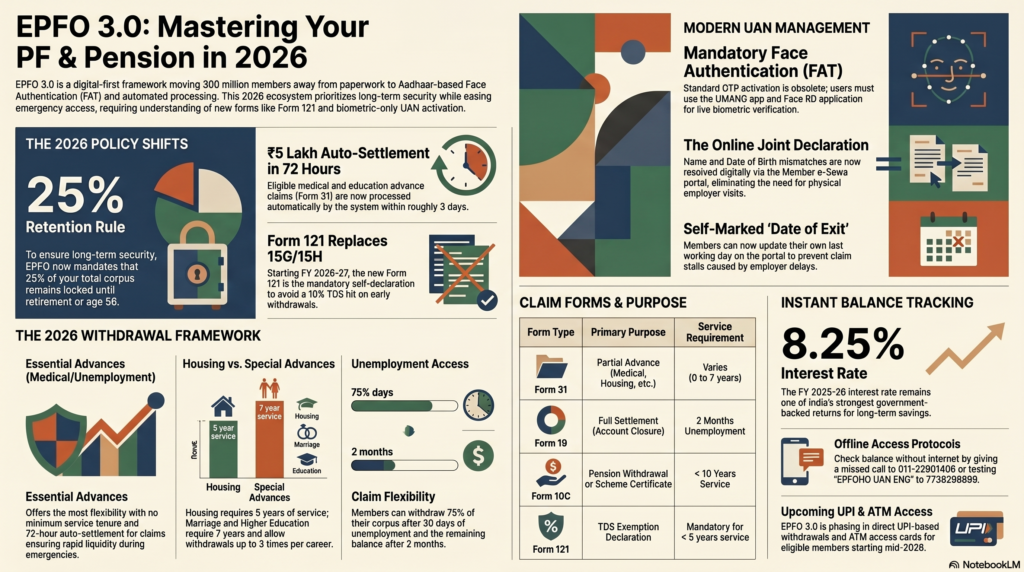
The transition to EPFO 3.0 has fundamentally changed how you access, verify, and withdraw your provident fund. Before navigating the portal, ensure you are up to date on these critical 2026 policy shifts:
- Biometric Mandate (FAT): Standard OTP UAN activation is obsolete. You must now use Aadhaar-based Face Authentication Technology via the UMANG app to activate or access new accounts.
- The 25% Retention Rule: You can no longer drain your entire account while employed. EPFO now mandates that 25% of your total corpus remains locked until retirement or age 58 to ensure long-term financial security.
- ₹5 Lakh Auto-Settlement: Waiting weeks for emergency funds is a thing of the past. Eligible medical and education advance claims (Form 31) up to ₹5 Lakh are now auto-settled by the system within ~72 hours.
- Form 121 Replaces 15G/15H: Starting FY 2026-27, the old Form 15G is no longer accepted for TDS exemption on early withdrawals. You must file the newly introduced Form 121 to avoid a 10% tax hit.
- Online Joint Declarations: Name or DOB mismatches that previously required physical employer visits can now be fully resolved through the digital Joint Declaration portal on Member e-Sewa.
Modern UAN Management: From Activation to Face Authentication
Your UAN, Universal Account Number, isn’t just another ID buried somewhere in your salary paperwork. In practical terms, it’s the anchor that holds your EPF history together. Jobs may change. Cities may change. Employers definitely will. Your UAN is the one thing that’s supposed to follow you through all of it.
And in 2026, EPFO has made one thing very clear: if your UAN isn’t properly activated, Aadhaar-linked, and verified, almost everything else gets harder. Balance checks, online claims, interest credits, profile updates—it all flows through this one number.
Step-by-Step: Activating Your UAN in the 2026 Ecosystem
Not too long ago, many employees depended entirely on HR teams or payroll departments to initiate UAN activation. That dependency has largely disappeared.
Under the EPFO circular that now mandates UAN activation through the UMANG app using Face Authentication Technology (FAT), members are expected to complete the process themselves.
Here’s what the activation journey looks like today:
Step 1 — Download UMANG
Install the UMANG (Unified Mobile Application for New-age Governance) app from either the Google Play Store or Apple App Store.
Step 2 — Access EPFO Services
Open the app, head into the EPFO section, and select “UAN Activation.”
Step 3 — Enter UAN and Aadhaar Details
Input your 12-digit UAN and your Aadhaar number. Once entered, an OTP is sent to the mobile number linked with your Aadhaar.
Step 4 — Complete Face Authentication
After OTP verification, the system launches the Face RD application for live facial verification. This isn’t a simple photo upload. The system checks facial movement, depth, and liveness in real time before matching your identity with Aadhaar records.
Step 5 — Create Login Credentials
Once verification clears, you’ll be asked to create your password for the EPFO Member e-Sewa portal.
For most people with a decent smartphone and stable internet connection, the process takes around 10 minutes, sometimes less. If you prefer a visual walkthrough, this guide breaks it down with screenshots.
How to Merge Two UAN Numbers Online to Maintain Service Continuity?
This happens more often than people realise.
You join a new company, HR accidentally creates a fresh UAN instead of linking your existing one, and suddenly, your EPF history is split across multiple accounts. At first, it feels harmless. Later? It can create serious headaches: claim rejections, incomplete service history, pension calculation issues and even dormant accounts.
EPFO doesn’t allow multiple active UANs for one member.
The fix is an online UAN merger through the Member e-Sewa portal.
Here’s the usual process:
- Log in using the UAN you want to keep active
- Go to Online Services
- Select “One Member – One EPF Account”
- Enter the older UAN and related Member ID
- Complete OTP verification
After that, the request moves through EPFO verification channels and, where necessary, to your previous employer for approval. Once cleared, the balances and service records are consolidated.
If your older account is especially old or sitting inactive without clear employer records, the new e-Praapti portal may help retrieve and reconnect those dormant accounts.
The New Biometric Mandate: Using the Face RD App for UAN Linking
The Face RD app isn’t optional anymore; it’s become a core compliance requirement in the 2026 ecosystem.
According to the updated EPFO guidelines, new UAN allotments and activations now require Aadhaar-based Face Authentication.
Why the shift?
Fraud prevention. Plain and simple.
The app performs liveness detection—things like blink tracking, slight facial movement, and depth mapping—to prevent misuse through photos, screenshots, or fake identity attempts.
If your phone struggles with camera quality or compatibility, EPFO hasn’t closed the door entirely. Members can still visit Common Service Centres (CSCs) for biometric verification using fingerprint devices. The official locator is available at https://www.epfo.gov.in/contact-us/.
How Do I Recover My UAN Password If My Registered Mobile Number Has Changed?
This is one of those problems people usually discover at the worst possible time, right when they need to check a balance or file a claim.
Thankfully, there are workable solutions.
If your Aadhaar mobile number is still active:
Use the “Forgot Password” option on the Member e-Sewa portal. Instead of choosing your EPFO-registered mobile number, select Aadhaar OTP verification. The OTP will be sent to your Aadhaar-linked number instead. The detailed process is explained here.
If both numbers are inaccessible:
You’ll need an offline correction.
Visit your nearest EPFO office, or in some cases an Aadhaar enrolment centre, with:
- Original Aadhaar card
- Your UAN details
- Latest salary slip or employment proof
Submit a mobile number update request. Once your records are updated, you’ll be able to reset your password online again.
A simple habit that saves a lot of future stress: keep your Aadhaar mobile number and EPFO-registered mobile number the same whenever possible. It sounds small, until you’re locked out of your account.
Real-Time Tracking: How to Check Your PF Balance Instantly
Knowing your EPF balance isn’t just about curiosity. For most salaried employees, it quietly shapes bigger financial decisions—whether that’s planning an emergency withdrawal, estimating retirement savings, evaluating a job switch, or simply making sure your employer is depositing contributions on time.
The good news? In 2026, checking your PF balance is easier than it used to be. EPFO now offers multiple ways to access your data—online, through mobile apps, and even without internet access.
The 2026 Member e-Sewa Passbook: Decoding the New Interface
If you want the most detailed breakdown of your EPF account, the Member Passbook portal is still the gold standard.
You can access it here: https://passbook.epfindia.gov.in
After logging in with your UAN and password, you’ll see a contribution ledger that breaks down:
- Your employee contribution
- Your employer contribution
- Interest credited
- EPF balance
- EPS pension allocation
This split matters more than most people realise. Your EPF and EPS contributions don’t sit in one single pool—they serve different purposes, and the passbook helps you track both.
One of the most useful improvements in the 2026 interface is how it handles multiple Member IDs. If you’ve worked across several companies, you can now switch between employment records much more smoothly and download separate passbooks for each employment period.
There’s one detail worth remembering though: the passbook may not always show your exact “live” balance. Interest for the current financial year, 8.25% for FY 2025–26, is usually credited later in the cycle, often after government ratification. So, if your numbers look slightly behind, that’s normal.
Using the UMANG App and Upcoming UPI Integration for Balance Checks
For people who prefer checking everything from their phone, which, let’s be honest, is most of us now, the UMANG app makes the process much easier.
After logging in using your UAN and MPIN:
EPFO → Employee Centric Services → View Passbook
That’s it.
You’ll see the same contribution records available on the desktop portal, plus the ability to download PDF statements if needed.
But UMANG is becoming much more than a passbook app.
Under the broader EPFO 3.0 rollout, UMANG is expected to support direct UPI-based PF withdrawals, allowing eligible members to request and receive partial withdrawals inside the same mobile flow. Reports suggested a phased rollout beginning around April 2026, although availability may vary depending on region and account eligibility.
There’s also active development around ATM-linked PF withdrawals, where members may eventually receive dedicated access cards tied to their EPF balances.
For updated rollout timelines, this guide continues to track developments closely.
Offline Methods: The 2026 Missed Call and SMS Protocols
Not everyone wants to log into portals or use apps. And sometimes, frankly, mobile data fails exactly when you need it.
EPFO still maintains two simple offline balance enquiry methods that continue to work reliably.
Missed Call Method
Using your UAN-registered mobile number, place a missed call to:
011-22901406
The call disconnects automatically, and within a few minutes, you’ll usually receive an SMS showing:
- Current PF balance
- Latest contribution details
- Last deposit date
No app. No login. No internet.
SMS Method
Send this message from your registered mobile:
EPFOHO UAN ENG
to:
7738299899
You can replace ENG with language codes like:
- HIN (Hindi)
- TAM (Tamil)
- MAR (Marathi)
- GUJ (Gujarati)
- and others.
You’ll receive an SMS response containing your balance information.
Can I Check My PF Balance Without a Registered Mobile Number or Internet Access?
Yes, but it’s less convenient.
If your registered mobile number is no longer active, and you don’t have internet access, you can still visit your nearest EPFO regional office with:
- Aadhaar card
- UAN details
- Government-issued photo ID
The office can generate a printed passbook statement during member service hours.
There’s also a newer alternative on the horizon.
EPFO’s upcoming e-Praapti portal is designed to help members access old or inactive PF accounts using Aadhaar authentication, even if they no longer remember their UAN.
This could be especially useful for employees who switched jobs years ago and left old accounts untouched.
Does EPFO Charge a Fee for Missed Calls or SMS Balance Checks?
No, EPFO itself does not charge anything for balance checks through missed calls or SMS services.
The missed call service disconnects before any billing kicks in, so it’s genuinely free.
For SMS enquiries, your telecom operator may apply a very small standard SMS charge, usually around Rs 1 or less, but EPFO doesn’t levy any service fee.
And that applies across the board: passbook downloads, online claims, grievance registration, and member portal access remain free for all eligible members.
The 2026 Withdrawal Framework: Rules, Limits, and Categories
For most employees, the real importance of EPF doesn’t fully hit until the day they actually need to withdraw from it.
Maybe it’s a medical emergency. Maybe a home purchase. Maybe an unexpected layoff, or a child’s education fees arriving all at once. That’s when the rules matter, not in theory, but in very real numbers.
And in 2026, EPFO has quietly reshaped those rules in ways that affect almost every withdrawal decision you’ll make.
Understanding when you can withdraw, how much you’re allowed to take, and what conditions apply has become more important than ever, especially with newer restrictions designed to protect long-term retirement savings.
The 3-Category System: Essential, Housing, and Special Advances
To make the process more structured, EPFO now organizes most partial withdrawals into three broad categories.
Category 1 — Essential Advances
This category covers situations where access to funds may be urgent or unavoidable.
Examples include:
- Medical emergencies
- Natural calamities
- Unemployment-related withdrawals
- Critical family emergencies
These claims generally come with the most flexible conditions. In many cases, there’s little or no minimum service requirement, especially for medical emergencies.
A major 2026 update: eligible claims under this category may now qualify for auto-settlement up to ₹5 lakh, with processing expected within 72 hours.
That’s a significant shift from the older system, where members often waited weeks.
Category 2 — Housing Advances
Buying a home remains one of the most common reasons members tap into their PF corpus.
Housing-related withdrawals may be used for:
- Buying a plot
- Constructing a house
- Purchasing a ready property
- Repaying an existing home loan
But unlike emergency withdrawals, this category comes with stricter eligibility rules.
Typically, members need at least 5 years of EPF membership, and withdrawal limits depend on salary structure, service period, and purpose.
Category 3 — Special Advances
These are life-stage withdrawals.
They include:
- Higher education expenses
- Marriage expenses (self, children, siblings)
- Disability-related equipment purchases
- Certain family welfare expenses
These usually require minimum service tenure and may have limits on how many times you can use them over your working life.
For a structured comparison of advance types, limits, and documentation, this guide offers a useful breakdown.
What Is the New 25% Retirement Retention Rule for EPF Withdrawals in 2026?
This has become one of the most talked-about EPFO changes, and understandably so.
Under the new 25% retention rule, EPFO requires members to keep at least 25% of their total EPF corpus locked in until retirement or age 58, whichever comes first.
In simple terms:
If your total EPF balance is ₹10 lakh, the maximum standard withdrawal you can make is ₹7.5 lakh.
The remaining ₹2.5 lakh must stay invested.
This rule exists for a practical reason. Over the years, many members treated EPF like a revolving savings account, making repeated withdrawals that severely reduced retirement security.
The new framework is designed to stop that.
There are, however, important exceptions.
The retention rule generally does not apply in cases involving:
- Permanent disability
- Retirement after age 58
- Death of the member
- Extended unemployment beyond two months
- Certain critical medical emergencies
For standard housing and special-purpose withdrawals, though, the rule remains fully applicable.
This means long-term planning matters much more now. If you’re expecting to use EPF for a home purchase 10 years before retirement, your accessible amount may be lower than you originally assumed.
Unemployment Rules: Accessing 75% of Your Corpus After 30 Days
Losing a job is exactly the kind of financial shock EPF is designed to cushion.
Under current withdrawal rules:
- If you remain unemployed for more than 30 days, you can withdraw up to 75% of your EPF corpus.
- If unemployment continues beyond 2 months, you can access the remaining balance as well.
This withdrawal is usually filed through Form 31.
One useful detail: employer attestation is typically not required here. That matters more than people think, especially if your exit from the company wasn’t exactly smooth.
You self-certify unemployment through the Member e-Sewa portal.
That said, EPFO’s digital verification systems have become smarter in 2026. Employment records, tax filings, and other linked databases make false claims much riskier.
Trying to game the system here isn’t just unwise, it’s increasingly difficult.
Higher Education and Marriage: Navigating the Real Withdrawal Limits
A lot of misinformation still floats around online about these categories, so clarity matters.
Education Withdrawals
You may become eligible after 7 years of EPF membership.
You can withdraw up to:
50% of your own employee contribution plus interest
Eligible uses include:
- Your own post-matriculation education
- Your children’s education
This withdrawal can generally be used up to 3 times during your career—not 10, despite what some outdated sources still suggest.
Marriage Withdrawals
Also available after 7 years of service.
Eligible purposes include:
- Your own marriage
- Children’s marriage
- Siblings’ marriage
The financial limit is similar:
Up to 50% of your employee contribution plus interest
And again, typically usable up to 3 times across your working life.
In both cases, EPFO may ask for supporting documents such as:
- Admission letters
- Fee structures
- Marriage invitations
- Registration proof
A small but important reminder: every withdrawal solves today’s problem, but it also reduces tomorrow’s compounding.
A ₹2–3 lakh withdrawal in your 30s can quietly become a much larger opportunity cost by retirement. That doesn’t mean never use it. It just means use it deliberately.
Filing Your Claim: A Practical Guide to Forms 19, 31, and 10C
When people talk about PF withdrawals, most of the confusion doesn’t come from eligibility rules, but from the forms.
One wrong form, one missing field, one outdated KYC detail and suddenly a process that should’ve taken days gets pushed back by weeks.
The good news? Once you understand what each form actually does, the system starts making a lot more sense.
Think of it this way:
- Form 31 = Partial withdrawal while still employed
- Form 19 = Full EPF settlement after exit
- Form 10C = Pension-related withdrawal or certificate under EPS
That’s the framework. Everything else builds on that.
Form 31: Mastering Auto-Settlement for Medical and Education (Up to ₹5 Lakh)
Form 31, officially the Advance Form, is what you use when you need access to your EPF money without closing your account.
This covers situations like:
- Medical emergencies
- Education expenses
- Marriage expenses
- Housing-related needs
- Temporary financial hardship
In short: you’re still part of the workforce, but you need access to part of your corpus.
That’s where Form 31 comes in.
The biggest 2026 change here is speed.
EPFO has expanded the auto-settlement limit to ₹5 lakh for eligible medical and education claims.
That means qualifying claims can now be processed in roughly 72 hours, often without employer intervention.
Here’s how the process works:
Step 1
Log in to the Member e-Sewa portal → Online Services → Claim (Form-31, 19, 10C & 10D)
Step 2
Verify your:
- Bank account details
- Aadhaar-linked mobile number
- KYC status
Step 3
Choose:
“PF ADVANCE (Form 31)”
Step 4
Select your purpose:
- Medical
- Education
- Marriage
- Housing
- Other eligible categories
Enter the withdrawal amount and upload supporting documents, such as hospital estimates, admission letters, or invoices.
Step 5
Submit the request.
If your claim falls within the auto-settlement framework, it enters digital processing immediately.
For eligible claims, employer approval usually isn’t required.
For claims above ₹5 lakh, or for categories outside the auto-settlement rules, manual verification and employer approval may still apply.
Form 19 and 10C: Closing Your Account and Claiming Pension Benefits
When you leave a job permanently, or retire, and don’t plan to continue EPF contributions, you move into settlement territory.
That’s where Form 19 comes in.
Form 19 is used for full EPF withdrawal, meaning the closure of your EPF account linked to that specific employment record.
This includes:
- Employee contribution
- Employer contribution
- Accrued interest
Before filing Form 19, make sure these basics are in place:
✔ Your Date of Exit (DOE) is updated
✔ Your UAN is Aadhaar-linked
✔ Your KYC is fully verified
✔ At least 2 months have passed since your last working day (unless retirement, disability, or exceptional cases apply)
Without these, claims often get stuck before they even reach processing.
Now comes the part many people overlook: EPS pension contributions.
That’s where Form 10C becomes relevant.
Form 10C handles the Employee Pension Scheme (EPS) component.
Its purpose depends on your service history:
If you have less than 10 years of service:
You may receive the pension contribution back as a withdrawal benefit.
If you have more than 10 years of service:
You generally won’t get a lump sum.
Instead, EPFO issues a Scheme Certificate, preserving your pension eligibility for retirement.
Both Form 19 and Form 10C can usually be filed together through the online claims interface.
EPFO’s official claim guidance is available here.
Tax Compliance: Submitting Form 15G/15H to Prevent TDS Deductions
This is where many members lose money, not because they weren’t eligible, but because they missed paperwork.
EPF withdrawals are generally tax-free if:
- Your total service period is 5 years or more, including merged accounts
or - Withdrawal happens due to circumstances beyond your control (closure, disability, etc.)
If those conditions aren’t met, and your withdrawal exceeds ₹50,000, EPFO may deduct TDS.
Typical rates:
- 10% if PAN is available
- 30% if PAN is missing
Traditionally, members used:
- Form 15G (below 60 years)
- Form 15H (60 years and above)
to avoid TDS where eligible.
But 2026 brings a major change.
Critical 2026 Update — Form 121
Starting FY 2026–27, EPFO has introduced Form 121 as the updated TDS self-declaration mechanism for EPF withdrawals .
This changes the old process significantly.
EPFO’s official circular is here.
For deeper explanations refer to this report.
Before filing a claim in FY 2026–27, members should also go through this guide.
Download Form 121 here:
Here is the government FAQs:
Practical filling guide.
A summary of why this matters.
This is one of those changes that’s easy to ignore, until you notice 10% missing from your payout.
How Many Times Can I Withdraw PF for Education or Medical Emergencies?
This depends entirely on the purpose.
Medical Withdrawals
For hospitalization, surgery, or serious illness involving you or eligible family members:
You can generally withdraw up to:
6 times your monthly salary (Basic + DA)
or
Your employee contribution plus interest
—whichever is lower.
There’s no fixed lifetime cap on the number of medical claims, but each claim must be genuine and supported with valid documentation.
Education Withdrawals
After 7 years of membership:
You may withdraw for post-matriculation education expenses.
Typical usage limit:
Up to 3 times during your working life.
And here’s the part many people ignore: every withdrawal isn’t just money leaving today—it’s compounding disappearing tomorrow.
A ₹3 lakh withdrawal at age 35 might not feel catastrophic.
But left invested at EPF rates over 20–25 years, that same amount could have grown into something much larger.
Sometimes withdrawing is necessary. Life happens.
Just make sure the reason is worth what future-you are giving up.
Troubleshooting Rejections: Why Claims Fail and How to Fix Them
Few things are more frustrating than doing everything “right,” submitting your PF claim, and then seeing a vague status update like Rejected, Pending, or the infamous Under Process that seems to sit there forever.
The truth? Most EPF claim rejections aren’t caused by complex legal issues or missing eligibility. More often, they come down to small data mismatches, incomplete KYC, outdated employer records, or technical inconsistencies between linked databases.
The upside is that almost all of these issues are fixable if you know where to look.
The Online Joint Declaration: Resolving Name and DOB Mismatches Digitally
This remains one of the biggest reasons claims get rejected.
Sometimes your Aadhaar says R. Kumar, your PAN says Ravi Kumar, and your bank account says Ravikumar S. On paper, it may look close enough. In EPFO’s digital system? Even small inconsistencies can trigger a mismatch.
Date-of-birth errors create similar problems, especially in older accounts where manual data entry happened years ago.
When your KYC records don’t line up, claim processing usually stops automatically.
The fix is the Joint Declaration process, which in 2026 is now fully digital.
Here’s how to do it:
Step 1
Log in to the Member e-Sewa portal.
Step 2
Navigate to:
KYC → Modify Basic Details
Step 3
Enter the corrected details.
Step 4
Upload supporting documents such as:
- Aadhaar card
- PAN card
- Passport
- Birth certificate
- School leaving certificate (where applicable)
Once submitted, your employer receives a digital approval request. After employer approval, the request moves to the relevant EPFO field office for final processing.
Typical correction timelines range from 7 to 15 working days.
A common mistake people make here: filing another claim before the correction reflects in the system.
That almost always leads to another rejection.
Wait until the update actually shows on your profile.
Updating the “Date of Exit” (DOE) Without Employer Intervention
Another surprisingly common issue is a missing Date of Exit (DOE).
Without a recorded exit date, EPFO’s system often assumes you’re still actively employed—which can block full settlement claims automatically.
This usually happens when:
- Employers forget to update exit details
- Payroll teams delay offboarding updates
- You left under strained circumstances and HR never completed the process
In the past, this often meant chasing HR endlessly.
In 2026, members can often fix this themselves.
Here’s the process:
Step 1
Log in to the Member e-Sewa portal.
Step 2
Go to:
Profile → Mark Exit
Step 3
Enter:
- Your actual last working date
- Reason for exit
Once submitted, the system updates your employment record, allowing you to proceed with eligible claims.
If your employer has already entered the wrong date, say, weeks or months after your actual exit, you may still need employer intervention or formal escalation.
Why Is My PF Claim Showing as “Under Process” for Several Weeks?
This is probably the most common anxiety point for members.
You submit the claim. Everything looks fine.
Then nothing.
Days pass. Sometimes weeks.
The status stays frozen on Under Process.
Before assuming something’s gone wrong, it helps to know the normal timelines:
- Auto-settlement claims: Around 3 working days
- Employer-attested claims: Usually 7–10 working days
- Field office/manual verification claims: Can take up to 20 working days
If your claim exceeds those timelines, here are the usual suspects:
KYC Verification Problems
Your Aadhaar, PAN, or bank details may not be fully verified.
Even if the details are entered, incomplete digital verification can stall payment.
Check the KYC section in your Member portal.
Dormant or Closed Bank Account
This happens more often than people admit.
If the bank account linked to your UAN is closed, inactive, or frozen, payment attempts can fail silently.
Update your bank details before resubmitting.
Employer Approval Pending
Some claims still require employer verification.
In many cases, the employer simply hasn’t approved it yet.
A quick follow-up with HR—armed with your claim reference number—often resolves it faster than waiting.
Regional Office Processing Delays
High-value claims, correction-linked claims, or manually escalated cases may sit longer due to workload at the regional field office.
That’s frustrating, but not always a sign of rejection.
For claim-specific troubleshooting, this guide provides practical examples.
Escalating Delays: Using the EPFiGMS Grievance Portal Effectively
If your claim crosses 30 days with no meaningful update, it’s usually time to escalate.
The official channel is EPFiGMS, the EPF Interactive Grievance Management System.
Official portal:
You can also access it directly through Member e-Sewa under Raise Grievance.
Here’s how to file a grievance properly:
Step 1
Log in using your UAN credentials.
Step 2
Select:
Register Grievance
Step 3
Choose the relevant category:
- Claim delay
- Claim rejection
- KYC mismatch
- Employer non-cooperation
- Account transfer issue
Step 4
Provide:
- Claim reference number
- Submission date
- Clear explanation of the issue
Step 5
Attach supporting screenshots:
- Claim status page
- Rejection messages
- KYC mismatch screenshots
- Employer communication (if relevant)
Once submitted, the system generates a grievance tracking number.
That grievance is routed directly to the relevant EPFO regional office.
You can track it here:
The official grievance resolution window is generally 30 days.
If unresolved beyond that, escalation to the regional PF Commissioner is possible.
For a more strategic breakdown of how to structure your grievance for faster action, this guide is worth reviewing.
The biggest mistake members make? Waiting quietly.
If your claim is genuinely stuck, documentation plus timely escalation usually works better than repeated portal refreshes. We’ve all done that. It rarely helps.
The Future of EPF: EPS Pension and Interest Credit
For a lot of EPF members, the conversation usually stops at one question: How much money can I withdraw?
Fair enough. That’s the part people feel.
But there’s another side to your EPF account—quieter, less talked about, and in many cases, more valuable over the long run.
That’s EPS, the Employee Pension Scheme.
Unlike your EPF balance, EPS isn’t designed to be a savings bucket you dip into when needed. It’s meant to become an income stream later in life. Whether you understand it or ignore it can make a very real difference when retirement arrives.
Is It Possible to Withdraw Pension Money While I Am Still Working?
In short, no.
While you’re actively employed under EPF coverage, the pension portion of your employer contribution stays locked inside the EPS framework.
Here’s how it works:
Out of your employer’s contribution, 8.33% is directed toward EPS, subject to the ₹15,000 wage ceiling.
That amount doesn’t behave like your normal PF balance.
You can’t partially withdraw it through Form 31.
You can’t transfer it to your savings account.
And you can’t use it for emergencies while you’re still in covered employment.
EPS is strictly a pension instrument.
That’s why, when you look at your passbook, the pension contribution may be visible, but it doesn’t appear as an amount you can simply claim on demand.
The only major exception happens when a member permanently exits the EPF system before completing 10 years of pensionable service.
In that case, you may become eligible for a withdrawal benefit under Form 10C, a one-time lump sum calculated using EPFO’s prescribed tables.
But there’s a tradeoff.
The moment you claim that withdrawal benefit, your EPS pension rights linked to that service period are effectively gone.
Permanently.
That’s not always the wrong decision, but it’s definitely one worth thinking through.
The 36-Month EPS Waiting Period and Scheme Certificates Explained
This is where things get a little more strategic.
Once you complete 10 years of qualifying EPS service, you generally become eligible for a monthly pension beginning at age 58.
The pension calculation follows this formula:
Monthly pension =
(Pensionable Salary × Pensionable Service) / 70
A lot of employees change jobs several times over a decade or two. That’s normal.
The problem? If your EPS service history isn’t properly carried forward, you risk breaking that continuity.
That’s where the Scheme Certificate becomes important.
If you leave one employer and aren’t immediately joining another EPF-covered organization, EPFO can issue a Scheme Certificate documenting your accumulated pensionable service.
Later, when you join a new employer, this certificate helps preserve your pension record instead of resetting the clock.
And honestly, many people miss this.
They focus entirely on withdrawing PF balances and accidentally undermine their future pension eligibility without realizing it.
The “36-month waiting period” often comes up in EPS discussions because service duration affects pension treatment. Depending on your total qualifying period, the system may determine whether you qualify for proportionate pension benefits, withdrawal benefits, or full pension eligibility.
Which is exactly why service continuity matters more than it seems in your 20s or 30s.
Tracking Your Interest: When Will the 8.25% Interest Be Credited to Your Account?
Interest is one of the biggest reasons EPF remains such a powerful retirement instrument.
For FY 2025–26, the EPF interest rate stands at 8.25%—continuing to offer one of the strongest government-backed long-term fixed-income returns available to salaried employees in India.
But one thing often confuses members:
“If the financial year ended, why hasn’t my interest shown up yet?”
Because EPF interest doesn’t appear instantly.
Here’s what actually happens:
- Interest is calculated monthly on your running balance
- But it’s credited as a lump sum after the financial year closes
- Final credit usually happens after government ratification—often between February and June of the following cycle
So yes, it’s completely possible for your March passbook to look “incomplete” even though your money is earning interest.
That delay is normal.
Before making a large withdrawal, it’s worth checking whether the year’s interest has already been posted.
Official updates and announcements can usually be tracked through EPFO press releases here.
One practical mistake many members make is withdrawing immediately after March 31 assuming interest has already been credited.
Sometimes it hasn’t.
Waiting for the official posting could materially affect your final payout.
Why the 8.25% Compounding Still Matters
It’s easy to underestimate compounding because it doesn’t feel dramatic month to month.
A few thousand here. A few thousand there.
But over 20 or 30 years?
That’s where EPF becomes quietly powerful.
At 8.25%, a disciplined contribution pattern can create a corpus many people would struggle to replicate through ordinary savings habits.
And under current rules, that growth remains tax-efficient, as long as annual contributions stay within the applicable thresholds.
Which is why every unnecessary withdrawal isn’t just money leaving your account.
It’s future compounding walking out with it.
That doesn’t mean never touch your PF. Life doesn’t work like that.
But it does mean understanding what you’re giving up before you click Submit Claim.
Frequently Asked Questions: EPF withdrawal online 2026
EPFO now mandates that 25% of your total corpus remains locked until retirement or age 58. For standard advances (like housing), you can only access up to 75% of your funds. This policy ensures long-term financial security and prevents complete account depletion.
You can instantly check your EPF balance offline for free. Simply give a missed call to 011-22901406 or send an SMS to 7738299899 with the text EPFOHO UAN ENG from your UAN-registered mobile number.
While eligible 2026 claims enjoy 72-hour auto-settlement, prolonged delays usually stem from KYC database hash mismatches (e.g., name or DOB discrepancies between UIDAI and EPFO records) or a missing Date of Exit (DOE). You can resolve identity mismatches digitally by filing an online Joint Declaration.
No. Starting FY 2026-27, Form 15G is obsolete for provident fund claims. You must now submit the newly introduced Form 121 to avoid a 10% TDS deduction if you are withdrawing funds before completing 5 years of continuous service.
Yes. Under EPFO 3.0 guidelines, standard OTP activation has been replaced. You must complete Aadhaar-based Face Authentication (FAT) using the UMANG app’s Face RD technology to activate or recover your Universal Account Number.
| Form Type | Withdrawal Purpose | Service Requirement | Max Limit (2026) | Auto-Settlement? | Tax/Compliance (Form 121) |
| Form 31 | Medical Emergency | No Minimum | Up to ₹5,00,000 | Yes (3-Day) | Tax-Free |
| Form 31 | Education | 7 Years | 50% of Employee Share | Yes (Up to 5L) | Tax-Free |
| Form 31 | Housing | 5 Years | Variable (25% Retention) | No | Form 121 if < 5yrs service |
| Form 31 | Marriage | 7 Years | 50% of Employee Share | No | Tax-Free |
| Form 19 | Full Settlement | 2 Months Unemp. | Full Balance | No | Form 121 Mandatory (<5yrs) |
| Form 10C | Pension Benefit | < 10 Years | Lump Sum (Table D) | No | Taxable in some cases |
| Form 121 | TDS Exemption | < 5 Years | N/A (Declarative) | N/A | Mandatory for FY 26-27 |
Future-Proofing Your Retirement: Final Strategic Takeaways
By 2026, EPFO has become something very different from what many salaried employees remember from even five or six years ago.
What used to feel like a slow, paperwork-heavy system is now evolving into something faster, more digital, and, if your records are clean, far more convenient.
But that convenience comes with a catch.
The system works best for members who stay proactive. People who keep their records updated, understand the rules before they need money, and act before a problem becomes urgent usually have a very different experience from those logging in only when there’s a crisis.
If there’s one takeaway from everything in this guide, it’s this: your PF account now rewards attention.
Here are the moves that matter most going forward.
Lock in Your Biometric Link Now
If your UAN still hasn’t been activated through Aadhaar-based Face Authentication, don’t push it off.
That biometric link is no longer just another optional verification step. It’s becoming the foundation for how EPFO plans to deliver future services, including UPI withdrawals and ATM-based access under EPFO 3.0.
The official FAT mandate is already in effect, and waiting until you urgently need funds is usually when technical issues feel most painful.
Get it done while there’s no pressure.
Consolidate Every Old UAN and Member ID
A surprising number of employees have money sitting in old PF accounts they barely remember.
Maybe it was your first job. Maybe a short stint in another city. Maybe an employer who created a second UAN during onboarding, and no one noticed.
Over time, those forgotten accounts can create claim issues, incomplete service records, and pension gaps.
Merge them now.
The standard online process handles most cases, and for older dormant accounts without proper UAN linkage, the e-Praapti rollout is designed to help recover them.
Old PF balances aren’t “lost money.” But they can become hard money.
Better to fix that while everything is traceable.
Clean Up Your KYC Before You Need It
This one sounds boring—until it isn’t.
A spelling mismatch. An old bank account. A missing PAN link.
Tiny details like these are behind a huge percentage of claim rejections.
And the worst time to discover them is when you’re already under financial stress.
Take ten minutes.
Log in. Check:
- Aadhaar details
- PAN status
- Bank account verification
- Name spelling
- Date of birth
If something’s off, start the Joint Declaration process early.
Future-you will thank you for not trying to fix it during an emergency.
Don’t Ignore the Form 121 Tax Update
This may be one of the easiest ways to lose money without realizing it.
From FY 2026–27 onward, EPFO has introduced Form 121 as part of its updated TDS declaration framework.
Members who keep submitting older forms, or assume the old process still applies, may find TDS deducted from their payout unexpectedly.
Before your next withdrawal, review the updated form requirements carefully.
Download Form 121 here:
https://www.incometaxindia.gov.in/documents/d/guest/fn-121
Tax paperwork isn’t exciting. Losing 10% of your withdrawal definitely gets your attention though.
Resist Turning EPF Into a Habitual Withdrawal Account
This might be the hardest advice in the guide—but maybe the most important.
EPF is accessible now. Faster. More digital. More convenient.
That’s good.
But easy access can quietly create bad habits.
A housing withdrawal feels manageable. Then an education withdrawal. Then another emergency advance.
And before you know it, a retirement corpus built over years starts looking smaller than it should.
That’s exactly why the 25% retention rule now exists.
Because every withdrawal doesn’t just reduce your balance.
It reduces decades of compounding.
A ₹2 lakh withdrawal in your mid-30s may not feel huge.
By retirement? It could represent ₹15–20 lakh or more in lost growth.
Use EPF when it genuinely matters.
Just don’t let convenience become leakage.
Use EPS Strategically
If you’re approaching 10 years of pensionable service, pause before withdrawing under Form 10C.
A lot of members cash out too early without realizing what they’re giving up.
A preserved EPS pension may not feel dramatic today—but a guaranteed monthly income at 58 can become far more valuable than a one-time payout.
If you’re changing jobs, request a Scheme Certificate instead of breaking continuity.
Pension decisions usually look small in your 20s.
They rarely feel small at retirement.
Watch the EPFO 3.0 Rollout Closely
UPI withdrawals and ATM access have the potential to fundamentally change how members interact with PF money.
That’s exciting, but it also means account hygiene matters more than ever.
When these features go fully live, members with incomplete KYC or unresolved identity issues may find themselves locked out of the very convenience they were waiting for.
For rollout tracking, EPFO updates and industry trackers like this can help.
Keep the EPFiGMS Escalation Path Ready
If something goes wrong, don’t sit on it.
Claims stall. Employers delay approvals. Data mismatches happen.
That part probably won’t disappear completely.
But EPFiGMS gives members a direct escalation channel:
The 2026 grievance system is faster, better routed, and far more transparent than older versions.
Use it when needed.
Silence doesn’t move claims. Documentation usually does.
The Bigger Picture
India’s EPF system is no longer just a retirement deduction quietly disappearing from your payslip every month.
It’s becoming a fully digital financial infrastructure—one where members who stay informed, organized, and a little proactive can get far more value from the system than ever before.
Own your UAN. Protect your KYC. Understand the rules. Withdraw carefully.
And then, maybe most importantly—let compounding do what it’s been quietly doing all along.
Building something your future self may one day be very glad you didn’t touch too early.
Disclaimer
This article is for informational purposes only and does not constitute financial advice. Consult a SEBI-registered investment advisor for personalised retirement planning guidance.




Leave a Reply