
Scholarship Money Not Received? How to Track Your DBT Status in 2026
Why Is Your Scholarship Payment Delayed?
Your NSP application says “approved.” Your college confirmed everything weeks ago. Even so, your bank account is still empty. But scholarship money still hasn’t been received?
If that sounds familiar, you’re far from the only student dealing with it. Delayed scholarship payments are a common headache across pre-matric, post-matric, merit, and minority scholarship schemes. The good news is that the money usually isn’t lost. It’s simply held up at a particular stage in the payment process.
The hold-up could be something as simple as your Aadhaar being linked to a different bank account than the one you expected. Your name might not match exactly across your Aadhaar, bank records, and scholarship application. Or your payment file may still be waiting with the department responsible for sending it to the next stage.
Each of these problems has a solution. The first step is finding where the payment has stopped. Once you know that, getting it moving again becomes much easier.
At a Glance: Scholarship Money Not Received?
- NSP Approval is Only Step One: An “approved” status on the National Scholarship Portal (NSP) means your application passed verification, but the actual fund transfer is handled by the Public Financial Management System (PFMS).
- Track Payments via PFMS: Once forwarded, track your funds on pfms.nic.in using the “Know Your Payments” portal and your bank account number, not your application ID.
- The #1 Reason for Payment Failure: Most Direct Benefit Transfer (DBT) failures happen because Aadhaar is not seeded to the bank account in the NPCI mapper, or the student account has reached its maximum balance limit.
- Quick Solutions: Verify your active bank link via the UIDAI Bank Mapper or the BASE portal. If seeding fails, opening an Aadhaar-seeded IPPB (India Post Payments Bank) account is a fast workaround.
- Escalating Delays: If your payment is stuck on “Under Processing with Agency,” follow up with your Institute Nodal Officer (INO), file a grievance on CPGRAMS (pgportal.gov.in), or submit an RTI application to the scheme’s Programme Authority.
Understanding the Direct Benefit Transfer (DBT) System for Scholarships
What is DBT and How Does it Affect Your Scholarship?
Direct Benefit Transfer, better known as DBT, is the system the government uses to send scholarship money straight into your bank account. Instead of funds passing through colleges, institutions, or local offices, the payment goes directly from the government treasury to the account linked to your application. The switch to DBT was meant to cut delays, reduce errors, and make it easier for students to keep track of where their scholarship stands.
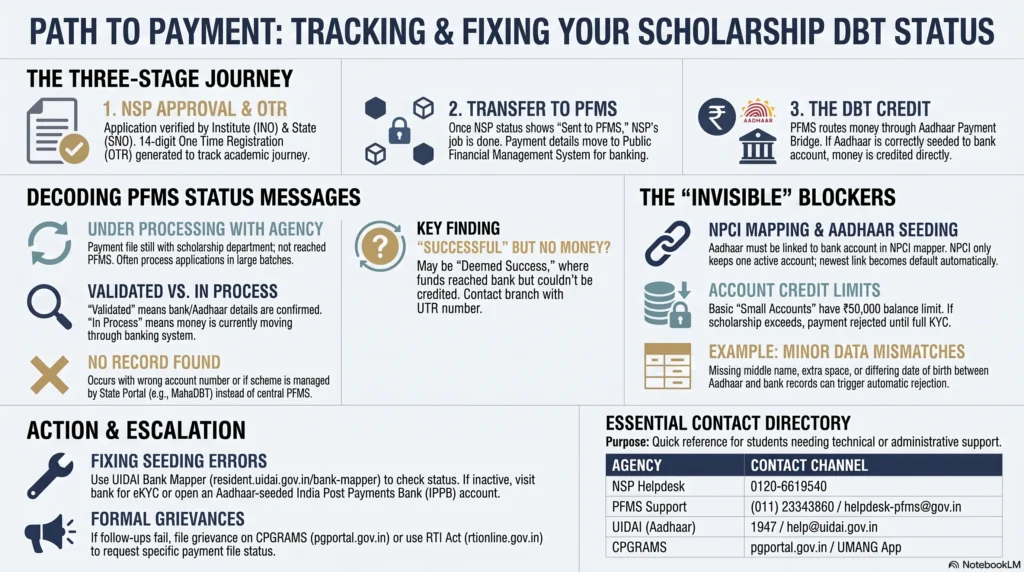
The process itself happens in four stages, according to the government’s Standard Operating Procedure for DBT payments (dbtbharat.gov.in). Your scholarship details are recorded and approved, your Aadhaar and bank account are checked, a payment file is created, and the money is released.
For students, there’s one point that causes confusion more than anything else. Seeing your application marked as “approved” on the scholarship portal does not mean the money has already been sent. Approval only clears the way for the payment process to begin. Every stage after that depends on your Aadhaar and bank information matching the records already in the system. Even a small mismatch can stop the payment until it’s corrected.
The Role of the Public Financial Management System (PFMS)
PFMS is the government’s payment platform, managed by the Office of the Controller General of Accounts, and it’s the system that actually handles the transfer of scholarship funds (pfms.nic.in). While many students think the National Scholarship Portal controls everything, PFMS is where the payment itself is processed.
After your scholarship is approved, the ministry or department responsible for your scheme sends the payment details to PFMS. The platform checks the information before passing it to a sponsor bank. From there, the payment is routed either through the Aadhaar Payment Bridge, if your Aadhaar is linked to your bank account, or through a regular bank transfer when Aadhaar-based routing isn’t being used.
This is also why PFMS is the place to check once your scholarship has been sanctioned. The National Scholarship Portal can tell you whether your application has been approved, but it does not track what happens after the payment enters the banking system. PFMS fills that gap by showing where the transaction currently stands.
Why Scholarships Move from the National Scholarship Portal (NSP) to PFMS
The National Scholarship Portal (scholarships.gov.in) is where students complete the application process. You register, upload documents, verify your details, and receive approvals from your institution and the relevant authorities. Every applicant now needs a One Time Registration (OTR), a 14-digit number generated using your Aadhaar or Aadhaar Enrolment ID. The same OTR stays with you throughout your academic journey, so you don’t need to create a new registration every year.
Students who can’t access the portal on their own can also complete the process through a nearby Common Service Centre (CSC). For a fixed fee of around ₹30, the centre handles registration, biometric authentication, and submission of the scholarship application.
Once all verification steps are complete, NSP updates your application status to show that it has been sent to PFMS. From that point onward, NSP has very little new information to offer. To find out whether the payment has actually been processed, you’ll need to check PFMS instead.
There’s one exception worth keeping in mind. Not every scholarship follows the central NSP-PFMS route. Many state-funded scholarship schemes run through their own DBT platforms. If your scholarship belongs to one of these schemes, PFMS won’t display its payment status because the transaction is handled elsewhere.
| State | Portal | Link |
| Maharashtra | MahaDBT Application Status | mahadbt.maharashtra.gov.in/ApplicationStatus/ApplicationStatus |
| Uttar Pradesh | UP Scholarship Status | scholarship.up.gov.in/status2122.aspx |
| Bihar | Post-Matric Scholarship Status | pmsonline.bih.nic.in |
| Madhya Pradesh | MP Scholarship Portal | scholarshipportal.mp.nic.in/Public/View_ApplicantDocuments.aspx |
| Karnataka | State Scholarship Portal (SSP) | ssp.postmatric.karnataka.gov.in |
| Punjab | Punjab Scholarship Portal | scholarships.punjab.gov.in |
If you’re not sure which portal applies to your scholarship, check the scheme name shown on your NSP dashboard or your scholarship sanction letter. That will tell you whether you should continue tracking your payment through PFMS or through your state’s own scholarship portal.
Step-by-Step Guide to Tracking Your Scholarship DBT Status
Checking Application Verification Status on the NSP
Start by signing in to scholarships.gov.in with your OTR ID and password. Open the Application Status page to see where your application currently stands.
Every application goes through more than one round of verification. First, your Institute Nodal Officer (INO) checks the details. After that, the application moves to the District or State Nodal Officer (DNO/SNO) for another review. Only after both approvals are complete does the status usually change to something like “Sent to PFMS” or “Forwarded for Payment.” Once you see one of these messages, the National Scholarship Portal has finished its part of the process and PFMS becomes the right place to track your payment.
If you’re unable to get past the registration stage, the problem may have nothing to do with your scholarship application itself. Many students run into failed face or biometric authentication while generating their OTR because their Aadhaar biometrics are locked. Instead of submitting the same request again and again, unlock your biometrics through the mAadhaar app or the myAadhaar portal first, then try the registration process again.
Using the PFMS “Know Your Payments” Portal
PFMS provides a dedicated payment tracking page at pfms.nic.in/SitePages/KnowYourPayment_Dw_NewNew.aspx
Select your bank from the list, enter your account number twice for confirmation, complete the captcha, and submit the form. Depending on the version of the portal you’re using, you may also receive an OTP on your registered mobile number before the results are displayed.
Once the search is complete, you’ll see every DBT payment that PFMS has recorded for that account. The results normally include the scheme name, the sanctioned amount, and the current payment status, making it easy to identify your scholarship if you’ve received more than one government benefit.
Tracking Status Using Your Bank Account Number
One detail catches many applicants by surprise. PFMS tracks payments using your bank account number, not your NSP Application ID.
That means entering the wrong account number will return no results, even if your scholarship has already been approved. The same thing can happen if your Aadhaar is linked to a different account from the one you’re searching.
If you aren’t completely sure which account was provided during the application process, check every account that could have been used. This is especially worth doing if your scholarship application was submitted with a parent’s or guardian’s account details.
Tracking Status Using Your PFMS Reference or Token Number
After a payment has been processed, PFMS creates a transaction reference, often called a UTR (Unique Transaction Reference) number.
Keep this number somewhere safe. You’ll usually find it in your PFMS payment details or in the SMS sent by your bank after the transaction is processed.
Some state scholarship portals provide even more information. Karnataka’s SSP portal, for example, separates payment tracking into two stages. One shows whether the approved amount has been sent for DBT processing, while the other shows whether the payment has reached the bank, along with the account number, bank name, UTR number, and credit date.
If your state’s portal offers a similar breakdown, check exactly where the payment has stopped before raising a complaint. If PFMS already shows a UTR but the money still hasn’t reached your account, your bank can trace the transaction with that reference number much faster than they can with only your application details.
Tracking Status Using Your Aadhaar Number
You can’t search PFMS directly with your Aadhaar number. The portal only accepts your bank account number.
Your Aadhaar is still useful for checking something else that matters just as much. Use the Aadhaar seeding check available in your NSP student dashboard. After verifying your Aadhaar with an OTP, you’ll see which bank account is currently linked to it.
If the linked account isn’t the one where you expected your scholarship to arrive, you’ve likely found the reason for the delay before even checking PFMS.
Decoding PFMS Payment Status Messages
PFMS status messages can look confusing at first, but each one tells you exactly where your scholarship is in the payment process. Before looking at the details, here’s a quick way to read the most common statuses.
| Status | What it actually means |
| Under Processing with Agency | The payment file is still with the department running your scholarship scheme. It hasn’t been sent to PFMS yet. |
| Sanctioned / Initiated | Your scholarship has been approved for payment, but the money hasn’t reached your bank account yet. |
| Validated | Your Aadhaar and bank details have passed the required checks. |
| In Process | The payment is moving through the banking system. |
| No Record Found | PFMS has no payment linked to the account number you searched. |
| Successful | PFMS has completed the transfer. Check your bank statement to confirm the credit. |
What “Under Processing with Agency” Means
If you see this status, your scholarship payment hasn’t reached PFMS yet. It’s still with the ministry, department, or institution responsible for preparing and sending the payment file.
In most cases, departments don’t send payments one student at a time. They group approved applications into batches before generating a payment file. That file also has to pass internal approvals before it can move forward, so even if your own application is complete, you may still have to wait until the entire batch is ready.
Since PFMS hasn’t received the payment yet, checking the portal repeatedly won’t give you any new information. Your best option is to contact your institute or the department handling the scholarship.
What “Sanctioned” or “Initiated” Indicates
This status means your scholarship has been approved for release. The payment is on its way, but it hasn’t been credited to your account yet.
Many students receive the money within a week or two after this status appears, although the actual timing depends on your bank and how many payments are being processed during that cycle.
If the status stays the same for much longer, it’s worth moving on to the escalation steps instead of waiting indefinitely.
What “Validated” vs. “In Process” Means
These two statuses are easy to mix up, but they refer to different stages.
Validated means PFMS has checked your bank account or Aadhaar-linked account and confirmed that the details are correct. At this point, your records have cleared the verification stage.
In Process comes later. It means the payment has already entered the banking system and is moving through the remaining stages before reaching your account.
A simple way to remember the difference is this. Validated means your details have been accepted. In Process means the money is actually moving.
What to Do if Status Shows “No Record Found”
This message usually comes down to one of three reasons.
The first possibility is that your scholarship hasn’t been sent to PFMS yet, even if your application has already been approved.
The second is that you’ve searched with the wrong bank account number. PFMS only checks the account linked to the payment, so entering another account, even one that belongs to you, won’t return the scholarship details.
The third possibility is that your scholarship is managed by a state portal rather than the central PFMS system. If that’s the case, you’ll need to check your payment status through your state’s scholarship portal instead.
Before assuming anything has gone wrong, confirm which bank account is currently linked to your Aadhaar by using the UIDAI Bank Mapper.
Understanding “Successful” but Money Not Credited
Seeing Successful on PFMS but no money in your account can be frustrating, but it doesn’t always mean the payment has failed.
Ask your bank whether the transaction has been recorded as “Deemed Success.” This usually means the funds reached the bank but couldn’t be credited to your account because of a technical issue on the bank’s side.
At this stage, PFMS has already completed its work. The next step is to contact your bank branch or raise the issue through the bank’s customer support. Keep your UTR or Payment Reference ID handy, as bank staff can trace the transaction much faster with that number than with your name or scholarship application details.
Most cases of this kind are sorted out within a few working days once the bank starts tracing the payment.
Top Reasons Your Scholarship DBT Payment Failed
Government DBT systems use a standard set of rejection reasons whenever a payment can’t be completed. Maharashtra’s DBT portal publishes one such list, and the same issues turn up across most central and state scholarship schemes.
| Common failure | What’s actually happening |
| Aadhaar not mapped / not seeded | Your Aadhaar isn’t linked to the bank account the scholarship payment is trying to reach. |
| Account inoperative, dormant, or frozen | Your bank account can’t accept credits because it’s inactive or under a restriction. |
| Beneficiary name differs | Your name doesn’t match across your scholarship application, Aadhaar, and bank records. |
| Invalid account number or IFSC | The banking details on file are incorrect, outdated, or belong to a closed account. |
| Credit limit exceeded | Your student account has reached the maximum balance or transaction limit allowed under RBI rules. |
Aadhaar Not Seeded to Your Bank Account
This is one of the biggest reasons scholarship payments fail.
For Aadhaar-based DBT payments to work, your Aadhaar must be linked to a bank account in the NPCI mapper. If that link doesn’t exist, or if your Aadhaar is connected to a different account, the payment won’t reach you even if every other detail on your scholarship application is correct.
There’s another detail many students don’t know. NPCI keeps only one active Aadhaar-linked bank account at a time. If you recently linked your Aadhaar to another bank, that newer account automatically becomes the destination for DBT payments. The earlier account stops receiving government credits without any separate notification.
Inactive or Frozen Bank Accounts
If your bank account hasn’t been used for a long time, the bank may classify it as dormant or inoperative. Such accounts usually can’t receive DBT payments until they’re reactivated.
Getting the account working again often requires a visit to the branch or an updated KYC submission.
A frozen account is a different matter altogether. Banks generally freeze accounts because of legal instructions or internal compliance checks. In those cases, you’ll need to work directly with the branch, as online scholarship portals can’t remove the restriction.
If you only use a particular account to receive scholarship payments, it’s worth confirming that the account is still active before looking elsewhere for the cause of the delay.
Name Mismatch Between Scholarship Application and Bank Records
PFMS checks your name exactly as it appears across your Aadhaar, bank account, and scholarship application.
Even a small difference can cause a payment to fail. A missing middle name, an extra space, an initial in one document but not another, or a different spelling of the same name can all trigger a rejection.
It’s also a good idea to check your date of birth while you’re at it. If it doesn’t match across your records, that can create similar problems.
Students who have recently updated their Aadhaar or changed banks should take a few minutes to confirm that every record still matches.
Incorrect Bank Account Number or IFSC Code Provided
A simple typing mistake can stop a scholarship payment.
An incorrect account number, an outdated IFSC code, or details belonging to a bank branch that has since merged with another can all cause the transaction to fail. The same applies if the bank information doesn’t match PFMS’s approved bank records.
If you think this is the problem, contact your institute first. In many cases, the banking details stored in the institute’s records are the ones being used for payment, even if you remember submitting something different.
Reaching the Maximum Balance Limit in Student Accounts
Many students open their first bank account under simplified KYC rules. These are known as Basic Savings Bank Deposit Accounts, or small accounts, and they come with limits set by the RBI.
For example, total credits can’t exceed ₹1 lakh in a financial year, the balance can’t go above ₹50,000 at any point, and monthly withdrawals are limited to ₹10,000.
A scholarship payment can be rejected if adding it would take your account beyond one of these limits. This can happen when scholarship installments, family transfers, or part-time earnings all end up in the same account.
If you’ve reached one of these limits, the solution is straightforward. Visit your bank branch and complete full KYC. Once the account is converted into a regular savings account, these restrictions no longer apply.
How to Fix NPCI Mapping and Aadhaar Seeding Errors
Verifying Your Current NPCI Mapping Status Online
The quickest way to check whether your Aadhaar is linked to the right bank account is through the UIDAI Bank Mapper at resident.uidai.gov.in/bank-mapper.
Enter your Aadhaar number or Virtual ID, complete the captcha, and verify the request with the OTP sent to your Aadhaar-linked mobile number. Once you’re signed in, the portal will tell you whether your Aadhaar is actively mapped and, if it is, which bank account is currently set to receive Aadhaar-based DBT payments.
If the status shows Active, that account is the one NPCI will use for scholarship payments and other government benefits. If you see Inactive, or no mapping appears at all, your Aadhaar either hasn’t been seeded, the request wasn’t completed successfully, or the mapping has been removed after a bank update.
Using the Bharat Aadhaar Seeding Enabler (BASE) Portal
NPCI also provides its own tracking portal at base.npci.org.in/catalog/seedingRequestDetails
The UIDAI Bank Mapper shows your current Aadhaar-bank link, while the BASE portal tells you what happened to a seeding request you’ve already submitted through your bank. You can check whether the request has been processed, whether NPCI has accepted it, and when the mapping was last updated.
This comes in handy if your bank says the request has already been forwarded but you want to confirm that it has actually reached NPCI.
Steps to Complete eKYC at Your Bank Branch
If your Aadhaar hasn’t been seeded yet, you’ll usually need to visit your bank branch with your Aadhaar card and complete the consent form for Aadhaar-based DBT services.
Some banks also let customers complete this process through internet banking or their mobile apps, so it’s worth checking those options before making a trip to the branch.
There’s another route if you’re running into repeated delays. Several state DBT portals recommend opening an Aadhaar-seeded India Post Payments Bank (IPPB) account for students whose scholarship payments are held up because of seeding issues. In most cases, you’ll only need your Aadhaar number, a mobile number, and your scholarship application ID. A PAN card can be provided if you have one, but it isn’t always required.
These accounts are generally opened on the same day with minimal paperwork and are available to anyone eligible for DBT payments, not just existing India Post customers.
How Long It Takes for PFMS to Retry After NPCI Updates
The government’s Standard Operating Procedure for DBT payments (dbtbharat.gov.in) lays out the expected timelines after your Aadhaar mapping has been corrected.
Once the update is completed, your bank normally has up to 16 business hours to notify PFMS. Cooperative banks and non-Core Banking System post office accounts may take as long as 48 hours.
If a payment file is already waiting in PFMS, the platform can take up to 8 business hours to complete its validation checks. After that, the sponsor bank usually has up to one working day to process the transaction through NPCI, followed by another working day for the destination bank to credit the money into your account. During this period, NPCI also receives regular updates on the payment status.
Taken together, the full process can take as long as four working days from the time PFMS receives an authorised payment file. That’s the maximum time allowed under the official procedure. In many cases, the payment reaches the account sooner.
How to Escalate Delayed Scholarship Payments
Contacting Your Educational Institution’s Nodal Officer
Your first stop should usually be your Institute Nodal Officer (INO). Since your college or institution submits the information that starts the payment process, the INO is often in the best position to spot and fix problems.
If your application is still waiting at Level 1 verification, or you think your bank details were entered incorrectly, the INO can often correct the records and send the application back into the system without you having to file a formal complaint.
Before meeting them, keep your Application ID, OTR number, and a screenshot of your current PFMS status ready. Having these details on hand usually makes the conversation much quicker and helps the officer identify your application without unnecessary delays.
If the issue has already moved beyond your institution, it will generally be handled by the District Nodal Officer (DNO) or the State Nodal Officer (SNO), depending on your scholarship scheme.
Filing a Grievance on the Centralized Public Grievance Redress and Monitoring System (CPGRAMS)
If your institution hasn’t been able to sort things out, or you haven’t received a response despite following up, you can submit a grievance through pgportal.gov.in.
Choose the ministry or state department responsible for your scholarship, describe the issue clearly, attach your Application ID along with your PFMS status if available, and submit the complaint.
Since the CPGRAMS reforms introduced in 2022, government departments are generally expected to respond within 30 days. After submitting your grievance, you’ll receive a registration number that lets you track its progress. If you’re not satisfied with the reply, the portal also provides an appeal option that sends the matter to a senior officer for another review.
If you already use UMANG for government services, you can file the same grievance through web.umang.gov.in without creating another account.
Using the Right to Information (RTI) Act to Force a Response
If repeated follow-ups haven’t produced a clear answer, filing an RTI application can help you get an official written response.
For scholarships handled by a central ministry, submit your application through rtionline.gov.in. The application fee is ₹10, although applicants who fall under the Below Poverty Line (BPL) category are exempt if they provide a valid certificate.
If your scholarship is run by a state government, you’ll need to use that state’s RTI portal because the central website doesn’t accept applications meant for state departments.
The online form allows up to 3,000 characters. If you need more space, you can upload a PDF with additional details.
When drafting your RTI, ask for specific information, such as the present status of your scholarship payment file and the reason it hasn’t been released. Focused questions usually receive more useful replies than broad requests asking for a general update on the case.
Locating the Scheme’s Specific Programme Authority (PA)
NSP and PFMS are only the platforms used to process applications and payments. The actual decision to approve and release scholarship funds rests with the Programme Authority responsible for your scheme.
Depending on the scholarship, this could be the Ministry of Social Justice and Empowerment, the Ministry of Minority Affairs, the University Grants Commission, or a state department dealing with education, welfare, or tribal development.
When filing a grievance or an RTI application, direct it to the department that manages your scholarship rather than to the NSP technical team. The portal operators can help with software-related issues, but they don’t have the authority to approve or release scholarship payments.
If you’re unsure which department is responsible, check the scheme name on your NSP dashboard or your scholarship sanction letter. That information will point you to the correct Programme Authority.
Preventive Measures for Future Scholarship Applications
Setting Up a Dedicated Bank Account for Government DBT
If you receive government benefits regularly, it’s a good idea to keep one bank account exclusively for DBT payments.
NPCI allows only one Aadhaar-seeded account at any given time. That single account receives all Aadhaar-based government credits, not just your scholarship. If you later link your Aadhaar to a different bank account for another purpose, the new account becomes the active one automatically. The earlier account stops receiving DBT payments without any separate notification.
Keeping one dedicated account for scholarships and other government benefits helps avoid this kind of confusion and reduces the chances of payments going to an unexpected account.
Ensuring Mobile Number Linkage Across All Documents
A working mobile number linked to both your Aadhaar and your bank account makes the entire scholarship process much smoother.
Many stages rely on OTP verification, including Aadhaar authentication and some PFMS checks. If your Aadhaar is linked to an old phone number, or the number registered with your bank is different, you may run into delays when trying to verify your identity or update your records.
Before submitting a scholarship application, confirm that the same active mobile number is registered with both your bank and Aadhaar. If you’ve recently changed your number, update both records as soon as possible.
Aligning Your Name Exactly Across Aadhaar, Bank, and School Records
Your name should appear exactly the same on your Aadhaar card, bank account, and school or college records before you apply for a scholarship.
Even small differences can create problems later. A missing middle name, an extra initial, a misplaced space, or a different spelling may be enough to stop the payment process until the records are corrected.
Taking a little time to check these details before submitting your application is far easier than dealing with a rejected payment after your scholarship has already been approved.
Relevant Portals and Contact Directories
National Scholarship Portal Helpdesk Information
If you need help with your NSP application, you can contact the National Scholarship Portal helpdesk on 0120-6619540. You can also submit a grievance through the “Services” section on scholarships.gov.in after logging in with your OTR ID.
Before calling or filing a complaint, keep your Application ID and academic year handy. Having those details ready makes it easier for the helpdesk to locate your application and provide case-specific assistance.
PFMS Technical Support Contacts
For payment-related issues, you can contact the PFMS helpdesk operated by the Office of the Controller General of Accounts in New Delhi.
- Phone: (011) 23343860
- Email: helpdesk-pfms[at]gov[dot]in
If speaking to the helpdesk doesn’t resolve the issue, the Know Your Payments page on the PFMS portal also includes an option to submit a grievance online. During peak scholarship payment periods, this can sometimes be a quicker route than waiting on a phone line.
NPCI and UIDAI Resolution Channels
If your issue is related to Aadhaar seeding or NPCI mapping, start with UIDAI.
You can call the UIDAI toll-free helpline on 1947 for Aadhaar-related assistance or send an email to help@uidai.gov.in.
If you’ve already submitted an Aadhaar seeding request through your bank and want to check whether NPCI has processed it, visit base.npci.org.in. That portal tracks the status of the request from NPCI’s side.
| Channel | Contact |
| NSP Helpdesk | 0120-6619540 |
| PFMS Helpdesk | (011) 23343860 / helpdesk-pfms[at]gov[dot]in |
| UIDAI | 1947 / help@uidai.gov.in |
| CPGRAMS | pgportal.gov.in |
FAQ: Scholarship Money Not Received?
It varies by scheme, but most scholarship transfers reflect within 2 to 4 weeks after final approval on the National Scholarship Portal (NSP). If your PFMS status shows “Initiated” or “Sanctioned,” the funds are actively moving through the treasury. Delays beyond this window should be escalated to the scheme’s dedicated helpline.
This usually means the transaction hasn’t been processed yet at the treasury level, or you searched using the wrong bank account number. PFMS tracks payments strictly by the Aadhaar-linked bank account receiving the DBT. Additionally, state-specific schemes may require checking their own dedicated portals instead of PFMS directly.
If your Aadhaar is not seeded for DBT, your payment will fail with an NPCI mapper conflict or “Inactive” status. You must visit your bank branch with your Aadhaar card and passbook to request Aadhaar Seeding and update the NPCI mapper. Once updated, you should re-check your PFMS status after 7 days.
A “Successful” status indicates the Public Financial Management System has approved and completed the transfer. The funds have been sent to your registered bank account. If your bank account remains empty despite this status, check your bank statement directly to confirm, as processing cycles can occasionally cause slight reporting delays.
Yes. PFMS allows you to track government scheme payments without logging in or needing your NSP application ID. By visiting the “Know Your Payments” section on pfms.nic.in, you can check your scholarship DBT status using only your registered bank account number or your Aadhaar number.
Disclaimer
This article is intended for general informational purposes and is based on publicly available details from NSP, PFMS, NPCI, UIDAI, and state scholarship portals at the time of writing. Portal names, contact numbers, and processing timelines are set by the respective government departments and can change without notice, so confirm current details directly on the official site before acting on a time-sensitive payment. For a case that stays unresolved, contacting your institution’s Nodal Officer or the scheme’s Programme Authority directly usually moves things faster than repeated portal checks alone.




Discussion (3)
Leave a Reply