
PM Kisan Status 2026-27: How to Check Your 24th Instalment Online
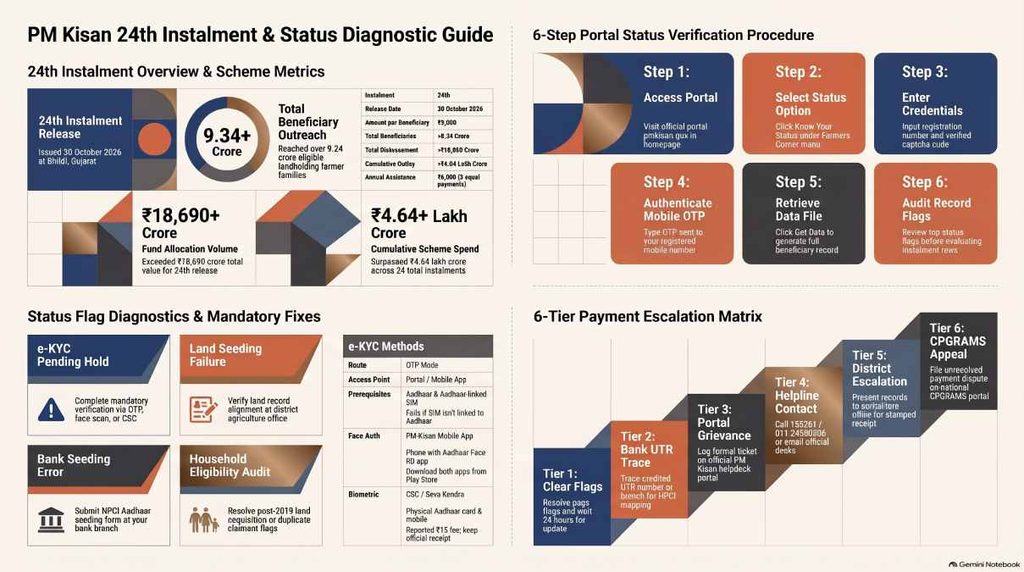
Checking PM Kisan status takes six steps. Open pmkisan.gov.in, the only official PM Kisan portal, and choose Know Your Status under Farmers Corner (some guides call it Beneficiary Status). Enter your registration number and captcha, press Get OTP, type the OTP sent to your registered mobile, then press Get Data and read the instalment rows.
The 24th instalment of ₹2,000 went out on 30 October 2026, yet some farmers still see no credit in their bank app, or a status page they cannot read. A PM Kisan payment not received usually traces to one of four causes: pending e-KYC, a bank account the payment system cannot find, land records that disagree with Aadhaar, or an eligibility flag.
Without a registration number, recover it through Aadhaar first; the steps sit under how to find your PM Kisan registration number. If the money is missing, skip to the fixes for a PM Kisan payment not received.
PM Kisan Status at a Glance
- Check status in six steps: open pmkisan.gov.in, go to Farmers Corner, choose Know Your Status, enter your registration number and captcha, press Get OTP, type the code, then press Get Data.
- The 24th instalment of ₹2,000 was released on 30 October 2026 to more than 9.34 crore farmers. No date is confirmed yet for the 25th.
- Without a registration number, recover it with your Aadhaar under Know Your Registration Number. Current steps show no mobile-number route.
- Read the flags before the instalment rows. A No against e-KYC, pending land seeding, failed Aadhaar or bank seeding and an eligibility note explain most holds.
- Complete e-KYC, which the portal marks mandatory. OTP e-KYC works on the portal and the app, face authentication runs in the PM-Kisan app, and biometric e-KYC at a CSC carries a reported ₹15 fee.
- If the page says paid but the passbook is empty, take the UTR and credited date to your bank and ask for a DBT credit trace. The payment may sit in the account mapped in the NPCI mapper.
- If the flags are clean and the row has not moved, file a portal grievance, call the helpline on 155261 or 011-24300606, visit the district agriculture office, then raise the case on CPGRAMS.
PM Kisan Samman Nidhi 24th Instalment: What Was Released and When
The government released the 24th instalment on 30 October 2026 at Banaskantha in Gujarat. The PIB release on the 24th instalment says over ₹18,690 crore reached more than 9.34 crore eligible farmers, with each account receiving ₹2,000. Equentis adds that Prime Minister Narendra Modi released it at Bhildi.
Release Date, Amount and Beneficiary Count
| Particulars | Details |
| Instalment | 24th |
| Release date | 30 October 2026 |
| Amount per beneficiary | ₹2,000 |
| Beneficiaries | More than 9.34 crore |
| Total amount | Over ₹18,690 crore |
| Disbursed so far | More than ₹4.64 lakh crore |
| Venue | Bhildi, Banaskantha, Gujarat |
| Annual assistance | ₹6,000 |
The Agriculture Ministry announced the schedule on 23 October, and the scheme’s official social media handle confirmed 30 October as the date, as Goodreturns reported. Equentis notes that the beneficiary count is slightly lower than the 9.44 crore of the 23rd instalment. That gap is a reason to read your own row instead of trusting the headline total.
What PM Kisan Samman Nidhi Pays and How
Pradhan Mantri Kisan Samman Nidhi (PM Kisan Samman Nidhi), also searched as Kisan Samman Nidhi, is a centrally sponsored scheme that PIB says was launched on 24 February 2019. It pays eligible landholding farmer families ₹6,000 a year in three equal instalments of ₹2,000, sent by Direct Benefit Transfer into Aadhaar-seeded bank accounts. The Ministry of Agriculture and Farmers Welfare runs it, and PIB calls it one of the largest DBT initiatives in the world.
The money involved is large. PIB puts cumulative disbursement above ₹4.64 lakh crore across 24 instalments, and the Union Budget 2026-27 allocates ₹60,000 crore. In July 2026 the Union Cabinet approved continuation from 2026-27 to 2030-31 with an outlay of ₹3.15 lakh crore, as PIB and BillCut record.
PIB attaches conditions to payment: land records seeded on the PM Kisan portal, plus a bank account linked to Aadhaar and completed e-KYC. Those conditions are the flags on your status page.
PIB describes the path a payment takes in stages.
- The farmer registers on the portal, through the mobile app or at a Common Service Centre.
- The state government verifies eligibility and uploads the beneficiary details.
- The system validates Aadhaar and bank account details and screens out ineligible applicants.
- After final state approval, the data goes to the Public Financial Management System (PFMS) for account verification.
- Eligible records generate fund transfer requests and payment orders, and the Department of Agriculture and Farmers Welfare issues sanction orders.
- Sponsor banks and the National Payments Corporation of India (NPCI) process the payments, and the money reaches the farmer’s bank account.
The last step shows in a passbook as a DBT credit labelled PM-KISAN-BNFT, per Bajaj Finance, and an SMS follows. BillCut, citing a PIB release, says payments have been Aadhaar-based since the 13th instalment. That is why a flag against Aadhaar or bank seeding stops a payment that every other field would let through.
Also Read: PMAY-G Apply Online 2026-27: How the Awaas+ Survey Works and How to Check Your Status
Earlier Instalments for Reference
The 22nd instalment came on 13 March 2026 and the 23rd on 20 June 2026, per the instalment history table from Bajaj Finance, so the 24th is the latest payment in the current run. Older rows on your status page belong to those earlier releases. Read the newest row for the 24th.
The gaps between releases are uneven:
| Instalment | Release date | Days since the previous one |
| 22nd | 13 March 2026 | n/a |
| 23rd | 20 June 2026 | 99 |
| 24th | 30 October 2026 | 132 |
The scheme pays three times a year, so one instalment lands roughly every four months. The 24th arrived 132 days after the 23rd, a little over that mark.
The longer gap says nothing about whether your own instalment is delayed. Only the row on your status page can do that.
How to Check PM Kisan Status Online on pmkisan.gov.in
The whole check takes about two minutes once the registration number is in hand. Each stage below ends with a note on what tends to go wrong.
What You Need Before You Start
You need the PM Kisan registration number and a phone that can receive an OTP, because the status page sends the code to the mobile number on your record. Anyone without the number should go to the recovery section first and come back.
Keep these within reach before you open the portal.
| What you need | What it does | If it is missing |
| Registration number | Opens the status page | Recover it through Aadhaar, as shown in the next section |
| Phone with the registered SIM | Receives the OTP | Raise the difference with the district agriculture office, which handles record faults |
| Aadhaar number | Recovers a lost registration number and starts OTP e-KYC | Find the card before you begin |
| Bank passbook or banking app | Shows the credited entry | Ask the branch for a statement |
| Notes app or a sheet of paper | Holds the registration number, UTR and credited date | Photograph the screen instead |
The table looks plain. Each row marks a point where the check can stall.
Step-by-Step: PM Kisan Know Your Status
The click path is the same on a phone browser and a computer.
- Open pmkisan.gov.in and find Farmers Corner on the homepage.
- Select Know Your Status.
- Enter your registration number and the captcha.
- Press Get OTP.
- Enter the OTP sent to your registered mobile number.
- Press Get Data.
Some guides call the second menu item Beneficiary Status, and Free Press Journal lists both labels for the same entry. Follow the label your homepage shows. Portal wording changes between releases, and the destination does not.
A rejected captcha is the usual first stall. Refresh the image and retype it. A wrong digit in the registration number returns no record at all, so paste the number from your notes instead of typing it from memory.
If the OTP never arrives, the mobile number on your record is probably not the SIM in your hand. A number changed after enrolment is the common cause, and it is a record problem. Refreshing the page will not fix it.
PIB says the state-built beneficiary database holds each farmer’s mobile number beside Aadhaar and bank details, so the correction runs through the state.
Three outcomes are possible when you press Get Data.
| What you see | What it means | Next move |
| No record found | The registration number has a typo | Retype it from your notes, or recover it through Aadhaar |
| A record with no payment shown for the 24th | The money has not been released to you yet | Read the flags on the page, starting with e-KYC |
| A record with the 24th instalment, a UTR and a credited date | The system shows the money as paid | Look for PM-KISAN-BNFT in the passbook |
If the page opens and shows rows, move on to reading the status page.
Check PM Kisan Beneficiary Status on the Mobile App or Kisan eMitra
The PM-Kisan mobile app and the Kisan eMitra chatbot also display beneficiary status, and the official homepage points farmers to the Kisan eMitra chatbot for help. Bajaj Finance names the app PMKISAN GoI and lists it on Google Play. Install it only from the Play Store, and use the same registration number or Aadhaar details you would type on the portal.
The app matters for one more reason: face authentication runs through it, so farmers who need that e-KYC route will install it anyway.
PIB says the app launched in 2020 and lets farmers self-register, track the status of benefit transfers and complete e-KYC.
Kisan eMitra is the AI chatbot the government introduced in September 2023, built with technical help from the EkStep Foundation and BHASHINI. It answers questions on payments, registrations and eligibility, by voice or text, at any hour.
It works in 11 languages: Hindi, English, Tamil, Bengali, Odia, Malayalam, Gujarati, Punjabi, Telugu, Marathi and Kannada. A farmer who finds the English status page hard to read can put the same questions to the chatbot in their own language.
Also Read: Dearness Allowance Hike July 2026: Cabinet Approves DA Increase to 63%
How to Find Your PM Kisan Registration Number
The number opens the status page, and the portal can return it from your Aadhaar. Two routes exist on paper; one works today.
Recover the ID With Your Aadhaar Number
ClearTax lists the steps for the Aadhaar route.
- On pmkisan.gov.in, open Farmers Corner and choose Know Your Status.
- Select Know Your Registration Number.
- Choose the Aadhaar Number option.
- Enter your Aadhaar number and the captcha.
- Press Get Mobile OTP and enter the code sent to the mobile linked to your record.
- Note the registration number that appears on screen.
If the OTP does not arrive at this step, the mobile number on the record is the problem, and the district agriculture office is the place to raise it. Write the number down before you leave the page. Then go back to Know Your Status, enter it with a fresh captcha, and follow the status steps above.
Recover the ID With Your Registered Mobile Number
Some older guides describe a mobile-number search on the same recovery page. The current steps published by ClearTax list Aadhaar as the recovery option and show no mobile-number field. If the page you open offers only Aadhaar, use Aadhaar.
Treat a mobile-number route as unavailable unless it appears on your own screen.
How to Read Your PM Kisan Beneficiary Status Page
After Get Data, the page shows one record and a table of instalments. Read it from the top, because the flags near the top usually explain the rows below them. Free Press Journal says the screen carries these fields:
- Eligibility
- e-KYC status
- Payment details for each instalment
- Land seeding status, which Goodreturns tells farmers to read before a release
- Aadhaar seeding, which BillCut says the same page reports
Order matters.
A No against e-KYC explains a held payment before you look at a single instalment row, and a pending land seeding flag points to a different office altogether. Spend the first minute on the flags and the second on the table. Starting with the table can send you into a panic over a blank 24th row when the cause sits two lines higher.
The Instalment Table, Bank Name, UTR and Credited Date
The page lists each instalment with the bank name, the UTR number, the credited date and the e-KYC status. The UTR is the transaction reference. It is the number a bank branch needs to trace a credit, so copy it exactly.
Bajaj Finance adds two details. The payment history shows the date and amount of each instalment credited, and the money appears in a passbook as a DBT credit from PM-KISAN-BNFT.
An SMS also reaches the registered mobile when the ₹2,000 lands. If the SMS and the passbook entry are both absent, the row on the status page is your evidence.
Screenshot the row for the 24th instalment. A saved image of the UTR and credited date spares you a second lookup at a bank counter.
Also Read: Viksit Bharat 2047: Analyzing the Strategic Policy Roadmap for a $30 Trillion Economy
e-KYC, Land Seeding and Bank Seeding Flags
The yes/no flags explain most holds.
Goodreturns tells farmers to clear e-KYC and land seeding, and to confirm the bank details are Aadhaar-linked, before a release. BillCut gives the same checks. Here is where each one leads.
| Flag on the page | What it means | Fix |
| e-KYC shows No | Aadhaar-based verification is pending | OTP, face or CSC e-KYC |
| Land seeding pending | The land record has not been verified against the scheme | Land record route |
| Aadhaar or bank seeding failed | The bank account cannot take the DBT credit | Seeding and NPCI route |
| Eligibility flag or withheld note | The record is under verification | Eligibility route |
After you finish e-KYC, BillCut notes that the official note says the updated status appears in your beneficiary status after 24 hours. Recheck the page the next day before you assume the fix failed.
Payment Status Messages and What to Do About Each
The status page names the stage a payment has reached, which is how you tell a delayed instalment from a failed one. The wording belongs to the portal, which edits it from time to time, so read the line beside the 24th instalment and place it in one of the situations below. RFT and FTO are the scheme’s own abbreviations: a request for fund transfer (RFT) is generated from eligible records, and a fund transfer order (FTO) is the payment order that follows.
| Stage | What it means | What to do |
| Waiting at the state stage | State officials have not approved the batch containing your record | Nothing to file yet. Recheck over the next few days. |
| RFT stage | The fund transfer request exists, and the payment order has not followed yet | Wait. If the row has not moved by the end of the release week, call the helpline. |
| FTO stage | The payment order exists and the sponsor bank and NPCI are still processing it | Wait for the SMS and look for PM-KISAN-BNFT in the passbook. |
| Credited, with UTR and date | The money has left the system | Check the passbook. If it is missing, use the bank trace below. |
| Failed | The transfer bounced | Check the e-KYC and seeding flags, then fix whichever shows No. |
Use the table as a guide to stages. The exact line on your screen can differ from one release to the next.
Status Shows Paid but the Money Is Missing
This is the commonest complaint after a release day, and the bank is the first office to visit, not a government desk. Take the UTR and the credited date to the branch and ask for a DBT credit trace on that reference. A trace tells you which account received the money.
Bajaj Finance explains why the answer can surprise you: the payment goes to the account mapped in the NPCI mapper, which need not be the account you check every week. A farmer with two accounts can miss the credit because an old savings account at a different bank holds it.
Ask the branch to check the mapper entry against your Aadhaar. File a government complaint only after the bank trace comes back empty.
Carry a short list of questions to the branch:
- Which account holds the credit for this UTR?
- Which account does the NPCI mapper show against my Aadhaar?
- When did that mapping last change?
- Can I have the answer in writing?
A written reply is what you attach to any later complaint.
PM Kisan e-KYC Rules for the 24th Instalment and After
The portal itself marks e-KYC as mandatory, with OTP e-KYC on the portal and biometric e-KYC at a nearby CSC, as the official homepage notice states. Equentis and Free Press Journal repeat the rule for the 24th instalment. PIB lists the same three modes, OTP, biometric and face authentication, and calls Aadhaar-based authentication a key pillar of the system.
Pick the route that fits the phone and the SIM you hold.
| Route | Where it happens | What you need | The catch |
| OTP | Portal or PM-Kisan app | Aadhaar number and the phone linked to Aadhaar | Fails when the SIM is not linked to Aadhaar |
| Face authentication | PM-Kisan app with the Aadhaar Face RD app | A phone that runs both apps, plus consent on screen | Both apps must come from the Play Store |
| Biometric | Common Service Centre or State Seva Kendra | Aadhaar card and the linked mobile | A ₹15 fee reported by BillCut; keep the receipt |
Start with OTP when the Aadhaar-linked SIM is in your hand. Face authentication suits a farmer whose phone runs both apps but whose SIM is not linked. The centre is the answer when neither opens.
OTP-Based e-KYC on the Portal or App
Free Press Journal says OTP e-KYC runs on both the portal and the mobile app. The portal steps come from ClearTax’s e-KYC walkthrough.
- Open pmkisan.gov.in and choose the e-KYC option under Farmers Corner.
- Enter your 12-digit Aadhaar number and press Search.
- Wait for the OTP sent to the mobile number linked to your Aadhaar.
- Enter the OTP and press Submit.
A SIM that is not linked to Aadhaar blocks this route, because the code goes to the Aadhaar-linked number. Anyone in that position should use face authentication or a CSC instead. Give the status page a day to refresh before you recheck.
Face Authentication in the PM-KISAN App
Face authentication runs through the app on your own phone. PIB says the app gained the feature in 2023, so a farmer can finish e-KYC with a face scan and no OTP or fingerprint. Free Press Journal gives the sequence.
- Install the PM-Kisan app and the Aadhaar Face RD app.
- Log in with the registered mobile number.
- Open the beneficiary status page.
- Choose e-KYC if the status reads No.
- Enter your Aadhaar number and give consent.
- Complete the face scan.
Install both apps from the Play Store only, and stop if any screen asks for a PIN or card number.
Biometric e-KYC at a Common Service Centre
The fallback for farmers with no OTP access is a Common Service Centre or State Seva Kendra, where an operator takes a fingerprint. Carry your Aadhaar card and the mobile linked to it.
BillCut reports a ₹15 convenience fee in the official note on e-KYC modes. Pay it only against a receipt, and keep the receipt until the status page flips to Yes.
PM Kisan Payment Not Received: Why the 24th Instalment May Be Missing
Each cause below has its own fix, and the fixes sit with different offices. Work out which flag is off before you call anyone.
| What the status page shows | Likely cause | Who fixes it |
| e-KYC: No | Verification is pending | You, by OTP, face scan or CSC visit |
| Land seeding pending | The land record is disputed or unverified | State agriculture or revenue office |
| Aadhaar or bank seeding failed | The account is unmapped, de-seeded or closed | Your bank branch |
| Registration asks for a Farmer ID | A state rule for new registrations | CSC or agriculture office |
| Eligibility withheld, or physical verification noted | Land acquired after 1 February 2019, or more than one claimant in the household | District agriculture office |
| Every flag clear and no payment | The payment is still at a processing stage | Nobody yet; wait and recheck |
Only e-KYC sits fully in your own hands. Everything else needs a bank clerk or an officer, so the sooner you name the cause, the sooner the right desk gets your paperwork.
Pending e-KYC
An unfinished e-KYC holds the payment even when every other field is clean. Finish it by OTP, face scan or CSC, and then read the e-KYC rules above for the steps.
Aadhaar-Bank Seeding and NPCI Mapping Failures
The transfer can only go to an Aadhaar-seeded bank account that is open to DBT credits. That condition fails after a bank change, and it fails when the account was never mapped. BillCut, citing a PIB release on Aadhaar seeding, says payments have been Aadhaar-based since the 13th instalment.
Failures follow when the bank de-seeds an Aadhaar from the NPCI mapper or when Aadhaar was never mapped to the account. A closed account fails the same way.
The fix sits at the bank. Bajaj Finance advises filling the DBT or NPCI Aadhaar seeding form at the branch.
- Go to the branch that holds the account.
- Fill the DBT or NPCI Aadhaar seeding form.
- Ask the staff to link your Aadhaar to the account for DBT credits and to confirm the mapper entry in writing.
- If the account is shut, open a new one and update the bank details on the PM Kisan portal.
Land Record Verification Failures
Land seeding means the state has checked your land record against the scheme. It fails when the name on the land record differs from the name on Aadhaar or when the record is disputed. It also fails when the state data never reached the portal.
Spelling variants and a swapped order of names cause most of the damage.
The fix runs through the state, not the Centre. Goodreturns tells farmers whose land seeding is pending to contact the relevant agriculture department or service centre, and BillCut points to the block or district agriculture office.
The central helpline cannot edit a state land record. Ask the office to correct the record at the source, such as the state land record portals commonly called Bhulekh, and to push the corrected entry to PM Kisan.
Bring the Aadhaar card and the land record extract, and point to the field that differs. An officer who sees both documents side by side can say quickly whether the fix is a spelling edit at the land office or a name update on the Aadhaar side. Ask which one applies before you leave, because they sit with two different offices.
Farmer ID Requirement in Some States
Bajaj Finance describes a Unique Farmer ID, also called a Farmer Registry ID, issued under the AgriStack initiative. The page says the ID is mandatory for new registrations in 14 states as of 2026 and expected to extend nationally.
If your state falls in that group, apply at a CSC or the agriculture office with your Aadhaar and land records, and carry the bank passbook in case the officer asks. Ask the district agriculture office whether your state applies the rule to existing beneficiaries, because the answer is a state decision.
Eligibility Flags: Land Transfers and Multiple Claimants in One Household
Some farmers are unpaid through no fault of their own. The official homepage notice names two suspected cases: farmers who acquired land ownership after 1 February 2019, and households where more than one member draws the benefit, such as husband and wife or an adult and a minor.
The scheme withholds benefits for such cases until physical verification is done. Ask the district agriculture office whether a verification visit is pending for your record and which officer holds the file.
A status refresh cannot fix either case. The PIB note on eligibility criteria sets the rules, and Equentis lists the exclusion categories:
- Institutional landholders
- Holders of constitutional posts
- Serving or retired government employees, with specified exceptions
- Income tax payers
- Professionals such as doctors, engineers, lawyers and chartered accountants
A family that has crossed one of those lines should not keep waiting. Bajaj Finance describes a Give Up option on the portal for families that have become ineligible, and the district agriculture office can say whether it fits your case.
The exclusions carry a cost. PIB says States and Union Territories run recovery proceedings against benefits paid to ineligible people, among them income tax payers, government employees, public sector undertaking personnel and holders of constitutional posts. Recoveries nationwide stood at ₹416.75 crore as of December 2025.
A household that knows it falls in one of those groups gains nothing by waiting, and may face recovery of money already received.
What to Do If Your 24th Instalment Is Missing
Move from the cheapest step to the slowest. First clear every flag on the status page. Then take the UTR to the bank if the page says paid.
After that, file a grievance on the portal, call the helpline, write to the right desk, and finally visit the district agriculture office. Keep your registration number and Aadhaar number within reach, along with the UTR if the page shows one.
Each step has its own trigger.
| Step | Action | Move on when |
| 1 | Clear every flag on the status page | The flags read Yes, and 24 hours have passed since the last fix |
| 2 | Trace the UTR at your bank | The page says paid and the passbook shows nothing |
| 3 | File a grievance on the portal | The flags are clean and the row has not moved |
| 4 | Call 155261 or 011-24300606, or write to the right desk | The grievance sits without a reply |
| 5 | Visit the district or block agriculture office | The fault lies in a land or eligibility record |
| 6 | Raise the case on CPGRAMS | The portal complaint stalls |
Raise a Grievance on the PM Kisan Portal
A written complaint creates a record, and that record is what the office works from. BillCut notes that farmers can raise unresolved cases as a grievance on the PM Kisan portal or on CPGRAMS. PIB confirms both channels and records 24,605 grievances on the portal during FY 2024-25.
Open pmkisan.gov.in, find the grievance or helpdesk option, and describe the problem in a few lines. Use these fields:
- Registration number
- Instalment: 24th, released 30 October 2026
- The exact line shown beside the 24th row
- The state of the e-KYC flag
- Bank name and UTR, if shown
- A one-line request to verify the record and release the pending ₹2,000
Write down any reference number the page gives you, since it is the thread you will pull on later.
PM Kisan Helpline Number: Call or Email the Right Desk
The official homepage prints the helpline as 155261 and 011-24300606, and BillCut notes that a PIB release lists 155261 as a 24-hour IVRS line for beneficiary status. The toll-free number is 1800-115-526.
State the problem in one sentence at the start of the call: the 24th instalment shows no credit although the e-KYC flag reads Yes. A caller who opens with the registration number and a clear fault gets a shorter conversation than one who starts with the whole story. Ask for a complaint number before you hang up and write it beside the date.
Email goes to two desks.
Write to pmkisan-ict@gov.in for portal errors and e-KYC problems. Write to pmkisan-funds@gov.in for payment failures. Mixing them up costs days, so put the registration number and the instalment number in the subject line.
Escalate to the District Agriculture Office
The district or block agriculture office is the right stop for land record and eligibility faults, which no central desk can edit. Carry your Aadhaar and the land record, plus a printout of the status page, and ask the officer to record the fault against your registration number.
If the portal complaint stalls, CPGRAMS is the next step. It is the central government’s public grievance system, and BillCut names it as the route after a portal grievance.
Ask the officer for a written acknowledgement with the date and your registration number on it. A stamped copy turns a verbal promise into a record, and it lets you cite the visit if you later move to CPGRAMS. The district officer also sits inside a monitored chain: PIB says State and District Monitoring Committees oversee implementation in their areas, with a national review chaired by the Cabinet Secretary above them.
PM Kisan Beneficiary List 2026-27
The list and the status page answer different questions. The beneficiary list says whether your name is enrolled in your village. The status page says what was paid.
A farmer can be on the list and unpaid, or paid and absent from a printout, so read both. PIB says the lists of eligible beneficiaries are displayed publicly at village level, and that a farmer left out by mistake can seek inclusion through the grievance mechanisms.
Find Your Name Through the State-to-Village Drill-Down
Bajaj Finance gives the click path.
- Open pmkisan.gov.in and choose Beneficiary List in Farmers Corner.
- Select your state.
- Select your district.
- Select your sub-district.
- Select your block.
- Select your village.
- Press Get Report.
The report returns the village list with registration numbers and payment status. Use the labels on the live portal if they differ from these.
The village report doubles as a second way to recover a lost registration number, because Bajaj Finance says it returns registration numbers alongside payment status. Find your name, copy the number and take it to Know Your Status. The route is slower than the Aadhaar one, and it is a fallback when Aadhaar recovery fails.
Read your name as the list spells it. A spelling that differs from your Aadhaar is worth a photograph, since land seeding failures often start with a name difference.
If Your Name Is Missing From the PM Kisan Beneficiary List
A missing name usually points to an enrolment that never completed approval, or to a record the state has flagged. Start with the grievance route above and give the registration number if you have one.
Then visit the local agriculture office with your Aadhaar and land record, plus the bank passbook. Do not file a second registration without asking the office first, because a duplicate claim inside one family is one of the flagged cases and can freeze both records.
PM Kisan Status FAQs
Open pmkisan.gov.in, choose Know Your Status under Farmers Corner, enter your registration number and captcha, press Get OTP, type the code, then press Get Data. Read the flags above the instalment rows first, as the status page section explains.
Only Aadhaar works today. Choose Know Your Registration Number, pick the Aadhaar option, enter the number and captcha, and press Get Mobile OTP. Mobile-number searches appear in older guides but not in the current steps. The recovery section has the full path.
Yes to both. The portal notice on the homepage calls e-KYC mandatory, and OTP e-KYC runs on the portal and in the PM-Kisan app. Without a phone linked to Aadhaar, use face authentication in the app or a CSC. The e-KYC section lists the routes.
Open Know Your Status and read the flags and the payment status first, then fix whichever one shows No and check again after 24 hours. Clear flags with no payment mean the instalment is delayed at a processing stage, so wait and recheck. If the page says paid but your passbook shows nothing, take the UTR to your bank. The escalation table lists the next routes in order.
A missing name usually points to an enrolment that never completed approval, or to a record the state has flagged. File a grievance, then visit the local agriculture office with your Aadhaar, land record and bank passbook. Do not file a second registration without asking first, because a duplicate claim in one family can freeze both records. The beneficiary list section has the village drill-down.
The official homepage prints 155261 and 011-24300606, and the toll-free number is 1800-115-526. Portal and e-KYC errors go to pmkisan-ict@gov.in, while payment failures go to pmkisan-funds@gov.in. The helpline section explains what to say on the call.
The government had not confirmed a 25th instalment date as of 30 October 2026, according to Equentis. Bajaj Finance places the 24th in the August to November period, so the four-month pattern points to a December to March window for the next one, but a pattern is not a promise.
Use only pmkisan.gov.in, the official app from the Play Store or a CSC, and treat WhatsApp or SMS links and APK files promising an e-KYC update as fraud, as BillCut warns. Genuine help comes from the contacts in the helpline section, and an official e-KYC method never asks for a bank PIN or card details.
Disclaimer
India Policy Hub is an independent publication. It is not affiliated with or endorsed by the Government of India, the Ministry of Agriculture and Farmers Welfare, the PM-Kisan portal, the Press Information Bureau, NPCI or any bank. This post offers general information on the Pradhan Mantri Kisan Samman Nidhi scheme as of 30 October 2026. It does not constitute legal, financial or professional advice. Scheme rules, portal wording, helpline numbers, fees and instalment dates change without notice, and the official portal at pmkisan.gov.in prevails over this post. Readers should verify every detail with the official portal, the district agriculture office or a qualified adviser before acting. India Policy Hub does not guarantee that any farmer will qualify for or receive any instalment. To the fullest extent permitted by law, India Policy Hub and its authors accept no liability for any loss or damage arising from reliance on this post or from third-party links.



Leave a Reply