
Patta Chitta Online in Tamil Nadu: How to View, Download and Verify Land Records (2026)
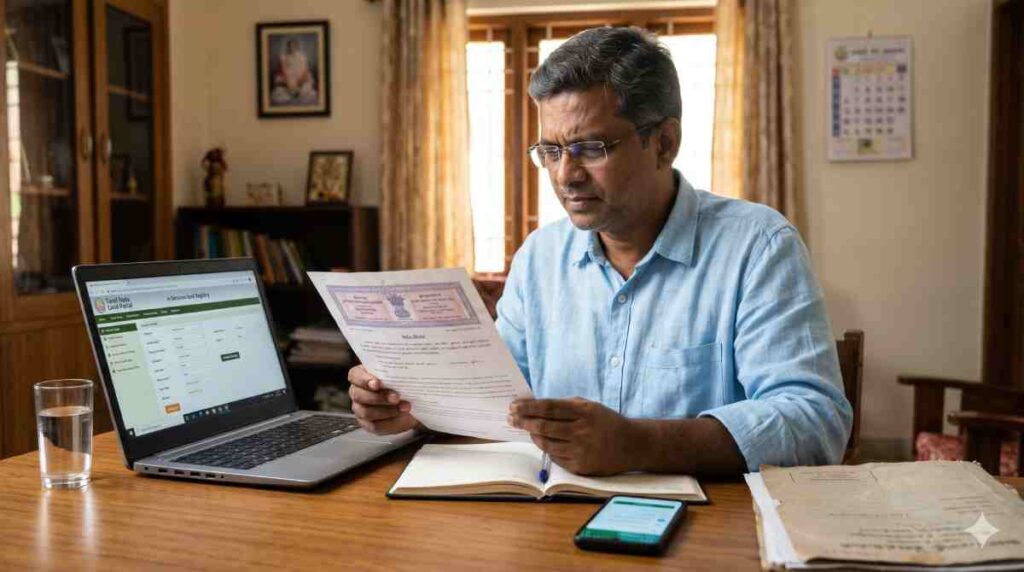
A seller hands over a photocopied patta. The survey number looks right, the name looks right, and the buyer has no quick way to tell whether the paper is current. To view Patta Chitta online in Tamil Nadu, open the e-Services portal at eservices.tn.gov.in, pick your district, taluk and village, enter the survey number and sub-division number, and confirm with a mobile OTP. The Tamil Nilam citizen portal at tamilnilam.tn.gov.in has a different job: patta transfers are filed and tracked there. Knowing which site to open first saves a wasted afternoon.
The steps below take in a fresh Patta Chitta extract, the FMB sketch, the TSLR extract and the new Integrated Land Record. They end with the check buyers care about most: setting a seller’s copy against the portal before any money changes hands. Have the survey number ready and your phone nearby.
Patta Chitta Online in Tamil Nadu at a Glance
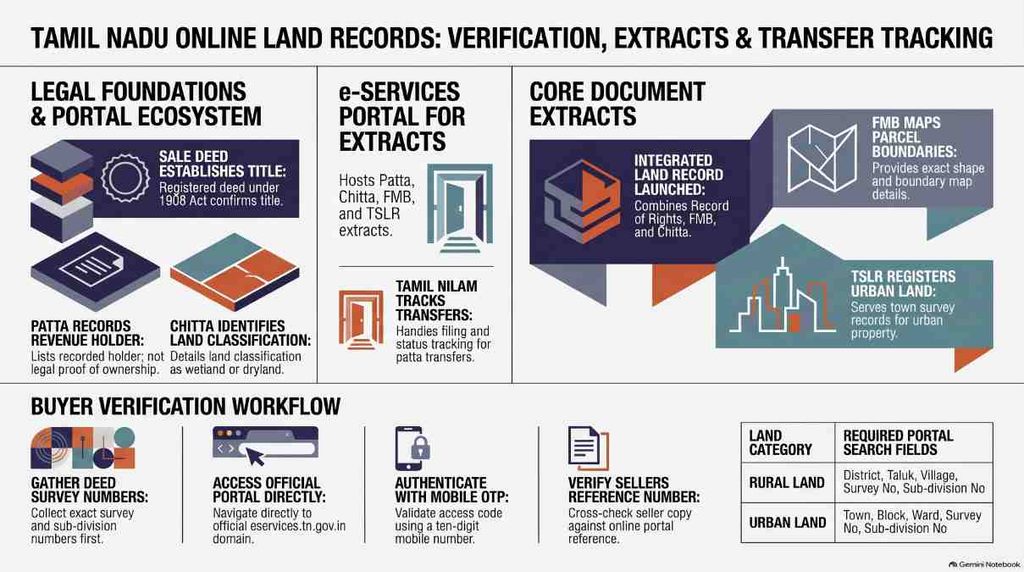
- To view a Patta Chitta extract, open the e-Services portal (eservices.tn.gov.in), pick your district, taluk and village, enter the survey number and sub-division number, and confirm with a mobile OTP.
- Patta transfers are filed and tracked on a different site, the Tamil Nilam citizen portal (tamilnilam.tn.gov.in).
- Patta Chitta is one extract. The patta names the holder, and the chitta describes the land. It is a revenue record and not conclusive proof of title, which sits in the registered sale deed.
- The Integrated Land Record (ILR), launched on 4 March 2026, combines the Record of Rights, the FMB and the Chitta. The rollout is gradual, so a blank result means the ILR has not reached your village.
- Pull the FMB sketch for the boundary map of a parcel and the TSLR extract for land inside a town.
- Before you pay for land, pull your own fresh extract and check the seller’s copy with the reference number verification service. The History of Patta Transfer service lists online transfers on private land from 2016 onwards.
What Are Patta and Chitta in Tamil Nadu?
Patta Chitta is the single extract the e-Services portal now issues for a parcel of land. It joins two records that were once kept apart. The difference between patta and chitta is easy to state: the patta names the holder, and the chitta describes the land. Search by survey number and both arrive on one page.
The portal’s help page lists chitta, A-Register, TSLR and FMB among the records it serves, and the Commissioner of Land Administration’s patta transfer page puts the state’s land records on the computerised Tamil Nilam system. If you are holding a survey number, none of that changes much. You run one search and get one extract.
| Field on the extract | Old record it comes from | What to read it for |
| Holder name and patta number | Patta | Who the revenue records list as the holder |
| Survey and sub-division number | Patta | Which parcel the entry covers |
| Land classification, dry or wet | Chitta | How the land is recorded |
| Extent | Patta and chitta | The area the record gives for the parcel |
The portal also serves the A-Register, and the verification service covered later in this post names it alongside Patta and Chitta. If all you want is to view a parcel, skip it. If you are checking a seller’s paper, you will meet the term on the portal, and it belongs to the same set of revenue records.
Also Read: Viksit Bharat 2047: Analyzing the Strategic Policy Roadmap for a $30 Trillion Economy
What a Patta Records and Whether It Is Proof of Ownership
A patta is the revenue record that lists who holds a parcel of land. It ties the holder’s name to a survey number and a sub-division number, and it states the extent.
The fields you will meet on the document:
- Holder name
- Patta number
- Survey number and sub-division number
- Extent of the land
The person named on a patta is the patta holder. That name is whoever the revenue office has recorded for the parcel, and it can differ from the person who farms or lives on the land, and from a buyer who holds a registered deed but has not yet had the patta changed. A transfer application exists to close that gap.
A patta cannot settle ownership. It is a revenue record, not conclusive proof of title, and title sits in the registered sale deed. The Registration Act, 1908 explains why. Section 17(1) requires registration of instruments that create rights in immovable property worth Rs 100 and upwards, and section 49 says an unregistered document that needed registration cannot affect that property, with narrow exceptions.
The Madras High Court has said the same in plain terms. In Jeyaraj v. Dasarathan, decided on 11 September 2024, the court treated a patta, tax receipts and adangal extracts as documents that back a claim without establishing title. In Velammal v. Rajammal, decided on 6 November 2008, it held that a patta alone cannot confer ownership.
The Supreme Court restated the principle in May 2026, in a judgment on Telangana land reported by LiveLaw. That ruling comes from another state, so it sets out a general principle, not a Tamil Nadu holding.
So a patta alone does not establish title. It tells a buyer whose name the revenue office carries for the parcel. The registered deeds tell the buyer whether that name belongs there. Read both.
What Chitta Records: Nanjai and Punjai Classification
Two classification terms turn up on almost every chitta entry. In common Tamil usage, nanjai means wetland and punjai means dryland. The portal’s help page says the chitta notes whether land is dry or wet, so the extract you open carries that land classification beside the extent.
Because the merged extract puts classification and extent on the same page as the holder’s name, there is no separate chitta document to chase. If a seller describes a plot as dryland and the extract lists it as wet, ask for the reason before going any further.
Read the land classification line slowly. Chitta entries carry the recorded classification of the land, so a parcel sold for crops or for building should carry a classification that fits the sale. The portal does not interpret the entry for you. It prints what the revenue records hold, and any difference between that and the seller’s story is a question for the seller and, if the answer stays vague, for the village administrative office.
The Integrated Land Record (ILR) Launched in March 2026
The Integrated Land Record, or ILR, is one digitised document that combines the Record of Rights, the FMB and the Chitta. The then Revenue Minister K.K.S.S.R. Ramachandran launched it on 4 March 2026, alongside a History of Patta Transfer service, according to the NIC Tamil Nadu announcement and the Revenue Department’s launch note.
The press release text adds more. The launch took place at the Directorate of Survey and Settlement in Chennai. The record rests on G.O. (Ms) No. 613 of 1 October 2021 and was validated by the National e-Governance Division. You search it by district, taluk, village, survey number and sub-division number.
A change of government followed in May 2026. An ANI report names K.A. Sengottaiyan as the minister assigned Revenue and Disaster Management, so the minister named in the launch coverage no longer holds that portfolio.
The rollout is gradual. Records may be missing where digitisation is incomplete, so some villages may return no record yet. A blank result for your village means the ILR has not reached it, and the ordinary Patta Chitta extract remains the document to pull for that parcel.
Open the Patta Chitta extract first, because the ILR may not have reached the village. Try the ILR next.
If it returns a record, read it as a second opinion on the same parcel, since it gathers the Record of Rights, the FMB and the Chitta in one place. If the two documents disagree on the holder name or the extent, stop there and ask the seller to explain before the conversation moves to price.
Also Read: PM Kisan Status 2026-27: How to Check Your 24th Instalment Online
What You Need Before You View Patta Chitta Online
Two numbers come from the land papers and one from your pocket: the survey number, the sub-division number and a working mobile number. Have them to hand before you open the portal. The portal’s about page names survey and sub-division number, patta number, owner name and Application ID as the details its services work with, and for a Patta Chitta search by survey number, the survey and sub-division number do most of the work.
Set these out before you start:
- The sale deed or an earlier patta, open to the page that carries the survey number
- The survey number and sub-division number, written down exactly as printed
- The village and taluk names as the deed spells them, plus the town, block and ward if the land is urban
- A phone with signal and enough battery for a code to arrive
- A stable internet connection, ideally on a screen larger than a phone
Survey Number and Sub-Division Number
Rural and urban searches ask for different fields. A rural search uses district, taluk, village, survey number and sub-division number. An urban search also asks for the town, block and ward, as the national services directory entry lists them.
| Land type | Fields the search asks for |
| Rural | District, taluk, village, survey number, sub-division number |
| Urban | Town, block, ward, survey number, sub-division number |
You will find these numbers on the sale deed or on an earlier patta. A typical entry reads like 123/4A, where 123 is the survey number and 4A is the sub-division. Copy the numbers exactly as the deed prints them. One missed letter sends you to a neighbouring parcel, and the portal will happily show you that parcel’s owner.
A Working 10-Digit Mobile Number for OTP
The view services ask for a 10-digit mobile number and a one-time password. Use your own number, make sure the phone is switched on with signal, and keep it beside the screen. The code goes to that number, and you need it on the very next step.
How to View Patta Chitta Online in Tamil Nadu: Step by Step
The view runs through five screens on the e-Services portal, and each step below maps to one of them. Option names sit in quotation marks as the portal words them. If a label on your screen reads a little differently, pick the closest one.
Step 1: Open the Official e-Services Portal and Choose the Service
Type eservices.tn.gov.in into the address bar. The portal’s index page opens with the land record services and a set of notices. Choose the option named “View Patta & FMB / Chitta / TSLR Extract”, the label the government services directory uses.
Some listings shorten it to “View Patta / Chitta”, and the portal’s own text calls the sketch a “Field Measurement Sketch (FMS)”. Pick the entry that names the Patta extract.
Look-alike sites exist, and they copy the look and wording of the official page. Only a tn.gov.in address is official. Type the domain yourself instead of tapping a search result, bookmark the correct address once you are on it, and open the portal from the bookmark next time. Never enter your number on a page whose address ends anywhere else.
A notice on the index page deals with Unicode Tamil text and the browser’s Translate option. Read it before you translate the page.
Step 2: Select Rural or Urban Land
The next screen asks for the land category, and the choice decides which fields follow. A deed that cites a village points to “Rural”. A deed that cites a town block and ward points to “Urban”.
| Choice | Pick it for | Fields on the next screen |
| Rural | Village land | District, taluk, village, survey number, sub-division number |
| Urban | Land inside a town or city | Town, block, ward, survey number, sub-division number |
| Natham, if offered | Village house sites | Follow the fields the screen shows |
Official pages name only the two main categories. A natham option, meant for the village house-site area, may also appear on your screen. If it does and your parcel is a house site inside the village settlement, pick it.
A wrong category announces itself on the next screen. If you chose Rural and the deed talks about a town block and ward, the fields will not fit the paper in your hand. Go back one screen and switch to Urban.
Step 3: Enter District, Taluk, Village and Survey Number
Work through the dropdowns in the order they appear: district first, then taluk, then village. The lists narrow as you go, so a wrong taluk hands you the wrong list of villages. In an urban search the same position holds the town, block and ward.
After the location dropdowns, type the survey number and then the sub-division number into the fields that follow. If the deed reads 123/4A, then 123 goes in the survey field and 4A in the sub-division field. Check the village spelling against the deed before you move on.
Two slips are easy to make: a sub-division typed into the survey field, and a village picked from another taluk’s list. Fix those before you blame the portal.
Step 4: Verify With the Mobile OTP
Enter your 10-digit mobile number and request the OTP. The code goes to that phone, so type it into the OTP field and submit.
If the code does not arrive, you stay on the verification screen and no extract opens. Check the number for a typo, confirm the phone has signal, wait a minute and request the code again. When repeated requests fail, close the tab, reopen the portal from the address you typed yourself and start again from Step 2.
Do not share the code with anyone, including a person who offers to run the search for you. The code is meant for the screen in front of you and nothing else.
Step 5: View, Download and Print the Patta Chitta Extract
The extract opens on screen. Look for the print and download options on that page: download keeps a file, print gives you paper. Before you do either, read four fields in this order.
| Field | Read it against |
| Holder name | The seller’s name on the deed and the seller’s ID |
| Survey and sub-division number | The numbers printed on the sale deed |
| Extent | The area the deed gives for the parcel |
| Land classification | The way the seller describes the land |
Save the file under a name that carries the survey number and the date. A web-issued copy is also the kind of document the portal’s verification service checks, and the buyer’s section below covers that step.
Print and download serve different readers. The printout goes to a lawyer or a bank officer who wants paper. The file stays with you, and the date in its name records when you looked.
Run the search again a week later and save the second extract beside the first. A change between the two is the cheapest warning you will ever get about a parcel in motion.
Spelling deserves a slow read. Tamil names written in English vary: initials come before or after the name, a father’s name may sit in the same field, and a letter can change between the deed and the extract. A small spelling variation in the holder name is a reason to ask, not a reason to panic. A different person’s name is another matter entirely, and so is a different survey number.
How to Download the Integrated Land Record (ILR) in Tamil Nadu
The ILR has its own search on the e-Services portal, separate from the Patta Chitta route above. It folds the Record of Rights, the FMB and the Chitta into one document, so a successful search saves you three lookups.
- Open the e-Services portal from the address you typed yourself.
- On the home page, choose the “Integrated Land Records” option.
- Work down the dropdowns from district to village.
- Enter the survey number and the sub-division number, then submit. Answer any verification prompt the screen shows before the record opens.
The launch announcement and the press release text describe the same entry fields: district, taluk, village, survey number and sub-division number. Read the document top to bottom once it opens, then check the holder name and extent against the deed, exactly as you would on a Patta Chitta extract.
Sometimes no record appears. That is no sign of a problem with your parcel: the rollout is gradual, and a village whose digitisation is incomplete may return nothing yet. Work through these in order:
- Check the survey and sub-division numbers against the sale deed, one character at a time.
- Try the search again after a few minutes, in case the page timed out.
- Pull the ordinary Patta Chitta extract and the FMB sketch for the same parcel, since between them they cover the same ground.
- Ask the village administrative office or the taluk office whether your village has been digitised for the ILR.
- Note the date of the failed search and try again later, since the rollout is gradual.
A blank ILR result does not stall a purchase, but it shifts the weight. Where the combined record is missing, lean harder on the ordinary extract, the FMB sketch and the registered deeds.
How to Check Your Patta Transfer Application Status on Tamil Nilam
Patta transfers and status checks run on the Tamil Nilam portal, which is a different site from the one used for viewing records. The viewing portal at eservices.tn.gov.in is the wrong place to chase a pending name change. The address to use is tamilnilam.tn.gov.in.
The portal’s landing text says any citizen can apply, and it names two application types: Not Involving Sub Division and Involving Sub Division. You need a registered deed plus ID and residence proof to apply.
The type matters for timing. DT Next reported in June 2025 a target of 15 days for petitions without sub-division and 30 days for those with it, and it also said all applications must be processed within 30 days. Treat those as reported targets.
The Commissioner of Land Administration’s patta transfer page says the Online Patta Transfer System came in under G.O.Ms. No. 303 dated 27.12.2016 and superseded the 2011 procedure. The page gives no fresh timelines.
The type follows the land. An application not involving sub-division concerns a whole survey number. One involving sub-division arises when only part of a survey number changes hands, which is common with plots carved out of a larger field. Filing under the wrong type can slow the file, so read the options on the portal against the sale deed before you submit.
Where to Find Your Application ID
The application ID is the number you receive when you apply, and you get it whether you filed online on Tamil Nilam or at a CSC or e-Sevai centre. The portal’s index page carries a notice that lists Rs 60 for filing at a CSC, so confirm the current fee at the counter. The portal’s about page names the Application ID as one of the details its services work with.
Keep the acknowledgement. It is the one paper that lets you track the file, and a copy photographed on your phone is better than none. If the application went in at the Taluk office, ask the staff there for the number against your receipt.
If you have lost it, go back to the place where you filed and ask the staff to look the application up with your name and the survey number.
Tracking the Status on the Tamil Nilam Portal and App
On the web, log in to the citizen dashboard with your mobile number and an OTP. Open “Application Status” and enter the application number. The screen then shows where the file stands.
The TamilNilam mobile app has a status tab that shows which official holds the file at that moment. That is the detail worth having when a transfer has sat for weeks. The app appears on Apple’s App Store with NIC as the seller, at version 1.0.7 in the current listing. Android users can use the web dashboard from a phone browser.
If the file has run past the reported target, take the application number to the Taluk office and ask which desk holds the file. A number in hand turns a vague complaint into a specific question.
How to View the FMB Sketch and TSLR Extract Online
The patta names a holder but does not draw the land. Two companion documents fill that gap, and which one you need depends on whether the parcel sits in a village or a town.
| Document | What it gives you | When you need it |
| Patta Chitta extract | Holder, classification, extent | Every purchase |
| FMB sketch | The boundary map of the parcel | Village land, or any plot whose edges you cannot see on the ground |
| TSLR extract | The town survey record | Land inside a town or city |
Downloading the Field Measurement Book (FMB) Sketch
The Field Measurement Book, or FMB, holds the cadastral map of a parcel: the shape and boundaries of the land, and where it sits among the neighbouring survey numbers. The portal’s index page lists Field Measurement Sketch copies as free to download.
The route is short because it starts at the same menu as the extract. Open the e-Services portal, choose “View Patta & FMB / Chitta / TSLR Extract”, select Rural, work down the dropdowns from district to village, and enter the survey and sub-division number. Then pick the FMB sketch instead of the extract. The TamilNilam app also lists FMB sketch details as a feature.
Once the sketch is on screen, hold it beside the deed. The boundaries the deed describes should fit the shape on the sketch, and the neighbouring survey numbers should be the ones the deed names. A plot that the seller calls rectangular and the sketch draws as an L deserves a question.
Sketches matter most when land is bought by extent. A seller who quotes an area in cents or acres is quoting a number from a document, and the sketch is the picture of that number. A plot that looks smaller on paper than the seller says is worth a measured survey before you pay. A licensed surveyor can mark the boundary on the ground against the FMB.
TSLR Extracts for Urban Properties in Chennai
TSLR stands for Town Survey Land Register, the record kept for land inside a surveyed town. An urban search asks for the town, the block, the ward, the survey number and the sub-division number, as the government services directory lists them, and that listing marks the service as fully online.
Here is a worked example for a Chennai plot. On the same menu as before, choose “Urban” and enter Chennai as the town.
Then add the block and ward from the deed, say block 12 and ward C, and finish with the survey number and sub-division number, say 47 and 3. Those values are made up for illustration, so use the numbers your own deed carries. The extract that opens lists the entry for that town survey parcel.
Coverage needs a careful reading. A Hindu report said TSLR sketches for urban areas were not available online, and it cited a residents’ association from Chitlapakkam. The directory entry and the TamilNilam app listing point the other way for the extract, since the app names a Town Survey Land Register Extract.
A sketch and an extract are different documents. No official source says an urban sketch can be downloaded, and none says every Chennai block and ward is covered.
Run the search for your own block and read what the portal returns. If it returns nothing, ask the local revenue or survey office for a certified copy.
How to Verify a Patta Chitta Copy Before You Buy Land
Picture the buyer’s side of the table. The seller’s photocopy lies in front of you, and the survey number on it is the one you were told. Before you trust a line of it, pull your own fresh extract for the same survey and sub-division number, using the five steps above.
That extract is the yardstick. Read the seller’s copy against it, field by field, and only then start the checks below. Note the date and time of your own extract, because any seller’s copy older than that is the one that has aged.
| Difference from your fresh extract | Question for the seller |
| A different holder name | Has a transfer gone through, or is one pending, since this copy was issued? |
| A different extent | Was the parcel sub-divided? |
| A different classification | What changed, and on whose application? |
| A survey number you did not expect | Does the copy belong to a neighbouring parcel? |
The portal checks the revenue record. It cannot check the deed. Ask the seller for the registered sale deed under which they acquired the land, and read the survey number printed in it against the extract. The registered deed is where title sits, and under section 49 of the Registration Act a document that needed registration but was never registered cannot affect the property. A clean portal result on top of an unregistered paper is still a weak purchase.
Verify With the Reference Number
The portal has a service named “Verify Web Issued Patta/Chitta Copy & A-Register Extract”. The government services directory lists the reference number as the input it takes, and the e-Services about page lists that service among the portal’s offerings. Web-issued copies carry a reference number, so look for it on the seller’s paper.
- Open the e-Services portal from the address you typed yourself.
- Choose the verification service named above.
- Type the reference number exactly as the seller’s copy prints it.
- Submit, and read the result on screen.
Read the portal result line by line against the seller’s paper. Holder name, survey number, sub-division number, extent and classification should agree on every line. One line that does not agree is enough to stop and ask questions. If the portal returns no record for the number, treat the copy as unverified and ask the seller to produce the original download.
A clean result tells you the portal holds a record of that copy. It does not tell you the copy is current, which is why the fresh extract comes first.
Scan the QR Code on a Web-Issued Copy
If a web-issued Patta Chitta copy carries a QR code, scan it with your phone camera and read the page it opens. Look at the address before you read anything else. An official page ends in tn.gov.in, and a page that ends anywhere else is a reason to walk away.
Then read the fields against the seller’s paper exactly as you did with the reference number. A copy with no QR code is not false on that account, and the reference number route still works.
A QR code can lead anywhere, so never type your mobile number or an OTP into a page that a code opens.
The ILR is a separate case. The Hindu’s pre-launch report said the ILR was expected to carry a QR code, but the launch-time sources never mention one. Treat the QR check as unavailable for the ILR unless the record you download shows a code.
Check Past Ownership Changes With Patta Transfer History
The second service launched on 4 March 2026 answers a different question: who held this parcel before the seller? The History of Patta Transfer service lists online patta transfers on private land from 2016 onwards for a given survey number. It sits inside the Tamil Nilam citizen login, so you reach it through the citizen portal with a mobile OTP. The NIC announcement states the scope, and the Commissioner of Land Administration’s page dates the Online Patta Transfer System to G.O.Ms. No. 303 of 27 December 2016, which explains the cut-off.
A November 2025 DT Next report on the planned service mentioned 2014 as a starting year, and it described a pilot in one taluk with a fee. Go by what the live service returns for your survey number. The launch press text lists a fee of Rs 50 per transfer year plus Rs 60 for processing, so confirm the current charge on the portal before you pay.
The scope has an edge. The service covers online transfers on private land from 2016 onwards. Transfers recorded on paper or before the online system are not described in the launch material, so do not expect them to appear. For anything older, ask the Taluk office what record exists.
A worked example, with invented names, shows the reading. Suppose the list for a survey number shows a transfer to Meena in 2017 and a second transfer to the seller in 2021. Each name should have a registered deed behind it, dated close to the year the list gives. If the seller is the 2021 name and the deeds agree, the chain is at least consistent. If the seller’s name appears nowhere in the list, the extract and the history disagree, and the sale should wait.
To read the history, set the list of names by year beside the registered deeds. Several transfers in quick succession deserve a hard look at why. A name with no registered deed behind it is the clearest warning the service can give.
Check Patta Chitta Online Before You Pay
Patta Chitta online and the other Tamil Nadu land records portals answer one question: what the revenue records say today. They do not answer who owns the land.
Before an advance leaves your account, pull a fresh Patta Chitta extract on eservices.tn.gov.in, run the seller’s copy through the reference number service, and read the Tamil Nilam transfer history against the registered deeds. If the ILR returns a record for the village, read that as well. If it returns nothing, fall back on the ordinary extract and the FMB sketch.
Keep everything you pull in one folder, named by survey number, with the date in each file name. The extract, the ILR if it returned one, the FMB sketch, the transfer history and your note of each search form a record of what the revenue system said on the day you decided. That folder is the first thing worth showing a lawyer.
Then hand the deed chain to a lawyer. A patta that agrees with the portal and a deed that agrees with the patta make a purchase you can defend. Either one alone does not. The searches take minutes, while a sale closed on a record nobody checked can take years to unwind.
Patta chitta online in Tamil Nadu: Frequently Asked Questions
What is the difference between patta and chitta?
The patta names the holder of a parcel, and the chitta describes the land. The e-Services portal now issues both as one extract, so a search by survey number brings both up on one page.
Is a patta proof of ownership?
No. A patta is a revenue record and not conclusive proof of title, which sits in the registered sale deed. In Velammal v. Rajammal, the Madras High Court held that a patta alone cannot confer ownership.
What is the difference between nanjai and punjai land?
In common Tamil usage, nanjai means wetland and punjai means dryland. The chitta records this classification beside the extent of the land.
Why is my Patta Chitta result not showing?
Check that the survey number and sub-division number sit in the right fields and that the village comes from the correct taluk’s list. A blank ILR result is different. It means digitisation is incomplete for that village, so pull the ordinary extract and the FMB sketch instead.
How do I verify a seller’s Patta Chitta copy?
Pull your own fresh extract for the same survey and sub-division number. Then run the seller’s reference number through the portal’s verification service and read the holder name, survey number, extent and classification line by line. A clean result shows the portal holds a record of that copy. It does not show the copy is current.
How do I check my patta transfer application status?
Log in to the Tamil Nilam citizen dashboard with your mobile number and OTP, open “Application Status” and enter the application number. The TamilNilam app also has a status tab that shows which official holds the file.
Disclaimer
This post is published by India Policy Hub for general information only. It is not legal advice and creates no advocate-client relationship between you and the publisher or author. The content draws on public sources available at publication, including Tamil Nadu government portals and court judgments. Procedures, fees, portal names, timelines and the coverage of the Integrated Land Record can change without notice. Timelines quoted from news reports are reported targets and not statutory deadlines.A patta is a revenue record and not conclusive proof of title. Before you buy, sell, mortgage or transfer land, confirm the position on the official portals and with a qualified advocate who has reviewed the registered deeds. India Policy Hub is not affiliated with the Government of Tamil Nadu. Links to external sites are provided for reference and are not an endorsement. To the extent the law permits, India Policy Hub and the author accept no liability for loss arising from reliance on this post.


Leave a Reply