
Mandatory e-KYC for Ration Cards: Online Update Guide and PDS Integration
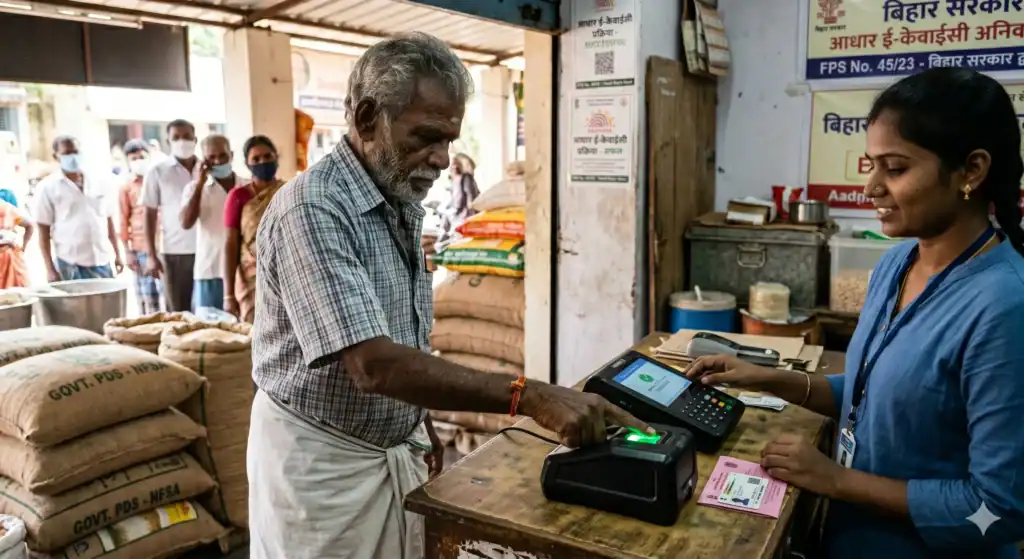
Navigating the 2026 Mandatory Ration Card e-KYC Update
Every month, India’s Public Distribution System (PDS) quietly does something massive, feeding around 813.5 million people. It’s the kind of number that’s hard to even picture. Entire countries don’t have populations that large. And yet, for many families, this system is just routine. Rice, wheat, and kerosene are collected, cooked, and lived on. But to keep this routine going and avoid sudden suspension of benefits, the government now requires every beneficiary to complete their ration card e-KYC online or at a local Fair Price Shop.
But sometime around 2025–2026, that routine picked up a new layer of urgency.
Now there’s a condition. A firm one: mandatory e-KYC for ration cards.
In simple terms, this means every household that depends on PDS benefits has to verify its identity using Aadhaar. No verification means no grains. That’s the deal. Whether it’s done through an OTP on a mobile phone or a fingerprint scan at a Fair Price Shop (FPS), the system now expects you to prove, digitally, that you are who you say you are.
And if that hasn’t happened yet, for you, or even one member of your family, it’s not just a minor delay. Your ration card can be flagged, even deactivated. Subsidies? Put on hold. Sometimes without much warning.
This guide is meant to cut through the confusion a bit. Not just the “how,” but also the “why.” What e-KYC actually involves. Why is the government pushing it so hard? The deadlines (which, to be honest, have shifted more than once). The exact steps—online and offline. What to do if something fails, which it often does. And where is all of this heading, especially with the bigger push toward something called Smart PDS?
Because at this point, this isn’t optional paperwork anymore. It’s the gatekeeper.
At a Glance: The 2026 Ration Card e-KYC Update
Short on time? Here is exactly what you need to know about the mandatory e-KYC update to protect your Public Distribution System (PDS) benefits:
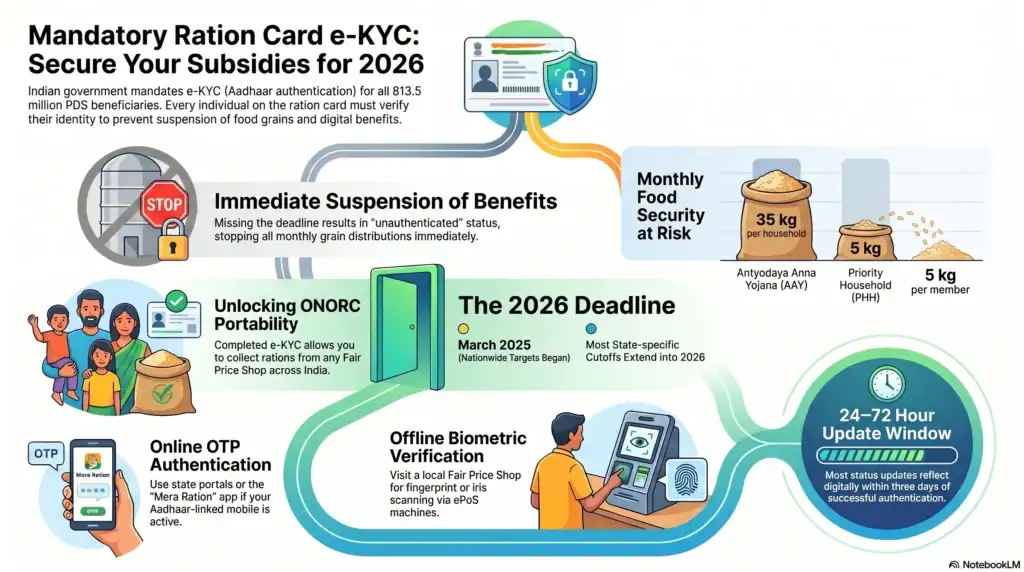
- The Mandate: e-KYC (Aadhaar authentication) is now strictly mandatory for every single member listed on your ration card. Verifying just the head of the household is no longer enough to secure your full family’s grain entitlement.
- The Consequence: Missing your e-KYC deadline will result in your ration card being flagged as “unauthenticated.” This leads to the immediate suspension of subsidized grains and potential deletion from the National Food Security Act (NFSA) database.
- The Deadlines: While the initial nationwide push targeted March 2025, most state-specific cutoffs have been extended into 2026. You must check your local state portal for exact dates.
- How to Update (Online): If your Aadhaar is linked to an active mobile number, you can complete the process in minutes via your state’s official PDS portal or the Mera Ration mobile app using an OTP.
- How to Update (Offline): If you cannot receive an OTP, visit your local Fair Price Shop (FPS). The dealer can verify your identity instantly using an ePoS machine for a fingerprint or iris scan.
- ONORC Portability: Completing your e-KYC is the only way to unlock “One Nation One Ration Card” benefits, allowing you to collect your rations from any state in India.
Essential Quick Links:
- National PDS Directory: State Food Portals Link
- Mera Ration App: Android | iOS
What is Ration Card e-KYC and Why is it Mandatory?
At its simplest, ration card e-KYC is just a way of saying: prove you’re real, and still eligible.
But the way it happens is very 2020s India—digital, Aadhaar-linked, and occasionally a little frustrating.
You take your ration card, connect it to your Aadhaar number, and then verify your identity. That verification can happen in two ways. Either you get a one-time password (OTP) on the mobile number linked to your Aadhaar, or you physically show up somewhere, usually a Fair Price Shop, and scan your fingerprint or iris. Done right, it takes a few minutes. Done wrong, well, it can take a few visits.
On paper, this all sounds neat and efficient. But the reason it exists is messier.
For years, the PDS system had a leak problem. Not a small one. Duplicate ration cards, names that shouldn’t be there anymore, and people who had moved states but were still somehow collecting benefits in two places. Then there are cards issued to individuals who have passed away. It added up quietly, but significantly.
According to data shared in the Lok Sabha, these “ghost beneficiaries” weren’t rare edge cases. There were millions of them.
So, the government stepped in with a fairly blunt solution: clean the system by verifying everyone. Link everything to Aadhaar and make identity traceable. If you’re eligible, you stay. If not, you’re out.
You can see how they frame it themselves at the official website of the Department of Food and Public Distribution. It’s less about exclusion and more about tightening the pipeline so benefits actually reach the right people.
There’s another layer to this, too, one that doesn’t get talked about as much unless you’ve migrated for work.
The whole One Nation One Ration Card (ONORC) idea, being able to collect your ration from any state, only works if the system can recognise you anywhere. That requires a shared, verified database. And that, again, circles back to e-KYC.
No verification leads to no portability.
The Department of Food and Public Distribution (DFPD) has been pretty direct about it. In its advisory, it has told states to push toward 100% Aadhaar-based authentication for all NFSA beneficiaries.
And there’s pressure attached. States that don’t comply risk losing their central allocation of food grains. So, this isn’t just a suggestion, but it’s tied to the supply itself.
Also Read: India DBT Reforms: ₹3.48 Lakh Crore Savings and 0.91 WEI Score Explained (2026)
The TPDS Amendment Order Explained
If you’re wondering where all this gets its legal backing from, it’s not just policy enthusiasm. There’s actual law underneath it.
The Targeted Public Distribution System (Control) Order, the framework that governs how NFSA is implemented, was amended to include Aadhaar authentication as a requirement. Not optional, not “recommended,” but required.
Through notifications, the DFPD essentially told states to do four things:
- Link every ration card to at least one Aadhaar number in the household.
- Ensure beneficiaries complete authentication—either OTP or biometric.
- Remove entries that fail verification or are found to be ineligible.
- Sync everything with the national NFSA database
It’s systematic and almost clinical.
And under Section 10 of the National Food Security Act, 2013, the central government does have the authority to define how eligible households are identified. So, by adding Aadhaar authentication into that mix, they’ve effectively made e-KYC part of the eligibility condition itself.
There was also some public pushback, concerns about genuine beneficiaries getting cut off. The government addressed that in a PIB release.
The tone is reassuring, but firm. The message is that this isn’t about removing rightful beneficiaries, but about plugging leakages that cost the system massive amounts every year.
Union Minister Pralhad Joshi even went on record saying reports of large-scale removal of legitimate beneficiaries were “completely misleading.”
Whether that reassurance lands the same way everywhere, that’s another conversation. But the direction is clear.
Crucial Deadlines & Consequences for 2026
If there’s one part of this whole e-KYC push that tends to trip people up, it’s the deadlines.
Not because they’re hidden, but because they keep shifting.
Different states, different timelines. Extensions granted, then extended again. Especially in rural areas where connectivity is patchy or biometric machines simply don’t cooperate. So, what you hear from one person might already be outdated for another.
Still, as of 2026, there are a few anchor points worth keeping in mind:
- The central government’s position hasn’t really changed: 100% e-KYC completion is the goal. Not “most,” not “eventually”—all beneficiaries.
- March 31, 2025, was the first big nationwide deadline. It came with a lot of urgency and a fair bit of panic, too. It was widely reported here:
- But reality didn’t quite match that deadline. So, states began extending their own cutoffs into 2026—Uttar Pradesh, Bihar, Karnataka, West Bengal, each with slightly different timelines depending on local progress.
Which means one thing: you really do have to check your own state’s portal- for example, Bihar, Karnataka– instead of relying on general advice.
Or go directly to the sites of states like Haryana. It’s a bit of a patchwork. No way around that.
What Happens if You Miss the e-KYC Deadline?
This is where things stop being theoretical.
Missing the deadline isn’t like forgetting to update some minor detail. The consequences tend to show up immediately, and usually at the worst possible moment, like when you’re standing at the ration shop.
Here’s what can happen:
Ration card suspension
Your card gets marked as “unauthenticated” in the system. That label matters. When the FPS dealer tries to process your transaction on the ePoS machine, it simply won’t go through. No override. No “just this once.”
Loss of subsidised grains
And this hits harder than it sounds on paper. Under NFSA rules, AAY households get 35 kg per month, and PHH members get 5 kg each. Without e-KYC, that entitlement basically disappears.
If you’ve ever had to buy the same quantity at market rates, you already know that it’s not a small difference. It costs ₹1,000 to ₹2,000 a month, easily.
Possible deletion from the database
If a card stays unauthenticated long enough, even after extensions, states can remove it altogether. And getting it back? That’s not quick. It turns into paperwork, verification visits, and waiting, sometimes weeks, sometimes months.
Ripple effect on other schemes
This part catches people off guard. Ration cards aren’t just for food anymore. They’re tied into other benefits—subsidised LPG under PM Ujjwala, kerosene allocations, various state schemes.
So when the ration card gets suspended, those links can break too. One issue turns into three.
Can a cancelled ration card be restarted?
Technically, yes. Practically, it depends.
You’ll usually need to apply at your local food office, tehsil, or taluka level, with documents proving you’re still eligible: income certificate, address proof, Aadhaar, sometimes even a family photo. There may be a fee. And then there’s the waiting.
Some states, like Uttar Pradesh, allow online applications through portals, which helps a bit.
But even then, it’s not guaranteed. And timelines can stretch anywhere from a month to three.
If the card was cancelled because you were genuinely ineligible, it likely won’t be restored at all.
Which is why this part sounds repetitive, but it matters. Doing the e-KYC before the deadline is far easier than trying to fix things afterward.
Step-by-Step Guide: How to Complete Ration Card e-KYC Online
For most people, the online route is the easiest, at least in theory. No queues, no waiting around at the ration shop, and no awkward back-and-forth with a machine that refuses to read your fingerprint.
But there’s one catch. Actually, two.
Your Aadhaar needs to be linked to your mobile number. And that mobile number needs to be active. If that’s not in place, the “easy” method quickly stops being easy.
If you’ve got that sorted, here’s how the process usually goes.
Online e-KYC via State PDS Portals (OTP Method)
The OTP method is what most states push as the default. The interface might look slightly different depending on where you live, but once you’ve done it once, the flow feels familiar. Before starting the ration card e-KYC online process, ensure your mobile number is actively receiving texts.
Step 1: Visit your state’s PDS portal
Start here: https://nfsa.gov.in/portal/State_Food_Portals
From there, pick your state. A few direct examples:
- West Bengal: https://food.wb.gov.in/
- West Bengal e-KYC page: https://wbfood.co.in/wb-food-ration-card-e-kyc-online/
- Bihar: https://epds.bihar.gov.in
- Karnataka: https://ahara.kar.nic.in
- Maharashtra: https://controllerofrationing-mumbai.gov.in/en/
Some of these sites feel modern. Others less so. Either way, the option is there.
Step 2: Find the e-KYC section
Look for labels like “e-KYC,” “Aadhaar Authentication,” or “Aadhaar Linking.” Sometimes it’s right on the homepage. Sometimes it’s buried in a menu that takes a minute to find.
No standard layout across states, so a bit of patience helps.
Step 3: Enter your ration card number
Type it exactly as it appears. One wrong digit and the system just won’t recognise you.
Once entered, your family details usually pop up, names, member list, that sort of thing.
Step 4: Enter Aadhaar number
Pick a family member and enter their 12-digit Aadhaar number.
Simple step. But double-check before hitting submit. Fixing mistakes later isn’t always straightforward.
Step 5: Choose OTP authentication
Select the OTP option. This triggers a message to the mobile number linked with that Aadhaar.
If the number isn’t linked or hasn’t been used in a while, you’ll hit a wall here.
Step 6: Enter the OTP
You’ll get a 6-digit code. Usually within seconds, though sometimes it takes longer than you’d expect.
It typically expires in about 10 minutes, so don’t wander off mid-process.
Step 7: Submit and save confirmation
Once verified, the system confirms it.
Take a screenshot. Or note it down. Not because you’ll definitely need it, but because when something goes wrong later, having proof helps.
Updates usually reflect within 24–72 hours.
And then, this part is easy to overlook: you repeat the same process for every family member on the card.
Yes, it’s repetitive. Yes, it’s necessary.
If you want a second reference or a slightly different walkthrough, these explain it in parallel ways.
This guide is also useful (especially if something doesn’t behave as expected).
Using the ‘Mera Ration’ Mobile App
If you’re more comfortable on your phone than a desktop site, and honestly, most people are, the Mera Ration app is worth trying.
It’s built by NIC under the DFPD, and it’s meant to bring everything into one place. Not just e-KYC, but also entitlement checks, FPS location, transaction history, that kind of thing.
Download links:
- Android: https://play.google.com/store/apps/details?id=com.nic.onenationonecard
- iOS: https://apps.apple.com/in/app/mera-ration-app/id6621209637
- FAQ: https://nfsa.gov.in/doc/FAQ_for_Mera_Ration_2.pdf
How to complete e-KYC on Mera Ration:
- Open the app, pick your language.
- Tap “Ration Card Details” and enter your ration card number or Aadhaar.
- Go to the “e-KYC / Aadhaar Authentication” section.
- Enter the Aadhaar number of the person you’re verifying.
- Choose the OTP method.
- Enter the OTP.
- Submit and note the confirmation/reference number.
The interface is usually smoother than state websites. Not perfect, but smoother.
The app also lets you:
- Check how much grain you’re entitled to
- Find nearby FPS shops
- See past transactions
- Verify ONORC portability
You can get more details in this guide.
Also Read: Viksit Bharat GRAM Act 2025: Why MGNREGA Was Replaced (125-Day Guarantee)
How to link an Aadhaar card to a ration card online on mobile?
If you want the simplest answer: use the Mera Ration app.
Download it, open “Aadhaar Seeding,” enter your ration card and Aadhaar details, and verify via OTP.
If you don’t want to install anything, you can do the same thing through your state’s PDS website on your phone browser. Same steps, just a slightly clunkier interface.
One thing to double-check before starting: your Aadhaar must be linked to an active mobile number. Without that, OTP-based e-KYC won’t work.
The Offline e-KYC Process: Biometrics and Fair Price Shops
Not everyone is going to do this online. That’s just the reality.
Some people don’t have smartphones. Some do, but their Aadhaar isn’t linked to a mobile number. And some just don’t trust the online process enough to rely on it.
So, the system has a fallback. A fairly solid one, actually: offline e-KYC through Fair Price Shops (FPS) and special camps.
It’s more physical, more hands-on, and sometimes more reliable if the tech cooperates.
How to Complete e-KYC at Your Local FPS
If you’ve ever collected your ration in person, this process will feel familiar, just with one extra step.
Step 1: Visit your designated FPS
Carry your ration card, and ideally, Aadhaar cards (or slips) for everyone in the household.
Try going during hours when e-KYC is being done. Some shops quietly set aside specific times or days for it, and if you show up at the wrong time, you might be asked to come back.
Step 2: Tell the dealer you’re there for e-KYC
This sounds obvious, but it matters. You’re not there to collect grain; you’re there for authentication.
The dealer switches the ePoS machine into e-KYC mode.
Step 3: Provide ration card details
They’ll enter your ration card number into the system, and your family details should appear on their screen.
Step 4: Do the biometric scan
This is the core step.
Each person either:
- places a finger on the scanner, or
- uses an iris scan (if available)
The machine sends that data to the UIDAI server and checks if it matches Aadhaar records.
When it works, it’s quick. When it doesn’t, it can take a few tries. Sometimes more than a few.
Step 5: Get confirmation
Once verified, the system confirms it. Some dealers give a printed receipt; others just show you the screen.
If you can, ask for proof. It’s one of those things that’s easy to ignore until something goes wrong later.
Step 6: Repeat for all members
This part is important and often skipped halfway through.
Each family member is supposed to authenticate individually. Some states are lenient if the head of household completes it, but that’s not universal.
Safer to just finish everyone’s verification in one go, even if it takes a bit longer.
If you need to locate your FPS or check related details:
- Bihar: https://epds.bihar.gov.in
- Karnataka: https://nfsa.gov.in/State/KA
- Uttar Pradesh: https://nfsa.gov.in/state/up
Doorstep e-KYC for Senior Citizens and Vulnerable Groups
Now, this part, quietly, is one of the more thoughtful additions.
Because not everyone can stand in line at a ration shop, elderly people, bedridden individuals, and people with disabilities, for them, even reaching the FPS can be a challenge.
So, in some states, the system comes to them.
Gujarat, for instance, rolled out a doorstep e-KYC initiative with India Post. Postal workers carry biometric devices and complete the process at people’s homes.
It’s a simple idea, but it makes a big difference.
Other states are experimenting with similar setups:
- Common Service Centres (CSCs) using mobile biometric kits
- Local e-KYC camps organised at the gram panchayat level
- Volunteers—NGOs, self-help groups—helping people through the process
- Even revenue officials conducting door-to-door verification in remote areas
It’s not perfectly standardised yet. Availability depends a lot on where you live.
If someone in your family can’t travel, it’s worth asking locally, your tahsildar’s office, food inspector, or even the panchayat office, about upcoming camps or doorstep services.
There’s also overlap with systems like Jeevan Pramaan, which use similar biometric setups. Sometimes the same infrastructure gets reused for ration card e-KYC in rural areas.
It’s not the fastest method, and occasionally it’s a bit chaotic. But for many people, this offline route isn’t just an alternative, it’s the only workable option.
How to Check Your Ration Card e-KYC Status Online
Finishing the e-KYC process feels like the end of it. You enter the OTP, or your fingerprint finally works after three tries, and you assume you’re done.
But it’s worth pausing here.
Because the system doesn’t always update instantly, and sometimes, what you think is “completed” is still sitting somewhere in a pending state. You only really find out when the ration shop says no.
So, checking your status isn’t just a formality; it’s a small safety step that can save you a wasted trip later.
Here are the main ways to do it.
Method 1: Through your State PDS Portal
Start with your state’s official site: https://nfsa.gov.in/portal/State_Food_Portals
Once you’re on your state portal, look for something like:
- “e-KYC Status”
- “Aadhaar Authentication Status”
- “Beneficiary Status”
Enter your ration card number or Aadhaar number, and you should see a list of family members along with their individual status.
This is usually the most direct and reliable method.
Method 2: Through the Mera Ration App
If you’ve already installed the app, this is probably quicker.
Open it, go to “Ration Card Details,” and you’ll see each member listed along with whether their authentication is done or still pending.
It’s surprisingly convenient, especially if you’re checking more than once.
Method 3: Through NFSA Portal (limited use)
The national portal but it’s more for big-picture data.
Think state-level numbers, not individual status. So, unless you’re curious about overall progress, it won’t help much for personal verification.
Method 4: SMS and Helpline
Some states let you check status via SMS—usually by sending your ration card number to a designated number.
Or you can call the national helpline: 1800-233-5500 (listed at https://india.gov.in/)
There’s also a directory of helplines.
Not everyone loves calling helplines, but in tricky cases, it can actually speed things up.
Method 5: At the FPS
This is the simplest, in a way.
Just ask your ration shop dealer to check on the ePoS machine. It shows which members are authenticated and which aren’t.
No login, no navigation. Just straight information.
Understanding e-KYC Status Messages
Now, this part tends to confuse people more than the process itself.
You check your status, and instead of a clear yes/no, you get labels that sound slightly vague. Here’s what they actually mean:
“Authenticated” / “Verified” / “e-KYC Complete.”
You’re good. Fully verified. No issues collecting rations.
“Pending Authentication”
Your Aadhaar is linked, but the actual verification (OTP or biometric) hasn’t been completed.
This is that in-between stage. Easy to miss, but important to finish.
“Aadhaar Seeding Pending”
This means your Aadhaar isn’t even linked yet.
So, before e-KYC, you need to complete the basic linking step first.
“Authentication Failed”
Something didn’t match.
Could be a fingerprint issue, a mismatch in records, or just a technical glitch. Either way, it needs a retry
“Suspended” / “Deactivated”
This is the serious one.
Your card has been blocked, usually due to missed deadlines or unresolved issues. At this point, it’s best to contact your local food office quickly instead of waiting.
How can I know my ration card KYC is completed or not?
The simplest way is still the state portal:
https://nfsa.gov.in/portal/State_Food_Portals
Search using your ration card or Aadhaar number, and check the status next to each family member. It should say “Authenticated” if everything’s done.
You can also:
- Check on the Mera Ration app
- Ask your FPS dealer to check on their device
- Or visit state-specific portals like for example, for Bihar or Karnataka
If all members show as verified, you’re fully set.
This part, checking status, feels small, but it’s one of those steps people skip until it causes trouble.
Troubleshooting Common e-KYC Failures
On paper, e-KYC is straightforward. Enter details, verify, done.
In reality, it’s a bit messier.
Fingerprints don’t match. OTPs don’t arrive. Names don’t line up across documents. And sometimes, nothing is wrong; you just hit a technical error at the wrong moment.
So instead of treating failures like rare exceptions, it’s better to expect a few bumps and know how to get past them.
Fixing Aadhaar Biometric Authentication Failures
This is probably the most common issue, especially for older individuals or anyone who’s spent years doing manual work.
Problem: Fingerprint scan keeps failing at the FPS machine
You try once. Then again. Then the dealer wipes the scanner with a cloth and says, “Try one more time.” Still fails.
Here’s what actually helps:
- Switch to iris scan
Most ePoS devices support iris scanning, even if it’s not offered immediately. Ask for it. It often works when fingerprints don’t. - Use a different finger
Aadhaar doesn’t depend on just one finger. Try your thumb, or even another finger entirely. - Clean your hands properly
Sounds basic, but it matters. Oil, dust, or very dry skin can interfere with the scanner. Wash, dry, try again. - Face authentication (where available)
There’s now a face-based option via the AadhaarFaceRD app
Not every location supports it yet, but it’s becoming more common. - Update your biometrics
If nothing works consistently, your stored biometric data might be outdated. Visit an Aadhaar Enrolment Centre and update it.
You can locate centres using the UIDAI app:
Exception-based handling
In some cases, FPS dealers can log a biometric failure and proceed using alternate verification methods. This isn’t universal, but worth asking about.
What to Do if Your Mobile Number is Not Linked to Aadhaar
This one blocks online e-KYC completely.
Problem: No OTP received, or system says mobile not linked
At that point, the system simply has nowhere to send the OTP.
Here’s what you can do:
- Update your mobile number in Aadhaar
Visit an Aadhaar centre and request a mobile update. It costs ₹50.
You can use this app to find nearby centres:
Once updated, you can go back and complete OTP-based e-KYC.
- Use biometric authentication instead (immediate workaround)
Don’t wait for the mobile update to go through, just visit your FPS and complete e-KYC using fingerprint or iris scan. - Retry OTP after some time
Sometimes OTP delays are just network-related. Wait a bit, try again. - Use TOTP via mAadhaar app
The mAadhaar app can generate a time-based OTP without needing a live SMS. Some state portals accept this.
Handling Demographic Data Mismatches
This is one of those problems that seems small until it blocks everything.
Problem: Name or details don’t match between Aadhaar and ration card
Even tiny differences can matter:
- “Suresh Kumar” vs “Suresh K.”
- “Lakshmi Devi” vs “Laxmi Devi”
Sometimes the system accepts it. Sometimes it doesn’t.
Here’s how to deal with it:
- Correct your ration card details
Visit your state portal or local food office and submit a correction request with supporting documents. - Correct your Aadhaar details
If Aadhaar is wrong, update it through UIDAI. - Rely on fuzzy matching (if applicable)
The system sometimes tolerates minor spelling variations. Not always, but sometimes it works in your favour. - Authenticate another family member first
If one person’s details match perfectly, complete their e-KYC first. In some states, that stabilises the record enough to proceed with others.
For more state-specific guidance, this guide can help.
Why is my ration card e-KYC rejected?
There’s usually a reason, and it’s often one of these:
- Mobile number not linked to Aadhaar (no OTP possible)
- Fingerprint mismatch or poor biometric quality
- Name/date mismatch between Aadhaar and the ration card
- Aadhaar is inactive or locked
- Ration card already flagged or suspended
- Temporary server or technical issue
Fix depends on the cause. Biometrics failing? Try iris or face. Mismatch? Update your records. Aadhaar locked? Unlock it via UIDAI.
And if nothing seems to work, don’t keep retrying blindly. Go to your district food office with your documents and raise it properly. It’s slower, but more reliable at that point.
This section tends to feel the most frustrating when you’re actually going through it, but once you identify the exact issue, it usually becomes manageable.
The Future of PDS: Smart PDS Integration & ONORC
If e-KYC feels like a one-time administrative hurdle, it’s not. It’s more like the entry gate to a much larger system that’s still being built.
Something more controlled. More traceable. And, depending on who you ask, either more efficient or more tightly monitored.
What is Smart PDS Integration?
“Smart PDS” sounds like a buzzword at first. The kind that gets used in policy presentations. But underneath that label is a fairly clear idea: track everything, verify everyone, and reduce leakage to almost zero.
That means the entire journey of food grains, starting from procurement, moving through storage, transport, and finally distribution, is being digitised.
According to the Department of Food and Public Distribution, this includes:
End-to-end digital tracking
Grains are no longer just moving through warehouses quietly. They’re tracked, sometimes literally, using GPS, barcodes, and transaction logs from ePoS machines.
So, when grain leaves an FCI godown and reaches an FPS, there’s a digital trail. And when it’s distributed, that too gets recorded.
AI-based anomaly detection
This is where it gets interesting.
The system is starting to use AI tools to spot patterns that don’t look right. For example, an FPS reports full distribution, but biometric data shows only partial authentication. That mismatch raises flags.
This shift was highlighted in this PIB release.
It’s not widespread everywhere yet, but it’s clearly the direction things are moving in.
CBDC-based Digital Food Coupons
This one feels like a glimpse into the future.
In Gujarat, there’s already a pilot where beneficiaries receive digital food coupons in a CBDC wallet instead of physical grain allocations. These can be redeemed at FPS shops.
It’s a big shift from physical distribution to something closer to a controlled digital marketplace.
Whether it scales nationally is still an open question.
Fortification and quality tracking
Even the quality of food grains, like whether they’re fortified with nutrients, is being monitored within the system.
So, it’s not just about who gets food, but also what exactly they receive.
All of this depends on one thing: a clean, verified beneficiary database.
Which is exactly what e-KYC is trying to build.
Without that, the rest of the system doesn’t really hold together.
For broader updates on NFSA implementation, you can check here.
One Nation One Ration Card (ONORC) Verification
Now this part, this is where e-KYC starts to feel genuinely useful, especially if you’ve ever had to move for work.
The One Nation One Ration Card (ONORC) system allows you to collect your ration from anywhere in India. Not just your home state.
Which sounds simple. But earlier, it wasn’t possible.
If your ration card was issued in Bihar, and you were working in Gujarat, you were effectively cut off from your entitlement unless you went back home.
ONORC changes that.
Here’s how it works, step by step:
- You travel to another state—for work, usually.
- You go to a local FPS there.
- You provide your Aadhaar number.
- The ePoS machine connects to the national NFSA database.
- Your details are fetched and verified.
- You receive your ration right there.
No transfer process. No reapplication.
But and this is the key part, it only works if your identity has already been verified through e-KYC.
Without that, the system can’t confidently match you to your entitlement.
So, portability gets blocked.
You can explore more about ONORC and related tools here:
And for data-heavy insights, like how many people are actually using portability across states, this Lok Sabha documents go into details.
There’s a quiet shift happening here.
From a local, paper-based welfare system to something national, digital, and tightly integrated.
For some, that means convenience. For others, it raises questions.
But either way, e-KYC is the hinge everything swings on.
Frequently Asked Questions: Ration Card E-KYC Online
Officially, yes. The National Food Security Act (NFSA) mandates 100% authentication of all beneficiaries. While some states keep the card active if the head of the household completes e-KYC, there is a major catch: your grain entitlement is calculated per person. If only 3 out of 5 members are authenticated, you will only receive rations for those three. To guarantee your full benefits, complete e-KYC for everyone listed. Verify state-specific rules on the NFSA portal.
Typically, e-KYC updates reflect in the system within 24 to 72 hours. In states with robust infrastructure (like Karnataka or West Bengal), updates can happen the same day. However, server loads can delay this up to a week. Pro Tip: Check your status online before visiting the Fair Price Shop (FPS). If your status remains “Pending” after 7 days, visit your local food office with your acknowledgement slip for manual resolution.
Yes, absolutely. If your mobile number isn’t linked to Aadhaar or OTPs fail, you can use offline biometric authentication. Simply visit your local Fair Price Shop and verify your identity using a fingerprint or iris scan on their ePoS machine. Some states also support face authentication via the AadhaarFaceRD app. If both OTP and biometrics fail, you can visit your district food office to complete the verification manually.
State-Wise Directory: Ration Card e-KYC Online Links & Offline Methods
| State / UT | Official PDS Portal | Online e-KYC Method | Offline Authentication | Estimated Processing |
| West Bengal | WB Food Portal | OTP (State Portal & Mera Ration) | FPS (Fingerprint / Iris) | 24–72 hours |
| Bihar | EPDS Bihar | OTP (State Portal & Mera Ration) | FPS (Fingerprint / Iris) | 24 hrs – 7 days |
| Karnataka | Ahara Karnataka | OTP (State Portal & Mera Ration) | FPS (Fingerprint / Iris) | 24–72 hours |
| Maharashtra | Maha Rationing | OTP (State Portal & Mera Ration) | FPS (Fingerprint / Iris) | 24–72 hours |
| Gujarat | State Food Directory | OTP (Mera Ration App) | FPS + Doorstep via India Post | 24–72 hours |
| Haryana | State Food Directory | OTP (Mera Ration App) | FPS (Fingerprint / Iris) | 24–72 hours |
| Uttar Pradesh | UP FCS Portal | OTP (State Portal & Mera Ration) | FPS (Fingerprint / Iris) | 24–72 hours |
National Helpline Note: If you face persistent server issues or your status does not update after 7 days, you can call the central toll-free PDS helpline at 1800-233-5500 for assistance across all states. (Data sourced from official NFSA directives).
Secure Your PDS Benefits: Complete Your Ration Card e-KYC Today
For a lot of families, the Public Distribution System isn’t just another government scheme, it’s part of the monthly rhythm. Quietly dependable, until something interrupts it.
And right now, that “something” is e-KYC.
Yes, it can feel like an extra step. Another formality in a system that already asks for plenty. But at the same time, it’s become the switch that decides whether your benefits continue smoothly or suddenly stop.
The intention behind it is fairly clear: reduce fraud, clean up records and make sure subsidies reach the right people. Whether it’s perfect in execution is another matter. But the direction isn’t changing.
The important part is this, you don’t really gain anything by waiting.
Because the process itself is already been made available in multiple ways:
- Online through state portals
- Through the Mera Ration app (https://play.google.com/store/apps/details?id=com.nic.onenationonecard | https://apps.apple.com/in/app/mera-ration-app/id6621209637)
- Offline at Fair Price Shops using biometrics
- And even doorstep options in some areas for those who need it
So, it’s less about access now, and more about timing. Don’t wait for your card to be suspended; take 10 minutes to finish your ration card e-KYC online today.
Here is your action checklist:
- Go to https://nfsa.gov.in/portal/State_Food_Portals and find your state’s portal.
- Check if your Aadhaar is already linked to your ration card.
- Make sure your Aadhaar is connected to an active mobile number (for OTP).
- Complete e-KYC online for yourself and then for each family member.
- If OTP isn’t an option, visit your FPS and use biometric authentication.
- Wait 24–48 hours, then check your status online.
- Keep your acknowledgement safe (screenshot, print—anything works).
- Consider installing the Mera Ration app to track everything in one place.
There’s also a bigger shift underway, this move toward Smart PDS. AI tracking, digital records and even experiments like CBDC-based food coupons.
It’s a long-term change. And e-KYC is, in a way, your entry point into that system.
You don’t need to understand all of it right now. But you do need to make sure you’re not left out of it.
Because when a ration card stops working, it rarely gives you much warning. It just doesn’t go through one day.
And fixing it afterward is always slower than preventing the issue in the first place.
If you want to stay updated on policy changes or announcements, this is still the most reliable place to check:
https://dfpd.gov.in/en
Disclaimer
The content provided on this page is designed as an educational explainer to help simplify complex topics and is for general informational purposes only. While we make every effort to ensure the accuracy, completeness, and reliability of the information presented at the time of publication, facts and circumstances can change. The information provided here is on an “as is” basis and does not constitute professional, technical, or legal advice. This explainer should be used as a foundational guide for understanding the topic, and readers are encouraged to conduct their own independent research or consult with relevant professionals before taking any action based on this content.


Discussion (1)
Leave a Reply