
PF Transfer Pending for Months? How to Use the EPF Grievance Portal to Unblock Your Funds
Why Is My PF Transfer Pending? The Real Reasons Behind EPF Delays
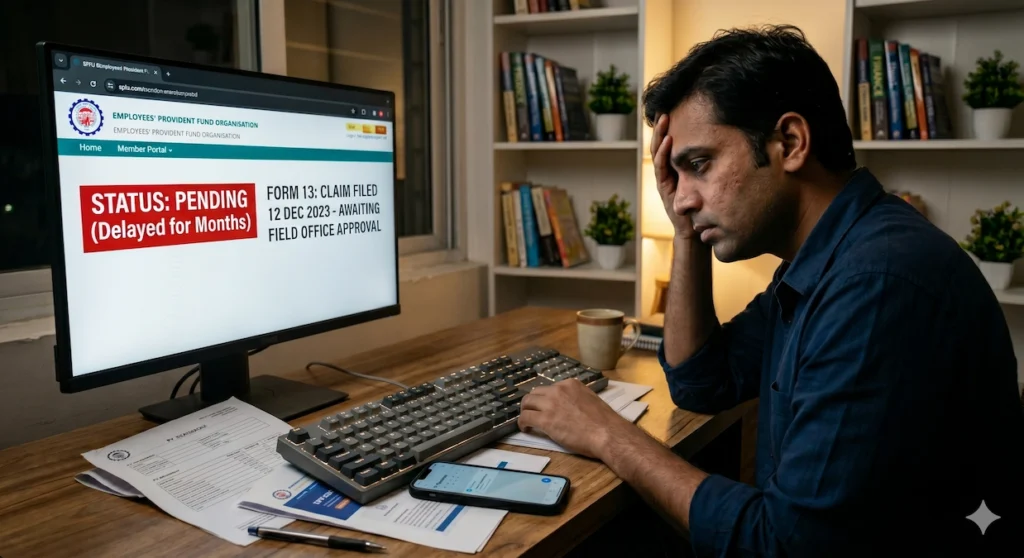
You did everything by the book. You submitted the transfer request, linked your UAN, and waited for the process to move forward. Then weeks turned into months. When you finally checked the EPFO member portal again, the status hadn’t changed. It still showed that your PF transfer is pending
For many employees, this is where the real frustration begins. Emails to HR go unanswered, helpline calls lead nowhere, and every follow-up seems to produce the same vague response. Meanwhile, your provident fund balance remains stuck between employers with no clear indication of when the transfer will actually happen.
The reality is that delayed PF transfers are far from rare. Across India, EPF members routinely report transfer claims remaining unresolved for months and, in some cases, even years. The delay may occur at the employer approval stage, inside an EPFO field office, or because of discrepancies hidden deep within the records. Whatever the reason, the outcome is the same: your money remains inaccessible and the process appears frozen.
Fortunately, there is a formal mechanism designed specifically to address these situations. The EPF i-Grievance Management System (EPFiGMS) allows members to raise documented complaints, track responses, submit evidence, and push stalled claims back into the system. When used correctly, it can be one of the most effective ways to get movement on a transfer that has been sitting idle for far too long.
In this guide, you’ll learn how the PF transfer process works, why transfers commonly get stuck, how to file an EPFiGMS grievance step by step, what different status updates actually mean, and what escalation options are available if the grievance process itself fails to deliver results. We’ll also cover practical steps you can take to reduce the chances of facing similar delays in the future.
At a Glance: What to do when PF transfer is pending for long
- EPF Transfer Delays are Common: Thousands of employees face months of waiting due to employer non-approval, regional field office backlogs (DA/AO review), or underlying KYC mismatches.
- The Solution is EPFiGMS: The EPF i-Grievance Management System (EPFiGMS) provides a formal, trackable platform to log complaints, force employer accountability, and push stalled claims forward.
- Proactive Prevention Works: You can avoid future processing bottlenecks by ensuring your date of exit is updated by HR, completing your e-nomination, and resolving Aadhaar-UAN name mismatches before changing jobs.
Understanding the EPF Transfer Process and Standard Timelines
Before you can figure out why your PF transfer is delayed, it helps to understand what a normal transfer journey looks like. Many members assume that once they submit the request, the process is largely automatic. In reality, several stakeholders are involved, including your employer, the EPFO system, and the field office responsible for processing the transfer.
Knowing where your claim is supposed to be at any given stage makes it much easier to identify where the delay is occurring and what action you should take next.
How Many Days It Will Take to Transfer PF From One Account to Another
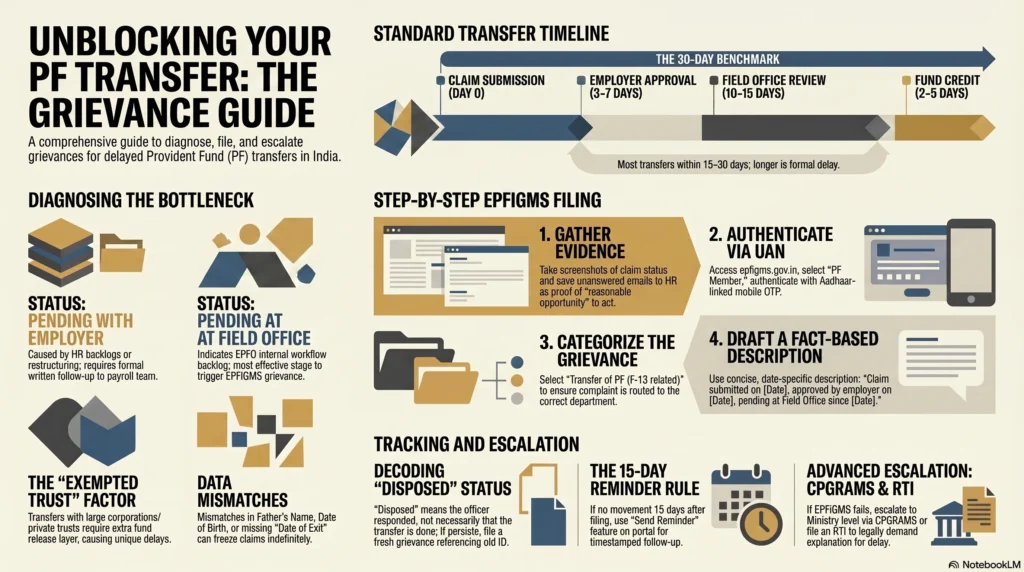
According to EPFO’s stated service standards, a transfer claim should generally be processed within 20 working days after employer approval. In practice, most straightforward transfers are completed within 15 to 30 working days from the date you submit the online request through the EPFO portal.
Of course, actual timelines can vary. Factors such as employer responsiveness, field office workload, KYC verification issues, and trust-managed PF accounts can all influence how quickly the transfer is completed.
Here’s a simplified view of the typical process:
| Stage | Responsible Party | Expected Duration |
| Member submits transfer claim online | EPFO Member Portal | Day 0 |
| Previous/current employer approves claim | Employer (HR/payroll) | 3-7 working days |
| Claim forwarded to field office (previous PF office) | EPFO system | Automatic on employer approval |
| DA/AO review and processing | Field Office (Dealing Assistant/Accounts Officer) | 10-15 working days |
| Fund credited to new PF account | EPFO/Trust | 2-5 working days |
If your claim has been sitting unresolved for more than 30 working days, it’s reasonable to consider it delayed. At that point, escalation through formal channels is not only justified but often necessary.
The Lifecycle of Form 13 (Revised) in the EPFO System
Every PF transfer is ultimately driven by Form 13 (Revised), the official document used to move your accumulated provident fund balance from one account to another. The form itself can be viewed here.
For most employees today, however, the process is entirely digital. If your UAN is active and your KYC details have been verified, you typically won’t need to download or submit a physical Form 13.
Once you initiate the transfer request online, the claim moves through several checkpoints:
- The transfer request is submitted through the EPFO Unified Portal.
- The designated employer verifies and attests the request.
- The EPFO system routes the approved claim to the relevant regional office.
- A dealing assistant reviews the request and supporting records.
- An accounts officer authorises the transfer.
- Funds are moved from the old PF account to the new one.
- The updated balance becomes visible in the destination account.
For members whose PF is managed by an exempted trust, there is an additional verification layer because the funds are initially held by the employer’s trust rather than directly by EPFO.
If you’re unsure whether your transfer request was submitted correctly, this walkthrough can help you verify each step before assuming there’s a processing issue.
Many transfer disputes turn out to be procedural errors made during claim initiation, so it is worth checking your submission carefully before escalating.
Why a Seamless UAN Linkage Doesn’t Guarantee an Instant Transfer
A common misunderstanding among EPF members is that linking Aadhaar to UAN automatically guarantees a smooth and immediate transfer. Unfortunately, that’s not how the system works.
While UAN integration makes it easier to view and manage multiple PF accounts under a single identifier, it does not eliminate the underlying verification requirements. Your transfer still depends on accurate records, employer action, and field-office processing.
Even small discrepancies can create significant delays. As reported by Business Standard, mismatches involving your name, date of birth, or other personal details can prevent smooth processing even when Aadhaar and UAN are linked correctly.
Another frequent issue involves the date of exit. If your previous employer has not updated your exit date in the EPFO system, the system may still treat you as an active employee at that organisation. In such cases, the transfer request can become stuck even though everything appears correct from your side.
In other words, UAN linkage opens the door, but it doesn’t guarantee the path beyond it is clear. The transfer still relies on accurate data, timely employer action, and successful processing by the EPFO office handling the claim.
Diagnosing the Bottleneck: Why is My PF Transfer Pending for So Long?
When a PF transfer remains stuck for months, the first instinct is often to blame EPFO. Sometimes that’s accurate. Often, though, the real issue lies elsewhere.
The word “Pending” can mean very different things depending on where your claim is sitting. A transfer awaiting employer approval requires a completely different approach from a transfer that has already reached the EPFO field office. Likewise, a hidden data mismatch can keep a claim frozen indefinitely without giving you a clear indication of what went wrong.
The key is to identify the exact stage where the process has stalled. Once you know that, you can choose the right remedy instead of wasting time chasing the wrong party.
PF Transfer Claim Pending With Present / Previous Employer
If your transfer status indicates that employer approval is still pending after more than a week, the delay is almost certainly at the employer’s end.
Under normal circumstances, employers are expected to verify and approve transfer requests within a few working days. When that doesn’t happen, it is usually due to administrative rather than technical reasons.
Some common causes include:
- HR has not noticed or reviewed the transfer request.
- The payroll team is handling a backlog of employee requests.
- EPFO credentials used by HR or the payroll vendor are not functioning properly.
- The company is undergoing restructuring, mergers, or system migration.
- The previous employer has shut down operations or is no longer responsive.
In these situations, your first step should be a formal written follow-up. Send an email to the relevant HR contact and include:
- Your UAN
- Transfer claim reference number
- Date of submission
- Old and new PF account details
Keep copies of every email you send.
This documentation becomes extremely valuable later if you need to raise an EPFiGMS grievance. It helps establish that you gave the employer a reasonable opportunity to act before seeking intervention from EPFO.
EPF Transfer Status Pending at Field Office (DA/AO Review)
If employer approval has already been completed and the claim status shows that it is pending at the field office, the delay has moved into EPFO’s internal processing workflow.
This is one of the most common situations reported by members.
Once a claim reaches the field office, it typically passes through multiple internal checks before funds are transferred. Depending on workload, staffing levels, and verification requirements, claims can remain in queue much longer than the prescribed timelines.
User experiences shared on Reddit highlight how widespread this issue has become. In one discussion on the r/epfoindia subreddit, members reported claims remaining at the field office stage for several weeks despite repeated follow-ups. Similar experiences appear in another thread, where a transfer remained pending for over three months without any meaningful update.
The frustrating part is that members often have very little visibility into what is happening internally. The status may simply continue showing “Pending at Field Office” without explaining whether the file is under review, awaiting approval, or sitting in a backlog.
This is precisely the scenario where filing a grievance through EPFiGMS tends to be most effective.
Data Mismatches: Name, Date of Birth, or Missing Date of Exit
Not every delay is caused by an overloaded office or an unresponsive employer. In many cases, the system itself is unable to process the transfer because the records do not match.
These discrepancies are surprisingly common.
Some of the most frequent issues include:
- Name mismatch: The name in EPFO records differs from Aadhaar records.
- Date of birth mismatch: The DOB recorded by an employer does not match Aadhaar-verified information.
- Missing date of exit: The previous employer never updated the employee’s exit date.
- Father’s name mismatch: Different employers entered inconsistent details across service records.
Even a seemingly minor variation can create problems. For example, a full name recorded in one system and an abbreviated version in another may be enough to trigger manual verification.
According to Scripbox, verified KYC details are essential for smooth claim processing. Unapproved Aadhaar, PAN, or bank account information remains one of the most common reasons for claim delays and rejections.
Members should also verify that their records have not been incorrectly linked or merged. EPFO has expanded facilities that allow members to correct certain account-level issues, including de-linking wrongly attached member IDs. More information is available here.
Before escalating a delayed transfer, it is worth spending a few minutes reviewing all personal details in your EPFO profile. A simple mismatch can sometimes be the hidden reason behind months of inaction.
Trust vs. Unexempted Establishments: How Corporate Structures Cause Delays
Another source of delay that many employees are unaware of involves the type of organisation they worked for.
Not all employers participate in EPF the same way.
Large corporations, public sector undertakings, banks, insurers, and major industrial groups often operate through exempted provident fund trusts. In these arrangements, the employer manages the PF corpus through an internal trust instead of depositing and administering the funds entirely through EPFO.
This structure introduces an extra layer into the transfer process.
Instead of moving directly between EPFO-managed accounts, the transfer typically follows a sequence like this:
- The employer’s trust releases the accumulated corpus.
- Funds are transferred to the EPFO-administered account.
- EPFO processes the onward transfer to the new PF account.
Because multiple entities are involved, delays can occur at any stage.
Employees often discover that the bottleneck isn’t actually EPFO but the trust office of their previous employer. In such situations, EPFO may have limited ability to accelerate the transfer until the trust completes its portion of the process.
This is particularly common among employees leaving:
- Public sector banks
- Insurance companies
- Large manufacturing conglomerates
- Government-linked enterprises
- Long-established private sector groups with exempted PF trusts
When a transfer involves an exempted trust, patience is often required. However, prolonged delays can still be challenged through documented grievances and escalation channels.
Introduction to EPFiGMS: Your First Line of Defense
When a PF transfer has been stuck for weeks or even months, many members fall into a cycle of repeated emails, unanswered calls, and endless portal checks. At some point, informal follow-ups stop being effective. That’s where EPFiGMS comes in.
Think of it as EPFO’s official complaint and tracking system. Unlike a phone call that leaves no record or an email that can be ignored, a grievance filed through EPFiGMS creates a documented case within the EPFO ecosystem. It assigns responsibility, generates a tracking number, and creates a paper trail that can later support further escalation if needed.
For members dealing with delayed transfers, EPFiGMS is often the first formal step that gets attention from the relevant office.
What is the EPF i-Grievance Management System (EPFiGMS)?
The EPF i-Grievance Management System (EPFiGMS) is the official online grievance redressal platform operated by the Employees’ Provident Fund Organisation.
It allows EPF members, pensioners, employers, and other stakeholders to register complaints related to provident fund services without having to visit an EPFO office in person.
Through the portal, users can:
- Submit complaints online
- Upload supporting documents
- Track grievance status
- Send reminders on unresolved complaints
- Receive responses from the concerned EPFO office
- Maintain a documented record of communication
According to Motilal Oswal, grievances submitted through EPFiGMS are automatically routed to the relevant regional office based on the member’s account details and jurisdiction. Once submitted, the system generates a unique registration number that can be used for all future follow-ups.
Before the introduction of EPFiGMS, resolving PF-related issues often required multiple visits to regional offices, physical letters, and repeated explanations to different officials. The portal was introduced to make the process more transparent, traceable, and accessible.
That doesn’t mean every complaint gets resolved overnight. However, having a formally registered grievance almost always places you in a stronger position than relying solely on emails or helpline calls.
Eligibility: Who Can File a Complaint on the Portal?
One of the advantages of EPFiGMS is that it is not limited to active EPF contributors. Several categories of users can access the system and raise grievances.
The portal broadly accepts complaints from:
- PF Members: Employees with a UAN who currently contribute to EPF or have contributed in the past.
- EPS Pensioners: Individuals receiving pension under the Employees’ Pension Scheme.
- Employers/Establishments: Registered organisations covered under EPF regulations.
- Others: Individuals who may not have a UAN or PPO but need to raise a general EPFO-related complaint.
For PF transfer issues, the vast majority of users will select the PF Member category.
As noted by Angel One, members can use this category to report issues such as:
- Delayed PF transfers
- Incorrect account entries
- KYC-related discrepancies
- Claim settlement delays
- Employer-related PF issues
If your transfer claim is pending and linked to your UAN, choosing the correct user category ensures that the grievance reaches the appropriate workflow within EPFO.
Key Categories for Transfer-Related Grievances
Selecting the right grievance category may seem like a minor detail, but it can significantly influence how quickly your complaint reaches the correct desk.
When filing a grievance, EPFiGMS asks you to specify the nature of your complaint. This helps route the case to the department best equipped to handle it.
For PF transfer-related issues, the most relevant categories typically include:
- Transfer of PF (F-13 related)
Used when a Form 13 transfer claim remains pending or has not been processed correctly. - Withdrawal/Settlement Delay
Useful when a claim has already reached the field office but no meaningful action has been taken. - Employer-Related Issues
Appropriate when the delay is caused by an employer’s failure to approve or process the request. - KYC / Aadhaar / Bank Account Issues
Suitable when data mismatches or verification problems are preventing claim processing.
Choosing a category that accurately reflects the problem helps reduce unnecessary back-and-forth. A complaint about an employer that is incorrectly filed as a field-office issue may end up being redirected, adding avoidable delays.
When in doubt, focus on where the claim is currently stuck rather than where it originally started. If employer approval is pending, classify it as an employer issue. If approval is complete and the file is sitting with EPFO, choose the field-office or transfer-related category.
A few extra seconds spent selecting the correct grievance type can save weeks later.
Step-by-Step Guide: Raising a Grievance for a Pending PF Transfer
Filing an EPFiGMS grievance is not complicated, but the quality of the complaint matters. Many members submit a grievance in a hurry, provide minimal information, and then wonder why they receive a generic response weeks later.
A well-prepared complaint does two things. First, it helps the EPFO official understand the issue immediately. Second, it reduces the chances of the office coming back for additional information, which can add unnecessary delays to an already overdue transfer.
The process only takes a few minutes, but spending a little time on preparation can significantly improve your chances of getting a meaningful resolution.
Gathering Evidence: Emails to HR and Screenshots of Claim Status
Before opening the grievance portal, collect all the documents and information related to your transfer claim. Think of this as building a file that clearly tells the story of what happened and when.
Ideally, you should have:
- A screenshot of the EPFO transfer claim status page
- The transfer claim reference number
- Your UAN
- Old and new PF account numbers
- Date of joining the new employer
- Date of leaving the previous employer
- Copies of emails sent to HR regarding the pending transfer
- Any replies received from HR or payroll teams
- SMS or email acknowledgements related to the transfer claim
The stronger your documentation, the easier it becomes for the reviewing officer to verify your claim.
Canara HSBC Life highlights this point in its grievance guide, noting that supporting documents play a major role in helping EPFO officers assess and resolve complaints efficiently. A grievance supported by screenshots and dated correspondence is far more actionable than a complaint that simply states, “My PF transfer is pending.”
Taking ten minutes to gather evidence before filing can save weeks later.
Accessing the Portal and Selecting the “PF Member” Status
Once your documents are ready, visit the EPFiGMS portal:
On the homepage, click Register Grievance.
You will be presented with a form asking you to identify your status. Since the issue relates to your own PF account, select:
PF Member
Most transfer-related complaints fall under this category because they are linked to a member’s UAN and PF account history.
Business Standard’s guide notes that the portal also supports other user categories, including pensioners, employers, and individuals filing general complaints. However, for transfer delays, PF Member is almost always the correct choice.
Choosing the right category at the outset helps ensure the complaint is routed correctly.
Authenticating Your Universal Account Number (UAN)
The next step is identity verification.
Enter your UAN in the designated field and complete the captcha verification. Once submitted, the portal retrieves basic information associated with your EPFO records.
Review the details carefully, including:
- Name
- Registered mobile number
- Email address
If everything appears correct, click Get OTP.
An OTP will be sent to the mobile number currently linked to your UAN. Enter the code to authenticate your identity and proceed.
One common stumbling block here is an outdated mobile number. Many employees discover that the number registered with EPFO belongs to a SIM card they stopped using years ago. If you no longer have access to the registered number, you’ll need to update your contact details through the EPFO system before you can complete the grievance registration process.
A quick verification at this stage can prevent unnecessary frustration later.
Selecting the Correct Grievance Category and Field Office
After successful authentication, the system displays PF accounts linked to your UAN.
Select the account associated with the transfer claim, usually the account maintained by your previous employer.
You will then need to identify where the delay is occurring.
The portal generally asks whether the grievance relates to:
- An employer
- A PF office
Choose carefully.
If the claim is waiting for employer approval, select Employer-related.
If the employer has already approved the transfer and the claim is stuck within EPFO processing, select PF Office-related.
The next screen typically displays the relevant regional office based on your account details. While the system often fills this automatically, don’t assume it is correct. Take a moment to verify the office shown matches the jurisdiction of the employer associated with the transfer.
An incorrect office selection can result in the complaint being forwarded multiple times before reaching the right desk.
Finally, select the grievance category most closely aligned with your issue.
For transfer delays, the appropriate option is usually:
Transfer of PF (F-13 related)
Getting this part right improves routing accuracy and reduces avoidable delays.
Drafting an Airtight Complaint Description (With Templates)
The complaint description is arguably the most important part of the entire process.
This is where you explain the issue in a way that allows an EPFO official to understand the situation immediately without having to piece together missing information.
A good grievance description is:
- Clear
- Concise
- Fact-based
- Date-specific
Avoid emotional language, accusations, or lengthy narratives. Focus on facts and timelines.
Template for Field Office Delay
I submitted an EPF transfer claim (Form 13) on [DATE] for transfer from PF Account No. [OLD ACCOUNT NUMBER] under [PREVIOUS EMPLOYER NAME] to PF Account No. [NEW ACCOUNT NUMBER] under [CURRENT EMPLOYER NAME]. The claim was approved by my employer on [DATE]. As of [CURRENT DATE], the claim remains pending at the field office without resolution. My UAN is [UAN NUMBER]. I request processing of the transfer and an update regarding the delay.
Template for Employer Non-Approval
I submitted an EPF transfer claim (Form 13) on [DATE] from PF Account No. [OLD ACCOUNT NUMBER] under [PREVIOUS EMPLOYER NAME] to PF Account No. [NEW ACCOUNT NUMBER] under [CURRENT EMPLOYER NAME]. Despite multiple follow-up emails, my employer has not approved the claim. Copies of my communications are attached. I request EPFO’s intervention to facilitate approval and processing of the transfer.
Notice that both examples focus on dates, actions, and current status. They leave very little room for ambiguity.
That clarity often translates into faster action.
Uploading Supporting Documents for Faster Resolution
Once your complaint description is complete, upload the supporting documents you’ve collected.
The portal generally accepts common formats such as:
- JPEG
- PNG
Attach documents that directly support your case, including:
- Screenshot of the transfer claim status
- Email correspondence with HR
- Employer responses, if any
- Claim acknowledgement messages
- Any transfer-related communication received from EPFO
According to Paisabazaar’s EPFiGMS guide , supporting documentation often accelerates grievance resolution because it allows the reviewing office to assess the issue without repeatedly requesting additional information.
Think of every attachment as reducing a future round of clarification.
Submitting and Securing Your Grievance Registration Number
Before clicking submit, review everything one final time.
Check:
- UAN
- Account numbers
- Dates
- Grievance category
- Uploaded documents
Once satisfied, click Submit.
The system will generate a Grievance Registration Number, sometimes referred to as a complaint number. You should also receive an acknowledgement via SMS and email.
Do not treat this number casually.
Save it immediately by:
- Taking a screenshot
- Saving the acknowledgement email
- Recording it in your personal notes
This registration number becomes the reference point for every future action, including status tracking, reminders, follow-ups, and escalations.
Without it, proving the history of your complaint becomes significantly more difficult.
A simple screenshot today can save a great deal of trouble if the matter drags on for several more weeks.
Tracking Your Grievance and Interpreting the Updates
Submitting a grievance is only half the battle. Once the complaint is registered, it’s important to monitor what happens next. Many EPF members assume that filing a grievance automatically guarantees resolution. In reality, the updates that appear on the portal often determine whether further action is needed.
The good news is that EPFiGMS provides visibility into the progress of your complaint. The challenge is understanding what the various status messages actually mean and knowing when a response represents genuine progress versus administrative closure.
How to Check EPF Grievance Status Online
Checking the status of your grievance is straightforward.
Visit:
On the homepage, click View Status.
You will typically need to provide:
- Your grievance registration number
- Registered mobile number or email address
- Security code/captcha displayed on the screen
Once submitted, the portal displays details such as:
- Current grievance status
- Assigned regional office
- Date of the latest update
- Remarks entered by the concerned officer
- Any action taken so far
It’s worth checking periodically rather than obsessively refreshing the page every day. Updates often occur in batches, and daily monitoring rarely reveals anything new.
If you prefer using a mobile device, you can also track grievance progress through the UMANG app, which integrates a variety of EPFO services into a single platform.
Decoding Status Terms: Under Process, Forwarded, and Disposed
One of the biggest frustrations for EPF members is that the status descriptions can be vague. A complaint may appear to be moving through the system while providing very little insight into what is actually happening behind the scenes.
Here’s what the most common status labels generally mean:
| Status | What It Means |
| Registered | The grievance has been successfully logged and assigned a registration number. |
| Under Process | The complaint is being reviewed by the assigned office. |
| Forwarded | The grievance has been transferred to another office with jurisdiction over the issue. |
| Disposed | The office has closed the complaint after providing a response. |
| Pending for More Information | Additional documents or clarification are required from you. |
Some of these statuses are more encouraging than others.
Registered simply confirms receipt. It does not indicate that anyone has started working on the complaint yet.
Under Process generally means the grievance has reached the responsible desk and is being reviewed. This is usually a positive sign, although claims can remain in this stage for some time depending on workload and complexity.
Forwarded can be either good or bad.
In some cases, it means your complaint was initially routed to the wrong office and has now been sent to the correct one. In other situations, it may signal additional delays caused by internal transfers between offices. Whenever you see a forwarded status, check which office received the complaint and whether that aligns with your expectations.
The status that causes the most confusion is often Disposed.
Many members assume a disposed grievance means the issue has been resolved. Unfortunately, that is not always true.
EPF Grievance Status Disposed But Issue Not Resolved
A grievance can be marked Disposed even when the underlying PF transfer remains pending.
This happens because the EPFiGMS system measures whether a response has been provided, not necessarily whether the problem has been solved.
For example, an officer may close a grievance after recording a remark such as:
“Claim under process.”
Or:
“Matter forwarded to concerned office.”
Technically, a response has been issued. From the system’s perspective, the complaint may therefore be considered disposed. From your perspective, however, nothing has actually changed.
This distinction is important.
If your grievance is marked disposed but:
- The PF transfer is still pending
- No funds have been credited
- No meaningful action has occurred
- The response is generic or incomplete
then you should not treat the matter as resolved.
Instead, consider the following steps:
- Save a copy or screenshot of the disposal remarks.
- Verify whether any real progress has occurred in the transfer status.
- File a fresh grievance referencing the earlier registration number.
- Clearly state that the previous complaint was closed without resolving the underlying issue.
- Consider escalation through CPGRAMS if multiple grievances have produced the same outcome.
This scenario is not uncommon. A Reddit discussion on r/personalfinanceindia describes a case where a transfer remained unresolved despite several EPFiGMS complaints being formally disposed over the years.
While cases that extreme are rare, they highlight an important lesson: focus on the actual transfer outcome, not merely the grievance status.
A complaint is only truly resolved when the transfer itself is completed.
Pushing for Resolution: How and When to Send Reminders
Filing a grievance is an important step, but it shouldn’t be the last thing you do. Like many administrative processes, EPF grievances can sometimes move quickly, while others seem to disappear into a queue with little visible activity.
This is where reminders become useful.
A well-timed reminder serves two purposes. It brings your complaint back into focus and creates an additional record showing that you actively followed up on an unresolved issue. The key is to be persistent without becoming excessive. Sending reminders strategically tends to be far more effective than submitting repeated complaints every few days.
The 15-Day Rule for EPF Grievance Resolution
EPFO generally aims to resolve grievances within 15 to 30 working days, depending on the complexity of the issue and the level of verification required.
According to Business Standard’s grievance portal guide, most grievances are expected to be addressed within this timeframe.
That doesn’t necessarily mean your PF transfer will be completed within 15 days. Rather, you should expect some form of meaningful action or response during that period.
As a practical rule:
- Wait at least 15 working days after filing the grievance.
- Check whether the complaint status has changed.
- Review any remarks or updates entered by the assigned office.
- If there has been no movement, submit a reminder.
Many members make the mistake of sending reminders too early. A grievance filed yesterday is unlikely to receive a different outcome simply because a reminder was sent today.
Patience matters. So does timing.
How to Send a Reminder on the EPFiGMS Portal
Sending a reminder is relatively straightforward and can be done directly through the grievance portal.
Visit:
On the homepage, select Send Reminder.
You will usually be asked to enter:
- Your grievance registration number
- Registered email address or mobile number
- Security code/captcha
Once authenticated, a text box will appear where you can enter your follow-up message.
Keep your reminder brief and professional.
A simple format works well:
This grievance was registered on [DATE] and remains unresolved. More than 15 working days have elapsed since submission. I request an update on the status of my PF transfer claim and early resolution of the matter.
Avoid lengthy explanations or emotional language. The objective is to highlight the delay and request action, not to rewrite the original complaint.
One additional benefit of sending reminders is that each follow-up creates a timestamp within the system. If you later need to escalate the matter through CPGRAMS, RTI, or direct communication with senior officials, these records demonstrate that you gave the concerned office sufficient opportunity to resolve the issue.
A practical guideline is to send reminders every 10 to 15 working days if there has been no meaningful progress.
Sending one reminder every couple of weeks appears reasonable and professional. Sending one every day usually achieves very little and can sometimes lead to hurried, generic responses.
Using the UMANG App to Monitor and Nudge Your Complaint
Many EPF members already use the UMANG (Unified Mobile Application for New-age Governance) app to check PF balances and claim statuses. The app can also be useful for keeping an eye on grievance progress without repeatedly logging into the EPFiGMS portal.
Through the EPFO section of UMANG, users can typically:
- View grievance status
- Check PF claim status
- Access passbook-related services
- Monitor account activity
While the app does not currently offer the same grievance-management functionality as the EPFiGMS portal, it provides a convenient way to stay updated on developments.
For members dealing with a long-pending transfer, this can be surprisingly useful. Sometimes the transfer status changes before a grievance update appears, and regular monitoring through UMANG can help you spot movement sooner.
The best approach is to use both platforms together:
- EPFiGMS for filing complaints, reminders, and escalations.
- UMANG for quick status checks and ongoing monitoring.
That combination gives you visibility into both the grievance process and the underlying PF transfer itself.
What Happens if an Employer Refuses to Approve the Transfer?
Most PF transfer delays are caused by administrative bottlenecks, missing records, or field-office backlogs. But occasionally, the problem is much more direct: the employer simply doesn’t approve the transfer request.
This can be especially frustrating because the employee has very little control over what happens at this stage. The claim remains stuck, reminders go unanswered, and weeks can pass without any visible progress.
The important thing to understand is that employers are not free to ignore transfer requests indefinitely. EPF compliance is a statutory obligation, and there are mechanisms available when an employer fails to cooperate.
The Legal Obligation of Employers Under the EPF Act
Many employees assume that PF transfer approval is a discretionary administrative task. It isn’t.
Under the Employees’ Provident Funds and Miscellaneous Provisions Act, 1952, employers are required to facilitate PF-related processes and cooperate with EPFO in matters relating to member accounts, transfers, and settlements.
In practical terms, this means an employer cannot simply sit on a transfer request forever because it is inconvenient or low priority.
While delays do happen for legitimate reasons, such as staffing changes, payroll transitions, or internal process issues, persistent non-action can attract scrutiny from EPFO.
A discussion on r/epfoindia highlights instances where members escalated employer inaction through formal EPFO channels and eventually saw movement after intervention from the regional office.
When a grievance clearly demonstrates employer non-cooperation, EPFO has the authority to engage with the establishment and seek compliance. In serious cases, continued failure to fulfil statutory obligations can expose employers to further action under the Act.
For employees, this means there is value in documenting every interaction rather than relying solely on verbal assurances.
Proving “Reasonable Opportunity” to the EPFO
If you eventually escalate the matter to EPFO, one question often arises:
Did you give the employer a reasonable opportunity to act?
This is where documentation becomes critical.
Before filing a grievance alleging employer non-cooperation, make sure you have made at least one formal written request to the relevant HR or payroll contact.
A strong follow-up email should include:
- Your full name
- UAN
- Transfer claim number
- Date of claim submission
- Request for approval of the pending transfer
Where possible, copy additional stakeholders such as:
- HR manager
- Payroll manager
- Employee relations contact
- Official EPFO coordinator within the organisation
The goal is not confrontation. The goal is creating a documented record.
If EPFO later reviews your grievance, these emails demonstrate that you attempted to resolve the issue directly before seeking intervention.
Without evidence, the matter can sometimes become a case of one party’s word against another’s.
With evidence, the situation becomes much clearer.
Even a simple email trail showing multiple unanswered requests can significantly strengthen your position.
Offline Strategies: Involving the HR Head or Payroll Vendor
While formal grievances are important, they are not always the fastest route to resolution.
In many organisations, the person responsible for processing PF approvals is not the person with authority to prioritise them.
A transfer request might be sitting unnoticed in a queue, awaiting action from an overloaded HR executive or payroll administrator.
In such situations, a professional escalation within the organisation can sometimes achieve more in two days than weeks of routine follow-ups.
Consider reaching out to:
- The HR Head
- Head of Payroll
- Finance Controller
- CFO (for smaller organisations)
- Employee Relations team
If the company uses an external payroll provider, it may also be worth contacting the payroll vendor directly through available support channels.
Many large employers rely on platforms and providers such as:
- ADP
- Keka
- Darwinbox
In some cases, the delay is not caused by unwillingness but by an operational oversight that becomes visible only when escalated to a senior stakeholder.
When writing to senior personnel, keep the tone professional and factual.
A concise message generally works best:
- Mention the transfer claim number.
- State how long the request has been pending.
- Reference any earlier follow-ups.
- Mention that an EPFiGMS grievance has been filed, if applicable.
- Request assistance in completing the approval process.
Most organisations prefer resolving such matters internally rather than having them escalate to regulatory authorities. For that reason alone, senior-level visibility often accelerates action.
Sometimes the solution isn’t legal pressure. It’s simply ensuring the request lands on the right person’s desk.
The Advanced Escalation Matrix: When EPFiGMS Fails
Most PF transfer issues are resolved through EPFiGMS. Sometimes, though, the process stalls despite multiple grievances, reminders, and follow-ups. You receive responses, your complaints are marked as “disposed,” yet the transfer itself remains exactly where it was months ago.
When that happens, it’s time to move beyond the standard grievance workflow.
The good news is that EPFiGMS is not the final escalation layer. Several higher-level mechanisms exist to create accountability, demand explanations, and push long-pending cases toward resolution. The further you escalate, the more important your documentation becomes. This is why every grievance number, email, screenshot, and reminder matters.
Moving the Complaint to CPGRAMS (Public Grievance Portal)
If your EPFiGMS grievance has produced little more than generic responses, CPGRAMS is usually the next logical step.
The Centralised Public Grievance Redress and Monitoring System (CPGRAMS) is the Government of India’s central grievance platform for complaints against ministries, departments, and public authorities. Since EPFO falls under the Ministry of Labour and Employment, unresolved EPF-related issues can be escalated through this channel.
Business Standard explains the process in detail here:
To file a complaint:
- Visit pgportal.gov.in
- Click Lodge Public Grievance
- Select Ministry of Labour and Employment
- Choose EPFO as the concerned authority
- Enter your complaint details
- Attach supporting documents
- Reference all previous EPFiGMS grievance numbers
This last point is crucial.
A strong CPGRAMS complaint doesn’t start from scratch. It clearly demonstrates that:
- A transfer claim was filed.
- EPFiGMS grievances were raised.
- Reminders were sent.
- The issue remains unresolved.
Because CPGRAMS operates at a higher administrative level, complaints receive greater visibility than routine portal grievances. The concerned office is required to provide a response, and users also have the ability to rate the quality of the resolution.
In practice, many long-pending PF cases begin moving once ministry-level oversight enters the picture.
Reaching Out Directly to the Regional PF Commissioner (RPFC)
When a transfer has been delayed for several months, direct communication with the Regional Provident Fund Commissioner can be surprisingly effective.
Every EPFO regional office is headed by an RPFC, who oversees grievance handling, compliance matters, and administrative functioning within that jurisdiction.
At this stage, your communication should be formal and well-structured.
Include:
- UAN
- Transfer claim number
- Dates of submission
- Details of all EPFiGMS grievances
- Copies of disposal remarks, if any
- Description of the current status
Avoid emotional language.
A concise timeline often works best because it allows the commissioner or their office to quickly understand the history of the case.
Where possible:
- Send the representation by email.
- Send a hard copy through Speed Post.
- Retain proof of delivery.
The combination of email records and postal acknowledgement creates a strong documentary trail and demonstrates that multiple avenues have been exhausted before seeking higher intervention.
Leveraging the EPFO WhatsApp Helpline and Social Media Desk
Not every escalation has to be formal.
Sometimes, the quickest way to gain clarity is through EPFO’s public-facing support channels.
EPFO currently operates a WhatsApp helpline:
9966044425
Members can share basic details such as:
- UAN
- Claim number
- Nature of the issue
While the helpline generally cannot directly process or approve a transfer, it can help clarify whether the claim is visible in the system and whether any obvious issue is causing the delay.
Another avenue that many members use is EPFO’s official social media presence.
The organisation’s official handle on X (formerly Twitter) is:
@socialepfo
Public posts referencing:
- UAN (partially masked)
- Grievance number
- Duration of the delay
sometimes attract attention from the social media support team, particularly when the complaint highlights an unusually long delay.
This should not replace formal grievance mechanisms. Think of it as a supplementary tool rather than the primary solution.
Still, there are enough anecdotal success stories to make it worth considering when other channels have stalled.
Filing an RTI for Unexplained Field Office Delays
When all else fails, the Right to Information Act, 2005 provides one of the strongest escalation tools available to citizens.
Unlike a grievance, an RTI application does not ask EPFO to resolve the problem. Instead, it asks EPFO to explain itself.
That distinction matters.
A grievance can be answered with a generic response. An RTI requires a documented reply within a statutory timeframe.
Business Standard explains how RTIs can be used to seek information about EPF claims and processing delays.
You can file an RTI online through:
The basic process is:
- Visit the portal.
- Click Submit Request.
- Select Ministry of Labour and Employment.
- Choose EPFO.
- Draft a specific information request.
- Pay the ₹10 application fee.
The quality of the question matters enormously.
Instead of writing:
Why is my PF transfer delayed?
Ask:
Please provide the current processing status of EPF transfer claim number [CLAIM NUMBER] under UAN [UAN NUMBER] and the reasons for delay beyond the prescribed processing timeline.
Specific questions tend to produce more useful responses.
An RTI can reveal:
- Current stage of processing
- Internal actions taken so far
- Reasons for delay
- Whether any verification is pending
- Which office or officer currently holds the file
Interestingly, many members report that simply filing the RTI triggers movement on the underlying claim. Once a formal information request enters the system, there is often greater pressure to review the pending matter and update records before the response deadline arrives.
Whether that happens or not, the RTI ensures you receive an official explanation rather than speculation.
And when a transfer has been stuck for six months or longer, that explanation can be extremely valuable.
Troubleshooting Common Rejections During the Transfer Process
Not every delayed PF transfer is simply waiting in a queue. Sometimes the claim has already been reviewed and effectively stalled because of an issue in the underlying records. Unfortunately, EPFO systems do not always communicate these problems clearly, leaving members wondering why a transfer that seemed straightforward suddenly stopped progressing.
The silver lining is that most transfer rejections follow a handful of predictable patterns. Once you identify the root cause, the path to resolution becomes much clearer.
PF Transfer Rejected Due to Father Name Mismatch
This is one of the most common yet least understood reasons for transfer delays and rejections.
Over the years, employees may have worked for multiple organisations, each maintaining its own HR and payroll records. A small variation in a father’s name entered by one employer can create a discrepancy when EPFO attempts to reconcile account information during the transfer process.
For example:
- “S. Kumar” in one record
- “Shiv Kumar” in another
- Missing middle names
- Different spellings due to manual entry errors
While these differences may appear minor, the EPFO system often treats them as material inconsistencies that require verification.
In many cases, the claim isn’t explicitly rejected. Instead, it remains in limbo while awaiting correction.
The usual solution involves submitting a joint declaration by the employee and employer to correct the relevant records. Once the correction is approved and reflected in EPFO databases, the transfer claim can generally be reinitiated.
Vakilsearch provides a detailed overview of the name correction process.
The same approach is commonly used for surname changes after marriage and other personal detail discrepancies.
Rejection Due to Overlapping Service Periods
Another surprisingly common issue involves overlapping employment records.
When you join a new employer, EPFO records your date of joining. Similarly, your previous employer is responsible for updating your date of exit.
Problems arise when these dates overlap or do not align correctly.
A typical example looks like this:
- New employer records joining date: 1 June
- Previous employer never updates exit date
- EPFO system still shows active employment at the old organisation
From the system’s perspective, the employee appears to be simultaneously active under two establishments.
This creates a logical conflict.
As a result, the transfer may be:
- Rejected
- Put on hold
- Sent for manual verification
- Delayed indefinitely pending clarification
The solution usually requires the previous employer to update the date of exit correctly through the employer portal.
Once the correction is reflected in EPFO records, the transfer request can normally be submitted again without major complications.
This is why it is always advisable to verify your exit details shortly after leaving a job rather than waiting until a transfer problem appears months later.
Rejection Due to Non-Payment of Dues by the Previous Employer
This is one of the more serious scenarios because the issue extends beyond paperwork.
In some cases, the previous employer has failed to deposit EPF contributions that should have been credited to the employee’s account. This situation is most commonly seen in:
- Financially distressed companies
- Businesses facing insolvency
- Organisations with long-standing compliance issues
- Employers under regulatory scrutiny
When contributions that should exist on paper have not actually been remitted, EPFO may be unable to process the transfer because the account balance itself is incomplete.
Unlike a name mismatch or exit-date issue, this is not something the employee can fix through a profile update.
The matter generally requires:
- A formal complaint against the employer
- Intervention by EPFO officials
- Review by the enforcement wing, where necessary
- Verification of unpaid contributions
In severe cases, recovery proceedings may be initiated against the employer.
If you suspect missing contributions, review your EPFO passbook carefully and compare contribution history against your salary records. Any significant gaps should be investigated immediately.
While these cases can take longer to resolve, early escalation often helps prevent the issue from becoming even more complicated.
Proactive Steps to Prevent Future PF Transfer Delays
Nobody thinks much about PF transfers while changing jobs. The focus is usually on the new role, salary negotiations, onboarding paperwork, and settling into a new workplace. The provident fund transfer often gets pushed to the bottom of the priority list until months later, when a pending status suddenly becomes a problem.
The reality is that many transfer delays can be avoided with a few preventive checks before and immediately after a job switch. A little housekeeping today can save weeks, and sometimes months, of follow-up later.
Completing E-Nomination and KYC Verification Before Resignation
One of the most effective ways to avoid future transfer complications is ensuring that your EPFO profile is fully updated before you leave your current employer.
Many members discover KYC-related issues only after a transfer claim gets stuck. At that point, correcting records can add another layer of delay to an already slow process.
Before resigning, verify that the following details are correctly linked and approved in your EPFO account:
- Aadhaar
- PAN
- Bank account details
- Mobile number
- Email address
More importantly, don’t just check whether these details have been uploaded. Confirm that they have actually been verified and approved.
As Scripbox explains pending or incomplete KYC approval remains one of the leading causes of claim-related issues across the EPFO ecosystem.
E-nomination is another important task that employees often postpone. While it doesn’t directly determine whether a transfer succeeds, maintaining a complete and updated EPFO profile reduces the likelihood of account-related complications later.
Think of it as preventive maintenance. You hope you never need it, but you’ll be glad it’s there if something goes wrong.
Ensuring the Date of Exit is Updated Correctly by HR
If there is one administrative detail that causes an outsized number of transfer delays, it is the date of exit.
When you leave an organisation, the employer is expected to update your exit date in the EPFO system. Until that happens, EPFO may continue treating you as an active employee of that establishment.
That creates obvious problems when you try to transfer your PF balance to a new employer.
A simple habit can prevent this issue:
- Confirm with HR that your exit date will be updated.
- Follow up after your last working day.
- Verify the update yourself through the EPFO portal.
Ideally, check within one or two weeks of separation rather than waiting until you initiate a transfer months later.
Many employees assume the update happened automatically because they completed their resignation formalities. Unfortunately, administrative delays do occur, and a quick verification can catch the issue before it turns into a transfer roadblock.
If the exit date is missing or incorrect, request correction immediately. It’s much easier to fix while your relationship with the former employer is still recent and active.
Merging Multiple Inoperative Accounts Before a New Job Switch
Employees who have changed jobs several times often end up with a trail of old PF accounts.
While the UAN framework has simplified account management significantly, legacy records can still create complications, especially when older accounts remain inactive, unmerged, or incorrectly linked.
If you have multiple PF accounts from previous employers, it is worth reviewing them before another job transition.
Benefits of consolidating accounts include:
- Cleaner account history
- Reduced risk of data mismatches
- Easier transfer processing
- Better visibility into accumulated balances
- Fewer verification issues during future claims
Vakilsearch’s guide on PF account consolidation provides a useful overview of the process.
Ideally, account consolidation should be completed well before your next transfer request. Waiting until a new claim is already pending often complicates matters because multiple processes end up running simultaneously.
There is another important reason to transfer rather than withdraw PF balances whenever possible.
As Business Standard notes, maintaining continuity through transfers helps preserve your overall service period. This can be important for tax treatment of future withdrawals, particularly for employees who are steadily building long-term retirement savings.
In other words, a smooth transfer isn’t just about convenience. It can also have meaningful financial implications years down the line.
Frequently Asked Questions (FAQs): PF transfer pending
A “Pending” status is not a rejection. It simply means your transfer request is awaiting approval in the workflow. The most common reasons include pending employer digital attestation, mismatched KYC details (like Aadhaar, PAN, or bank account), or a missing Date of Exit from your previous employer.
Generally, an online EPF transfer is processed within 15 to 30 working days after your employer approves it. However, if there are verification delays or a high volume of claims at the regional EPFO office, the timeline can extend. If it takes longer than 30 days, you should consider escalating the issue.
If your claim is Pending at Field Office (or DA/AO review), it means your employer has approved it, but the EPFO staff is still cross-checking your service history. You can raise an official complaint through the EPFiGMS portal to expedite the review process.
You can file a complaint using the EPF i-Grievance Management System (EPFiGMS). Select the “PF Member” category, authenticate using your UAN, choose the relevant field office, and select “Transfer of PF (F-13 related)” to formally log your issue. Always attach supporting documents like screenshots.
A “Disposed” status means the grievance officer has provided a response or forwarded the request, closing the ticket in their system. If your funds are still stuck, do not assume the issue is resolved. You should file a fresh grievance referencing the previous registration number or escalate the matter to CPGRAMS.
Final Takeaway
A PF transfer that has been pending for months can feel like a bureaucratic black hole. You submit the request, watch the status page for weeks, follow up with HR, and still see no meaningful progress. The longer the delay continues, the easier it is to assume that nothing can be done.
In most cases, however, a stalled transfer is not a dead end. It is usually the result of a specific bottleneck, whether that’s employer inaction, field-office backlog, a data mismatch, or an issue involving a PF trust. The challenge is identifying where the process has stalled and applying the right remedy at the right time.
This is where the EPFiGMS portal becomes invaluable.
A well-documented grievance gives you something that phone calls and informal follow-ups cannot: a formal record. It creates accountability, generates a trackable reference number, and establishes a timeline of actions taken by both you and the authorities involved.
If your transfer remains unresolved, don’t stop at filing a grievance. Monitor the status, send reminders when appropriate, and escalate through CPGRAMS, the Regional PF Commissioner, or even RTI if necessary. Each layer adds visibility and increases the pressure for action.
Above all, maintain meticulous records throughout the process.
Save:
- Claim acknowledgements
- Screenshots of transfer status
- Emails sent to employers
- Replies received
- Grievance registration numbers
- Reminder submissions
- Escalation references
These records transform a vague complaint into a documented case that is far harder to ignore.
Members who approach PF transfer delays methodically often achieve better outcomes than those who rely solely on repeated calls or verbal assurances. Persistence matters, but documented persistence matters even more.
The goal is simple: create a clear paper trail, follow the escalation ladder when necessary, and keep pushing until the transfer is actually completed, not merely marked as “processed” or “disposed.”
Disclaimer
This article is for informational purposes only and does not constitute legal or financial advice. EPF rules, timelines, and procedures are subject to change. Please verify current requirements at epfindia.gov.in or consult a qualified advisor for specific guidance on your claim.




Leave a Reply