
IT Refund Stuck? A Practical Guide to Responding to Defective Return Notice
Why Your IT Refund is Stuck: Understanding the Defective Return Notice
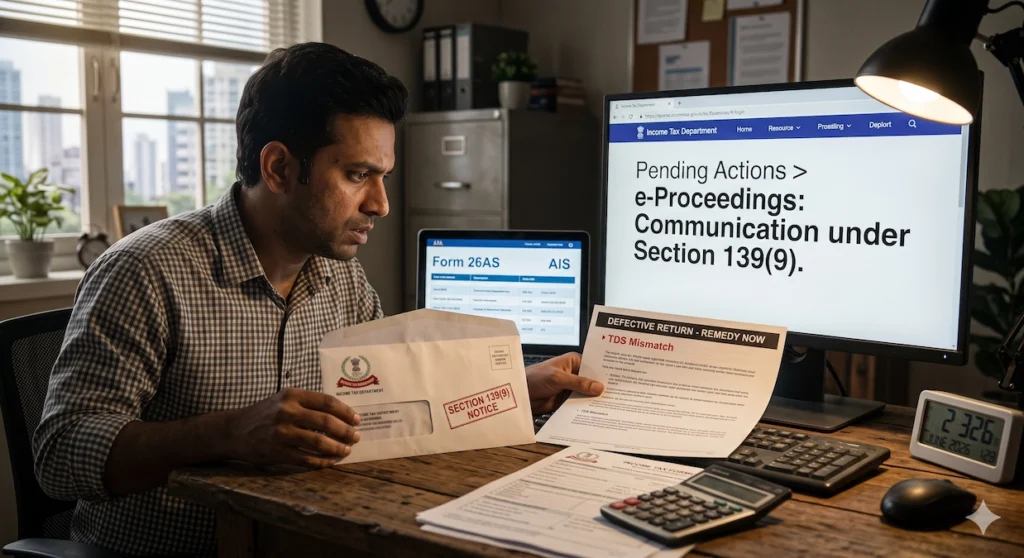
You filed your ITR on time, completed the e-verification, and expected your refund to arrive without any issues. Then an email from CPC Bengaluru lands in your inbox with the subject line: “Communication under Section 139(9).” Seeing the words “defective return” is enough to make most taxpayers uneasy. It sounds serious, but in most situations, it doesn’t mean you’ve committed a major error. It simply means the Income Tax Department has identified something in your return that needs to be corrected before it can move ahead.
Think of it as a chance to fix a problem rather than a penalty or rejection.
In this guide, we’ll explain what a defective return notice actually means, why it can put your refund on hold, the common reasons these notices are issued, and how you can respond through the Income Tax e-filing portal within the mandatory 15-day deadline. If you act quickly and submit the correct response, your return can be processed, your refund can move forward, and the issue is usually resolved without further complications.
At A Glance: Defective Return Notice
The 139(9) Notice: A Defective Return Notice under Section 139(9) is not a penalty; it is simply an opportunity to correct errors or omissions in your tax return.
Why Refunds Get Stuck: The Income Tax Department pauses all processing when a defect is found, meaning your income tax refund is completely blocked until the return is corrected.
Common Causes: Notices are most frequently triggered by TDS mismatches with Form 26AS or AIS, filing the wrong ITR form, missing audit reports, or unpaid self-assessment taxes.
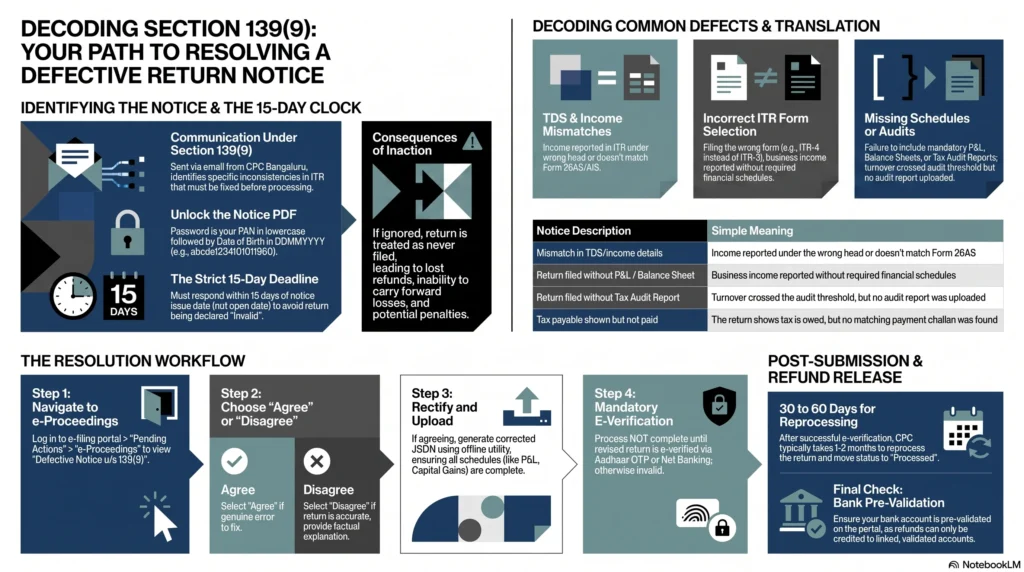
Strict 15-Day Deadline: You must submit your response within 15 days from the date the notice was issued. Failing to do so can result in your return being declared “invalid,” as if you never filed at all.
How to Open the Notice: The password to unlock the emailed PDF notice is your PAN in lowercase followed by your Date of Birth in DDMMYYYY format (e.g., abcde1234f01011990).
The Resolution Process: To reply, log into the Income Tax e-filing portal, navigate to Pending Actions > e-Proceedings, and choose either to “Agree” (and submit a corrected JSON file) or “Disagree” (and provide a factual explanation).
Why Your Income Tax Refund is Delayed: The Role of Section 139(9)
The Link Between Blocked Refunds and Defective Returns
Once you file your Income Tax Return, it is processed by the Income Tax Department’s Centralised Processing Centre (CPC) in Bengaluru. Most of this happens through automated systems that compare the information you’ve reported with data already available to the department from sources such as Form 26AS, the Annual Information Statement (AIS), and TDS returns filed by employers, banks, and other deductors.
If the system spots a discrepancy, it flags your return for review. At that point, processing comes to a halt. Since refunds are issued only after the return has been successfully processed, any defect automatically puts your refund on hold.
That’s why a Section 139(9) notice and a delayed refund often go hand in hand. Until you respond to the notice and the CPC accepts the corrected return, the refund remains blocked, even if you’re otherwise entitled to receive it.
For salaried taxpayers who have already paid taxes through TDS, this can be especially frustrating. You’ve done everything you thought was required, yet your refund remains stuck because of an issue that often turns out to be a simple mismatch or missing detail.
The encouraging part is that these notices are usually fixable. Once you submit the necessary corrections and the CPC reprocesses your return, the refund process typically resumes.
What Exactly is a Defective Return Notice Under Section 139(9)?
Section 139(9) of the Income Tax Act, 1961 gives the Assessing Officer (AO) the authority to identify defects in a filed return and ask the taxpayer to correct them. As explained by ClearTax, a return is treated as defective when it contains missing information or inconsistencies that prevent it from complying with the requirements of the Income Tax Act.
Although the law refers to the Assessing Officer, these notices are generally generated automatically by the CPC during the initial processing stage. If the system detects an issue, it sends a Section 139(9) notice to your registered email address, clearly mentioning the defect and giving you 15 days from the date of issue to respond.
As noted in this guide, these notices are commonly triggered by errors, omissions, or inconsistencies that stop the department from processing the return accurately. Typical reasons include missing income disclosures, TDS mismatches, incomplete schedules, or filing the wrong ITR form.
Fact vs. Fiction: Why This is a Correction Opportunity, Not a Penalty
Receiving a notice from the Income Tax Department can be unsettling, and many taxpayers immediately assume they’re facing a penalty or an investigation. In reality, a Section 139(9) notice is neither.
As India Filings explains, a defective return is simply a return that needs correction. It has not been rejected outright. Instead, the department is giving you an opportunity to fix the identified issues. If you respond within the prescribed time and make the necessary corrections, there are generally no adverse consequences.
A simple way to think about it is this: the CPC has paused processing because something in your return doesn’t match the information available to it. Once you clarify or correct that issue, processing continues, and your refund can move ahead just like any other valid return.
Decoding the Root Causes of a Defective ITR
Understanding why your return was flagged is the fastest way to resolve the issue. While every notice is based on the facts of an individual return, most Section 139(9) notices fall into a handful of common categories.
TDS Mismatches Between Form 26AS, AIS, and Your Return
One of the most common reasons for receiving a defective return notice is a mismatch between the income reported in your ITR and the tax information available with the Income Tax Department.
Form 26AS reflects the TDS deducted against your PAN by employers, banks, clients, and other deductors. The Annual Information Statement (AIS) provides an even broader picture by including various income streams and financial transactions reported by third parties.
As Quicko explains a notice may be issued when the income declared in your return doesn’t align with the TDS reflected in Form 26AS.
For example, a freelancer may receive payments after TDS has been deducted under Section 194J but accidentally report that income as salary instead of professional income. Although the tax has been deducted correctly, the income head in the return doesn’t match the TDS section, prompting the system to flag the discrepancy.
Similar issues can arise when taxpayers forget to report savings account interest, fixed deposit interest, or dividend income that already appears in the AIS. Even relatively small omissions can trigger a notice because the department’s systems compare your return with the information already on record.
Filing the Wrong ITR Form for Your Specific Income Type
Choosing the correct ITR form is just as important as reporting the correct income. Every return form is designed for a specific category of taxpayers, and using the wrong one can result in a defective return.
As explained by India Filings, one common mistake is filing ITR-4 instead of ITR-3. ITR-4 is meant for taxpayers opting for the presumptive taxation scheme under Sections 44AD, 44ADA, or 44AE. However, if your declared profits fall below the prescribed threshold of 8% for non-digital receipts or 6% for digital receipts, you may not qualify for the presumptive scheme. In that situation, you’re generally expected to file ITR-3 and maintain the required books of account.
Using the wrong form doesn’t just increase the chances of receiving a defective return notice. As ClearTax notes, it can also affect your eligibility to carry forward losses or claim certain deductions.
If you’re unsure which form applies to your income, you can use the Income Tax Department’s ITR selection tool.
Incomplete Income Disclosure (Interest, Dividends, and Capital Gains)
The AIS captures far more than salary income. It may include savings account interest, fixed deposit interest, dividend payments, capital gains from shares and mutual funds, and several other financial transactions.
When your ITR doesn’t reflect income that already appears in the AIS, the system may classify your return as defective.
A common example is forgetting to include interest earned from one of several bank accounts. Another frequent issue involves mutual fund redemptions or equity transactions. Some taxpayers assume that gains below the taxable limit don’t need to be reported. While tax may not always be payable, the transaction often still needs to be disclosed in the appropriate capital gains schedule.
Even if the omitted amount seems insignificant, it’s always better to ensure your return matches the information available in the AIS.
Missing Audit Reports or Financial Statements (Section 44AB)
Certain taxpayers with business or professional income are legally required to maintain books of account and, where applicable, obtain a tax audit under Section 44AB.
If your turnover crosses the prescribed threshold and the required Tax Audit Report, along with Forms 3CA or 3CB and Form 3CD, hasn’t been uploaded before filing your return, the CPC may treat your return as defective.
Quicko illustrates this with the example of a salaried individual who also trades extensively in Futures & Options. If the turnover exceeds the applicable audit threshold, filing ITR-3 without the mandatory audit report can trigger a Section 139(9) notice.
IndiaFilings also identifies the failure to submit audited financial statements, including the profit and loss account, balance sheet, and auditor’s report where required, as a recognised reason for defective return notices.
Unpaid Taxes or Incorrect Self-Assessment Tax Details
Sometimes the issue isn’t with your income at all. It may be with the tax you’ve reported as paid.
If your return shows that additional self-assessment tax was payable but the payment wasn’t made, or if the challan details entered in the ITR don’t match the department’s records, your return may be flagged.
This situation is common among taxpayers with business income, capital gains, rental income, or multiple income sources where TDS doesn’t fully cover the final tax liability.
As highlighted by Quicko, discrepancies between the tax payable in the return and the taxes actually paid are a recognised reason for issuing a defective return notice.
Name and PAN Card Mismatches
Even basic personal details can sometimes create problems.
If the name entered in your ITR doesn’t exactly match the name recorded in the PAN database, the system may identify it as a mismatch. This often happens because of abbreviations, spelling variations, initials, or name changes that haven’t been updated consistently across records.
Fortunately, this is usually one of the simplest issues to resolve. Before filing your return, check that the name appearing in your ITR matches your PAN records exactly, including initials and spelling.
How to Access and Understand Your Section 139(9) Notice
Locating the Communication in Your Registered Email
A Section 139(9) notice is usually sent by CPC Bengaluru to the email address linked to your Income Tax e-filing account. As IndiaFilings explains, the email subject typically mentions “Communication under Section 139(9)” along with your PAN and the relevant Assessment Year, making it relatively easy to identify.
If you don’t see the email in your inbox, don’t panic. Government emails occasionally end up in the spam or junk folder, so it’s worth checking there as well.
If you’ve changed your registered email address and no longer have access to the old one, you can still view the notice by logging into the Income Tax e-filing portal and accessing it through the e-Proceedings section after updating your contact details if required.
The Exact Password Format to Open the Notice PDF
The notice is attached as a password-protected PDF, and many taxpayers get stuck simply because they aren’t sure how to open it.
The password format is straightforward. Enter your PAN in lowercase letters, immediately followed by your date of birth in DDMMYYYY format, without any spaces or special characters.
For example, as illustrated by India Filings, if your PAN is XYZAB1234D and your date of birth is 05/01/2000, the password would be:
xyzab1234d05012000
Quicko also confirms the same format. Their example uses PAN AAGPR1212A with a date of birth of 02/10/1980, resulting in the password:
aagpr1212a02101980
The two things to remember are that the PAN must be entered in lowercase and the date should be written as eight consecutive digits.
Finding the Notice on the E-Filing Portal via ‘Pending Actions’
Even if you never received the email, or accidentally deleted it, you can still access the notice directly from the Income Tax e-filing portal.
Log in to https://eportal.incometax.gov.in/iec/foservices/#/login using your PAN or Aadhaar and password. After signing in, navigate to Pending Actions and then select e-Proceedings. If a Section 139(9) notice has been issued, you’ll find it listed there along with an option to download the notice PDF.
This is also the section where you’ll eventually submit your response, so it’s useful to become familiar with the navigation. The Income Tax Department has also published guidance on responding to e-Proceedings.
Translating the Department’s Defect Description into Plain English
The wording used in a Section 139(9) notice can seem technical at first glance. Fortunately, most defect descriptions point to fairly specific issues.
| Defect Description in Notice | What It Means |
| Mismatch in TDS/income details | The income has been reported under the wrong head, or the TDS claimed doesn’t match Form 26AS. |
| Return filed without P&L / Balance Sheet | You reported business or professional income but didn’t complete the required Profit & Loss or Balance Sheet schedules. |
| Return filed without Tax Audit Report | Your turnover crossed the audit threshold under Section 44AB, but the mandatory audit report wasn’t uploaded. |
| Incorrect ITR form | The return was filed using a form that isn’t applicable to your type of income. |
| Tax payable shown but not paid | The return calculates additional tax payable, but the payment or challan details are missing or don’t match departmental records. |
| Name/PAN mismatch | The personal details entered in the ITR don’t exactly match the PAN database. |
Understanding the exact defect mentioned in your notice is important because it determines the correction you’ll need to make before your return can be processed and your refund released.
The 15-Day Deadline and the Consequences of Inaction
When Does the 15-Day Resolution Clock Start Ticking?
One of the biggest mistakes taxpayers make is assuming the 15-day response period begins when they open the email or download the notice. It doesn’t.
The countdown starts from the date the notice is issued by the Income Tax Department. That means the clock begins ticking the moment the CPC sends the communication, regardless of when you actually see it.
As ClearTax explains, taxpayers are given 15 days from the date of the defective return notice to rectify the issue and submit their response.
For that reason, it’s a good idea to act as soon as you receive the notice. Starting early gives you enough time to review the defect, compare your return with Form 26AS and the AIS, gather any supporting documents, make the necessary corrections, and submit everything without rushing at the last minute.
The Threat of an “Invalid” Return: Treating It Like You Never Filed
Missing the 15-day deadline can have far more serious consequences than many taxpayers realise.
According to Quicko, if you don’t respond within the prescribed time, the Income Tax Department may treat your original return as invalid. In practical terms, it’s as though you never filed your return for that financial year.
Quicko’s ITR status guide also notes that when a defective return remains unresolved, its status ultimately becomes invalid. This means all the consequences associated with non-filing can apply, even if you originally submitted your ITR on time.
Simply filing the return isn’t enough. It must also be free of defects or corrected within the allowed timeframe.
Loss of Refund Eligibility and Carried Forward Losses
When a return becomes invalid, the impact goes beyond a delayed refund.
If you’re entitled to a tax refund, you could lose the ability to claim it until the matter is resolved. Similarly, taxpayers planning to carry forward eligible business losses or capital losses to future years may lose that benefit altogether.
As IndiaFilings explains, an invalid return can result in the loss of important tax benefits, including refunds, deductions, and the ability to carry forward losses. The department may also proceed with its assessment based on the available information, which could potentially lead to a higher tax demand than what is actually payable.
IndiaFilings further notes that ignoring a Section 139(9) notice may expose taxpayers to interest, penalties, denial of exemptions, and the inability to carry forward losses that would otherwise have been available.
The Process for Requesting a Time Extension
If you’re unable to respond within 15 days because the correction requires additional work, such as completing a tax audit or reconciling complex financial records, you may be able to request more time.
As explained by ClearTax, you can write to your Assessing Officer and request an extension by explaining the reasons for the delay. This is commonly referred to as seeking condonation of delay. Whether the request is accepted depends on the circumstances, and the Assessing Officer has the discretion to allow the delayed response, provided the assessment hasn’t already been finalised.
If the original 15-day response window has already expired, another possible route is filing a revised return under Section 139(5). However, this is a separate process and shouldn’t be confused with responding directly to a Section 139(9) notice. It generally becomes relevant only after the response period has lapsed.
Step-by-Step Guide: How to Respond to a Defective Return Notice on the Portal
Step 1: Logging In and Navigating to the ‘e-Proceedings’ Tab
Start by logging in to the Income Tax e-filing portal at https://eportal.incometax.gov.in/iec/foservices/#/login using your PAN or Aadhaar and password. If you haven’t created an account yet, you’ll first need to register at https://eportal.incometax.gov.in/iec/foservices/#/register-home.
After signing in, head to the dashboard and click Pending Actions. From there, select e-Proceedings. This section brings together all notices and communications from the Income Tax Department that require your attention, including any notices issued under Section 139(9).
Step 2: Evaluating the System-Flagged Defects
Inside the e-Proceedings section, look for the entry titled “Defective Notice u/s 139(9).” You’ll also see the acknowledgement number associated with your original return. Click View Notices to open the notice details and download the PDF if needed.
Take the time to read the notice carefully instead of rushing to respond. It will clearly identify the issue the CPC has found, whether it’s a TDS mismatch, an omitted schedule, the use of an incorrect ITR form, missing financial statements, or another discrepancy.
Next, compare the notice with your original return and cross-check the relevant details against your Form 26AS and the Annual Information Statement (AIS), which you can access through the Income Tax portal. This comparison usually makes it much easier to identify exactly what needs to be corrected.
As IndiaFilings points out, understanding the specific reason mentioned in the notice is the most important first step because it determines how you should respond.
Step 3: Making the Choice to “Agree” or “Disagree”
When you’re ready to respond, click Submit Response within the e-Proceedings section. The portal will ask you to choose one of two options:
- Agree: You accept that the defect identified by the department is valid and intend to submit a corrected return.
- Disagree: You believe the defect has been raised incorrectly and want to explain why your original return is accurate.
Choose your response carefully.
If you’ve identified an actual mistake, such as reporting income under the wrong head, leaving out a mandatory schedule, selecting the wrong ITR form, or missing an income source, agreeing and submitting the corrected return is usually the most straightforward solution.
If you genuinely believe the notice is based on an error, you can select Disagree, but your explanation should be supported by facts and relevant documents rather than a general statement that you disagree.
Step 4: How to Proceed if You Agree (Filing the Revised Return)
Selecting Agree generally prompts the portal to provide a JSON file containing your return data, along with the option to respond through the Offline Utility.
The corrections themselves are made in the Income Tax filing utility. Depending on the issue, you may need to:
- Correct the income head under which certain income has been reported.
- Add missing schedules such as Schedule P&L, Schedule Balance Sheet, or Schedule Capital Gains.
- Upload a required Tax Audit Report.
- Update self-assessment tax challan details.
- File the return using the correct ITR form if the original one was incorrect.
Before generating the revised JSON file, compare your corrected return with both the AIS and Form 26AS. Make sure every income source reflected in those records has been properly disclosed in the revised return. Spending a few extra minutes on this review can help prevent another notice.
Once the corrections are complete:
- Generate the updated JSON file.
- Upload it through the portal.
- Complete the e-verification process using Aadhaar OTP, net banking, or any other available verification method.
As confirmed by ClearTax, the corrected return is processed by the department after it has been successfully submitted.
Step 5: How to Proceed if You Disagree (Drafting a Factual Explanation)
If you choose Disagree, the portal will provide a text box where you can explain why you believe the defect is incorrect.
This explanation should be concise, factual, and directly address the issue mentioned in the notice. Avoid emotional language or broad statements. Instead, explain exactly why the department’s observation doesn’t apply to your return and refer to supporting records wherever possible.
For instance, if the notice claims there’s a mismatch in TDS, your response could explain that the income of a specified amount was correctly reported under the relevant income head and that the corresponding TDS shown in Form 26AS matches the credit claimed in your return.
Before submitting, review your explanation carefully. The portal typically displays a confirmation stating that the response cannot be modified after submission. Once you’re satisfied, tick the confirmation box and click Submit.
As noted by Quicko, you’ll receive an acknowledgement number after a successful submission, which you should keep safely for future reference.
Resolving Specific and Complex Defective Return Scenarios
Some defective return notices are straightforward and can be resolved with a simple correction. Others involve business income, presumptive taxation, or accounting requirements that demand a closer look. Understanding the nature of the defect will help you choose the right corrective action.
Fixing Missing Annexures and Mandatory Schedules
If your notice points to a missing Profit & Loss account or Balance Sheet, you’ll need to reopen your return in the ITR filing utility and complete the required schedules with the relevant financial information. This typically applies to taxpayers with business or professional income who are required to maintain books of account under Section 44AA.
Some taxpayers skip these schedules because they believe their business is too small for them to apply. Before making that assumption, it’s worth checking whether the record-keeping requirements under Section 44AA actually apply to your profession. Certain professions, including legal, medical, engineering, architecture, accountancy, technical consultancy, and interior decoration, are required to maintain books once they cross the prescribed income or gross receipt thresholds.
India Filings identifies this as one of the recognised reasons for defective return notices at, particularly where taxpayers fail to submit required books of account or omit audited financial statements, including the Profit & Loss account, Balance Sheet, or auditor’s report where applicable.
Reconciling Presumptive Taxation Inaccuracies
Errors relating to the presumptive taxation scheme can also trigger a Section 139(9) notice.
If you’ve opted for presumptive taxation under Section 44AD or 44ADA but your declared profits fall below the minimum percentage prescribed under the scheme, you may not be eligible to file under those provisions. In such cases, the return may need to be filed using ITR-3, along with the required Profit & Loss account and Balance Sheet.
Another situation arises when a taxpayer exits the presumptive taxation scheme before completing the required five consecutive assessment years. Under Section 44AD(4), this can result in an obligation to maintain books and obtain a tax audit. Filing the return without complying with those requirements may lead to a defective return notice.
As explained by Quicko, taxpayers who opt out of the presumptive taxation scheme before completing the stipulated period and fail to obtain the required tax audit may receive a notice under Section 139(9).
Addressing Missing Books of Accounts for Unorganised Businesses
Small businesses and self-employed individuals sometimes don’t maintain formal books of account. Even so, the Income Tax Department still expects certain financial information to be reported accurately in the return.
At a minimum, taxpayers should be able to disclose annual gross receipts, gross profit, business expenses, net profit, and basic closing balances such as stock-in-hand, cash, sundry debtors, and sundry creditors where applicable.
According to India Filings, failing to provide these essential financial details, even when formal accounting records aren’t maintained, is a recognised reason for issuing a defective return notice.
The key takeaway is that not maintaining full accounting books doesn’t remove the obligation to report the financial summary required in the ITR. Providing complete and accurate financial information greatly reduces the chances of your return being flagged during processing.
Post-Submission: Tracking Your Resolution and Unblocking Your Refund
Submitting your response to a Section 139(9) notice isn’t the finish line. There are a few more steps that determine whether your corrected return is accepted and, ultimately, whether your refund is released. Keeping an eye on your return status can help you spot any issues before they turn into another delay.
Ensuring Proper E-Verification of Your Revised Return
After filing the corrected return, don’t forget to complete the e-verification process. This step is just as important as submitting the return itself. Until the revised return is successfully verified, it isn’t treated as valid by the Income Tax Department.
For most taxpayers, the quickest option is e-verification through Aadhaar OTP, provided the Aadhaar-linked mobile number is active and Aadhaar is linked with PAN. You can also verify your return through net banking, a pre-validated bank account, or an eligible DEMAT account.
If electronic verification isn’t possible, you can send the signed ITR-V acknowledgement to CPC Bengaluru by ordinary post or speed post within 30 days of filing. While this option is available, it usually takes longer to complete the verification process and may delay your refund.
A common mistake is assuming that uploading the corrected JSON file completes the process. It doesn’t. Before moving on, check that your return status changes from “Submitted and pending for e-verification” to “Successfully e-verified.” Only then should you consider the response fully submitted.
Monitoring the Status of Your Notice Response
Once you’ve submitted and e-verified the corrected return, you can monitor its progress directly on the Income Tax e-filing portal.
There are two places you’ll want to check:
- e-Proceedings: Go to Pending Actions → e-Proceedings to see the latest status of your response to the Section 139(9) notice.
- View Filed Returns: Navigate to e-File → Income Tax Returns → View Filed Returns to track the processing status of the corrected return.
As explained by Quicko, your return typically moves through several stages, beginning with “Submitted and pending for e-verification,” followed by “Successfully e-verified,” and finally “Processed.”
Once the status changes to “Processed,” it generally means the CPC has accepted your corrected return and your refund, if applicable, is moving through the payment process.
Expected Timelines for the CPC to Reprocess Your Refund
After your corrected return has been accepted and successfully e-verified, the CPC generally takes 30 to 60 days to process it, although the actual timeline can vary depending on workload and the complexity of the case.
Refunds are usually credited directly to the pre-validated bank account linked to your PAN. While direct bank transfer is now the standard method, there may still be rare situations where smaller refunds are issued by cheque.
Before waiting for the refund, it’s worth checking whether your bank account has been pre-validated on the e-filing portal. You can do this by visiting My Profile → Bank Accounts after logging in.
Many taxpayers overlook this step. Even after a return has been processed successfully, the refund cannot be credited if the bank account hasn’t been pre-validated or isn’t correctly linked with your PAN. Verifying these details beforehand can help avoid unnecessary delays.
Escalating Stalled Responses via e-Nivaran and CPGRAMS
If more than 60 days have passed since your corrected return was submitted and e-verified, and there’s still no update, or if your refund has been processed but hasn’t reached your bank account, it’s time to consider raising a grievance.
The first option is e-Nivaran, which is available through the Income Tax portal under the Help section. When submitting a grievance, keep your PAN, Assessment Year, acknowledgement number, and a clear description of the issue handy. Providing complete information usually makes it easier for the department to investigate the matter.
If the issue remains unresolved, you can escalate it through CPGRAMS (Centralised Public Grievance Redress and Monitoring System). This platform handles grievances relating to central government departments and provides a mechanism to track the progress of your complaint.
You can also contact the CPC helpdesk on 1800 103 0025 (toll-free) or +91-80-46122000, available Monday to Friday between 8:00 AM and 8:00 PM. Before calling, keep your PAN, Assessment Year, and the acknowledgement number from your notice response ready, as these details are typically required for verification.
In many cases, raising an e-Nivaran grievance before contacting the helpline helps speed up the conversation because the support representative can refer directly to your existing complaint.
Best Practices to Prevent Defective Returns and Ensure Fast Refunds
Dealing with a defective return notice is usually manageable, but avoiding one in the first place is even better. A few simple checks before you submit your ITR can significantly reduce the chances of delays and help your refund reach you faster.
The Importance of Reconciling AIS and 26AS Before Hitting Submit
Before filing your return, make it a habit to compare your ITR with both Form 26AS and the Annual Information Statement (AIS).
Start with Form 26AS. Check that every TDS entry reflected against your PAN matches what you’ve claimed in your return. This includes the amount of income reported, the corresponding TDS credit, and the correct income head. Even a small mismatch can prompt the system to flag your return during processing.
The AIS goes a step further by capturing a wider range of financial information, including savings account interest, fixed deposit interest, dividend income, mutual fund transactions, securities transactions, and other reported financial activities.
Review these entries carefully before filing. If you come across information that appears incorrect, you can submit feedback through the AIS module on the Income Tax portal. If the information is accurate, make sure your ITR reflects it appropriately so there are no surprises when the department cross-checks your return.
As India Filings recommends, reconciling your income, TDS credits, and schedules before filing is one of the simplest ways to avoid defective return notices. ClearTax also highlights pre-filing reconciliation as a key preventive measure in its notice management guidance.
Verifying Pre-Validated Bank Accounts to Avoid Final Stage Delays
Even if your return is filed correctly and processed without any issues, your refund can still be delayed if your bank account hasn’t been pre-validated on the Income Tax portal.
Refunds are credited only to eligible, pre-validated bank accounts linked with your PAN. Before filing your return, log in to the e-filing portal and go to My Profile → Bank Accounts to verify that your account details are correct.
Double-check the account number, IFSC code, and account holder’s name. The portal validates these details electronically with your bank, and this process can take a few days. Completing it well before filing your return helps ensure there are no avoidable delays once your refund is approved.
It’s a small task that many taxpayers overlook, but it can save considerable time later.
Paying All Due Taxes Before Finalizing Your Return
Another common reason for defective returns is reporting additional tax payable without actually paying it before filing.
This situation often arises when income from sources such as capital gains, business income, rental income, interest, or a change of employment increases your final tax liability beyond the TDS already deducted.
If your calculations show that additional tax is payable, pay the outstanding amount as self-assessment tax before submitting your return.
You can make the payment using Challan 280 (Income Tax on Companies / Other than Companies) through the Income Tax e-filing portal or your authorised bank. Once the payment is complete, note the BSR Code, Challan Serial Number, and Date of Deposit, then enter these details accurately in the tax payment section of your ITR.
Incorrect or missing challan information is a well-known trigger for defective return notices.
As India Filings advises at, paying any outstanding tax and updating the corresponding challan details before filing is far easier than correcting the issue after receiving a Section 139(9) notice. Spending a few extra minutes reviewing your return before submission can save days or even weeks of follow-up later.
Section 139(9) and Defective Return Notices
Can I change my response after submitting it on the portal?
No. Once you’ve submitted your response to a Section 139(9) notice, it cannot be edited or withdrawn. As confirmed by Quicko, the Income Tax portal doesn’t provide an option to modify a submitted response. That’s why it’s important to review your corrected return or your explanation carefully before you click Submit. Taking a few extra minutes to double-check everything can save you from unnecessary complications later.
What if the 15-day window has passed?
If you’ve missed the 15-day response deadline, all hope isn’t lost, but your options become more limited.
You may still be able to file a revised return under Section 139(5), provided the applicable deadline for the relevant assessment year hasn’t expired. This is different from responding directly to a Section 139(9) notice, so it’s important not to confuse the two.
You can also approach your Assessing Officer and request condonation of delay by explaining why you couldn’t respond within the prescribed period. As ClearTax explains the Assessing Officer has the discretion to accept a delayed response if sufficient reasons are provided.
What is the ITR status that indicates a defective return?
If the Income Tax Department has issued a notice under Section 139(9), your return status on the portal will generally display “Defective.”
Once you’ve submitted the required response, completed e-verification, and the CPC has accepted your corrected return, the status will eventually change to “Processed.” Keeping an eye on this status is one of the easiest ways to track the progress of your case.
Will I face a penalty for filing a defective return?
Receiving a defective return notice doesn’t automatically mean you’ll have to pay a penalty.
A Section 139(9) notice is intended to give taxpayers an opportunity to correct mistakes or provide missing information. Problems typically arise only when the notice is ignored or the defect isn’t rectified within the prescribed timeframe. In that situation, your return may be treated as invalid, which can expose you to the consequences associated with non-filing, including interest, penalties where applicable, and the loss of certain tax benefits.
Responding promptly and submitting the necessary corrections is usually enough to prevent those outcomes.
Frequently Asked Questions (FAQ): Guide to Defective Return Notice
A defective return notice under Section 139(9) indicates that the Income Tax Department’s system found missing details, incorrect forms, or inconsistencies in your filed ITR. It is not a penalty, but an official opportunity to correct errors such as a TDS mismatch with Form 26AS or a missing tax audit report.
Once you submit your response and successfully e-verify your revised return, the Centralised Processing Centre (CPC) typically takes 30 to 60 days to reprocess the file. Once marked as “Processed,” your pending income tax refund will be credited to your pre-validated bank account.
You are given a strict 15-day deadline to submit a response. If you fail to respond in time, your return will be declared “invalid”—meaning the department treats it as if you never filed an ITR. This results in the complete loss of your tax refund, the inability to carry forward financial losses, and potential penalties for non-filing.
No, you cannot modify or withdraw your response to a defective return notice once it has been submitted through the e-proceedings tab. Always ensure you reconcile your data with your Annual Information Statement (AIS) before finalizing the submission.
Disclaimer
This article is for general informational purposes only and does not constitute legal or tax advice. Tax laws and portal procedures may change. Consult a qualified tax professional for advice specific to your situation.




Discussion (4)
Leave a Reply